



If you want more game storage for a Legion Go 2, first confirm whether its SSD slot accepts the drive’s M.2 size and interface: the 4TB internal options here are M.2 2280, but the product pages do not confirm Legion Go 2 fit. For portable storage without opening the handheld, the Samsung T9 and SSK use USB connections, while the Crucial P310 4TB is explicitly listed as compatible with the Lenovo Legion Go, not specifically the Legion Go 2.
Compare at a glance
| Product | Brand | Size | Weight | Stands out for | Price |
|---|---|---|---|---|---|
| 1 Samsung T9 Portable SSD 4TB | Samsung | 3.46 × 2.36 × 0.55 in | 0.3 lb | Large 4TB capacity | Check price |
| 2 Crucial P310 2TB NVMe SSD | Crucial | 3.15 × 0.86 × 0.09 in | 0 lb | 2TB capacity | Check price |
| 3 Crucial P310 4TB NVMe SSD | Crucial | 3.15 × 0.92 × 0.38 in | 0 lb | Spacious 4TB capacity | Check price |
| 4 SSK Portable SSD 4TB | SSK | 2.6 × 1.5 × 0.5 in | Not listed | 4TB capacity in a compact portable drive | Check price |
| 5 Fikwot FN960 4TB NVMe SSD | Fikwot | Not listed | Not listed | 4TB capacity | Check price |
| 6 Acer Predator GM7 2TB NVMe SSD | Acer | 3.15 × 0.87 × 0.09 in | 0 lb | 2TB capacity | Check price |
| 7 Lufasnd 4TB M.2 NVMe SSD | Lufasnd | 3.15 × 0.87 × 0.36 in | 0 lb | M.2 2280 form factor | Check price |
| 8 SANDISK Optimus 5100 4TB NVMe SSD | SANDISK | 3.15 × 0.09 × 0.87 in | 0 lb | High 4TB capacity | Check price |
| 9 WD_BLACK SN7100 4TB NVMe SSD | SANDISK | 3.14 × 0.86 × 0.04 in | 0 lb | Large 4TB capacity | Check price |
Sizes and weights as listed by the manufacturer on Amazon. Check the retailer for current price and availability.
Pros
- Large 4TB capacity
- Up to 2,000 MB/s stated speeds
- Thermal management for heavy use
- Firmware updates and drive health monitoring
Cons
- Top speeds depend on a compatible USB 3.2 Gen 2x2 connection
- Who should skip it: buyers who do not need 4TB capacity
Pros
- 2TB capacity
- Fast stated sequential speeds
- PCIe Gen3 backward compatibility
- Supports select handheld gaming systems
Cons
- Who should skip it: buyers needing Gen5 speeds
Pros
- Spacious 4TB capacity
- PCIe 4.0 NVMe interface
- Compatible with select handheld consoles
- Works with PCIe Gen3 systems
Cons
- Who should skip it: systems lacking M.2 2280 support

Pros
- 4TB capacity in a compact portable drive
- USB-C and USB-A cables included
- Stated read speeds up to 1,050MB/s
Cons
- Who should skip it: users who need Windows to display 4TB

Pros
- 4TB capacity
- Included aluminum heatsink
- Up to 5,000MB/s stated read speed
- Five-year limited warranty
Cons
- Who should skip it: buyers needing stated read speeds above 5,000MB/s

Pros
- 2TB capacity
- PCIe 4.0 x4 interface
- HMB and SLC cache
- Drive cloning and migration software
Cons
- Who should skip it: users requiring published endurance figures

Pros
- M.2 2280 form factor
- PCIe Gen4 x4 interface
- Stated speeds up to 5,000MB/s read
Cons
- Capacity information conflicts: title says 4TB, description says 1TB
- Who should skip it: buyers needing unambiguous capacity details

Pros
- High 4TB capacity
- PCIe 4.0 interface
- Up to 1,200 TBW rated endurance
- SANDISK Dashboard software support
Cons
- Who should skip it: buyers needing more than 4TB
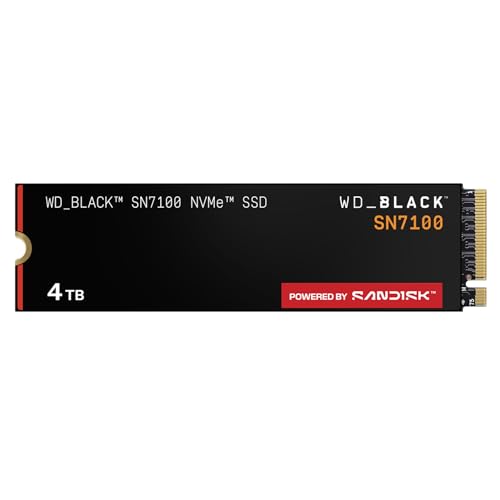
Pros
- Large 4TB capacity
- High stated sequential speeds
- Up to 2,400TBW endurance
Cons
- Replaced by a newer generation
- Who should skip it: shoppers seeking SANDISK's latest generation
Best Handheld-Oriented Internal SSD: Crucial P310 4TB NVMe SSD
For a high-capacity internal drive to investigate for handheld use: Crucial P310 4TB NVMe SSD lists M.2 2280, PCIe 4.0, read speeds up to 7,100 MB/s, and compatibility with the Lenovo Legion Go and select handheld consoles. That makes it a relevant candidate, but the product page does not name Legion Go 2, so confirm the device’s SSD dimensions and support before buying. Skip it if you need a confirmed Legion Go 2 fit or a drive that connects externally without opening the device.
Best for Portable Transfers: Samsung T9 Portable SSD 4TB
For an external drive when portability matters: Samsung T9 Portable SSD 4TB connects over USB 3.2 Gen 2×2 and lists speeds up to 2,000 MB/s, with a thermal solution intended to control heat during heavy use. Its product details do not establish Legion Go 2 compatibility or the handheld’s available USB performance. Skip it if you want an internal upgrade or require a confirmed connection-speed match with the device.
Best for USB-C and USB-A Flexibility: SSK Portable SSD 4TB
For moving files between different USB port types: SSK Portable SSD 4TB lists USB 3.2 Gen 2 speeds up to 1,050 MB/s read and 1,000 MB/s write, and includes USB-C and USB-A cables. That flexibility can help when the drive also serves a desktop or other device, though the product page does not specifically confirm Legion Go 2 support. Skip it if you need storage installed inside the handheld or if your priority is the highest listed sequential speed among these portable drives.
Best Listed Endurance for a 4TB Internal Drive: SANDISK WD_Black SN7100 4TB NVMe SSD – Gen4 PCIe
For buyers comparing stated write endurance: SANDISK WD_Black SN7100 4TB NVMe SSD – Gen4 PCIe lists up to 2,400 TBW for the 4TB model and up to 6,700 MB/s write speed. It is an M.2 2280 PCIe Gen4 drive intended for laptops and handheld gaming devices, but Legion Go 2 fit is not explicitly confirmed. Skip it if you cannot verify that the handheld accepts an M.2 2280 SSD.
Key Numbers at a Glance
- The internal 4TB options include M.2 2280 models, including Crucial P310 4TB NVMe SSD and SANDISK WD_Black SN7100 4TB NVMe SSD – Gen4 PCIe.
- Crucial P310 4TB NVMe SSD lists up to 7,100 MB/s read and 6,000 MB/s write; SANDISK WD_Black SN7100 4TB NVMe SSD – Gen4 PCIe lists up to 7,000 MB/s read and 6,700 MB/s write.
- Samsung T9 Portable SSD 4TB lists up to 2,000 MB/s, while SSK Portable SSD 4TB lists up to 1,050 MB/s read and 1,000 MB/s write.
- SANDISK WD_Black SN7100 4TB NVMe SSD – Gen4 PCIe lists up to 2,400 TBW for its 4TB model; Fikwot FN960 4TB NVMe SSD lists up to 700 TBW.
How to Choose the Best 4TB SSD for Legion Go 2
Confirm the M.2 size and interface first
Bottom line: Buy an internal SSD only after confirming the handheld’s slot size and supported interface. The Crucial P310 4TB, Acer Predator GM7 2TB, and several other internal choices are M.2 2280 PCIe Gen4 drives, but the Legion Go 2 compatibility detail is missing from their listings. The Crucial product page names the Lenovo Legion Go, which is not enough to establish that a different model accepts the drive. Check the Legion Go 2 manufacturer documentation for SSD length, keying, interface, and any installation restrictions before selecting an internal model.
If you are still comparing internal storage models, the SSD category can help you explore other form factors. Do not assume that an M.2 2280 drive fits simply because it is an NVMe SSD or works in another handheld.
Choose internal or external storage for your routine
Bottom line: Choose internal storage for an installed upgrade and USB storage for a separate, portable library. The Samsung T9 connects through USB 3.2 Gen 2×2, while the SSK includes both USB-C and USB-A cables and lists USB 3.2 Gen 2. Neither product page specifically confirms Legion Go 2 compatibility, so verify the handheld’s USB support and how you plan to use the drive. External storage avoids selecting an internal M.2 length, but it remains a separate device to connect and carry.
If you mainly need a drive for backups or file transfers rather than game installation, our guide to best portable SSDs under $100 covers a narrower portable-storage use case. For larger desktop-style backups, see best 4TB external hard drives.
Read speed is not the whole performance story
Bottom line: Treat sequential speed as a manufacturer-listed ceiling, not a promise of game-loading results. The Crucial P310 4TB lists up to 7,100 MB/s read, while the Silicon Power UD90 4TB lists up to 5,000 MB/s read. Those figures describe sequential performance, and the product pages do not establish how much difference either drive would make in Legion Go 2 games.
For a portable drive, the Samsung T9’s up-to-2,000 MB/s claim is higher than the SSK’s up-to-1,050 MB/s read figure, but the handheld’s port and workload also affect transfer rates. Choose based on compatibility and how you will use the storage, rather than assuming the largest speed number guarantees a better gaming experience.
Consider capacity, endurance, and warranty together
Bottom line: Match capacity to your game library, then compare endurance and warranty details for an internal drive. The 4TB Crucial P310 is listed with a five-year warranty in its product details? The available product information does not state its warranty, so do not assume one. By contrast, Silicon Power UD90 lists a five-year limited warranty or up to 1,200 TBW, whichever comes first, and Fikwot FN960 lists a five-year limited warranty and up to 700 TBW.
TBW is a stated write-endurance rating, not a guarantee that a drive will last for a particular number of years. For a portable copy of important saves or media, remember that extra storage is not a backup unless another separate copy exists. The Storage category includes other storage formats if an SSD is not the right fit for your backup plan.
Check heat and physical clearance
Bottom line: Do not install a heatsink-equipped drive unless the device has room for it. The Fikwot FN960 4TB is described as including a heatsink, while the Acer Predator GM7 2TB lists thermal throttling and power management rather than an included heatsink. The Legion Go 2’s internal clearance and any allowed heatsink configuration are not stated in these product details, so confirm those points before purchase.
How We Compared These Products
This guide compares product-page specifications, stated interfaces and form factors, listed speed and endurance figures, compatibility claims, and warranty details where available. It is based on product research rather than firsthand evaluation; customer ratings in the supplied product data do not establish Legion Go 2 compatibility or measured performance.
Which Option Fits Your Handheld and Devices?
If the Legion Go 2 documentation confirms an M.2 2280 PCIe Gen4 slot, compare the Crucial P310’s listed 7,100 MB/s read speed with the WD_Black SN7100’s stated 2,400 TBW endurance and choose according to your priorities. If you want external storage, consider Samsung T9 for its higher listed sequential speed or SSK for its included USB-C and USB-A cables, after checking device support.
Mistakes to Avoid When Choosing an SSD for a Handheld
- Assuming every M.2 drive fits. Check the handheld’s supported SSD length and interface; M.2 2280 is a specific form factor.
- Treating another model’s compatibility as proof. The Crucial P310 page names Lenovo Legion Go, not Legion Go 2; verify the exact device model.
- Choosing by sequential speed alone. Compare the connection, use case, capacity, and stated endurance as well as the headline MB/s figure.
- Ignoring the heatsink. Confirm clearance before considering the heatsink-equipped Fikwot FN960 for an internal handheld upgrade.
Frequently Asked Questions
Will a 4TB M.2 2280 SSD fit the Legion Go 2?
The product details here do not confirm the Legion Go 2’s SSD size or supported interface. Check Lenovo’s documentation for the exact model before buying an M.2 2280 drive, and verify any restrictions on heatsinks.
Is the Crucial P310 4TB compatible with Legion Go 2?
The product page lists compatibility with Lenovo Legion Go and select handheld consoles, but does not specifically name Legion Go 2. Treat that as an unconfirmed fit until you check the newer handheld’s specifications.
Can I use an external SSD with the handheld?
The Samsung T9 and SSK are USB portable SSDs, but their product details do not explicitly confirm Legion Go 2 support. Check the handheld’s USB compatibility and the drive’s connection requirements before relying on one for games or files.
Does a faster listed SSD make games load faster?
Not necessarily. Listed sequential speeds do not establish game-loading performance, and the product information does not include Legion Go 2 results comparing these drives. Confirm compatibility first, then consider speed as one factor among capacity and endurance.
Is an SSD with a heatsink suitable for a handheld?
Only if the device has enough clearance and permits that configuration. The Fikwot FN960 4TB is listed with a heatsink, but Legion Go 2 internal clearance is not established by the product details here.
Should I choose an internal SSD or portable SSD?
An internal SSD is suited to an installed upgrade, provided its size and interface match the handheld. A portable SSD such as the Samsung T9 or SSK is a separate USB drive, so check connection support and consider whether carrying and connecting an external drive suits your routine.


Write Your Review
No reviews yet. Be the first to share your experience!