




If your Steam Machine is running short on room for games, first check whether it accepts an internal M.2 NVMe drive, a 2.5-inch SATA SSD, or external USB storage. The Samsung 990 PRO is a fast PCIe 4.0 M.2 option for a compatible system, while the TEAMGROUP T-Force Vulcan Z is a SATA choice and the Samsung T9 is portable; the right 4TB SSD depends on the machine’s available connection and installation space.
Compare at a glance
| Product | Brand | Size | Weight | Stands out for | Price |
|---|---|---|---|---|---|
| 1 Samsung T9 Portable SSD 4TB | Samsung | 3.46 × 2.36 × 0.55 in | 0.3 lb | Large 4TB capacity | Check price |
| 2 Samsung T7 Portable SSD 4TB | Samsung | 3.34 × 2.24 × 0.31 in | 0.2 lb | Large 4TB capacity | Check price |
| 3 Samsung 870 EVO 4TB SATA SSD | Samsung | 3.94 × 2.76 × 0.27 in | 0.2 lb | 4TB storage capacity | Check price |
| 4 TEAMGROUP T-Force Vulcan Z 4TB SATA SSD | TEAMGROUP | 3.94 × 2.76 × 0.28 in | 0.1 lb | Large 4TB capacity | Check price |
| 5 SanDisk Extreme Portable SSD 4TB | SANDISK | 3.35 × 2 × 0.39 in | 0.1 lb | 4TB of storage | Check price |
| 6 Lufasnd 4TB M.2 NVMe SSD | Lufasnd | 3.15 × 0.87 × 0.36 in | 0 lb | M.2 2280 form factor | Check price |
| 7 SANDISK Optimus 5100 4TB NVMe SSD | SANDISK | 3.15 × 0.09 × 0.87 in | 0 lb | High 4TB capacity | Check price |
| 8 WD_BLACK SN7100 4TB NVMe SSD | SANDISK | 3.14 × 0.86 × 0.04 in | 0 lb | Large 4TB capacity | Check price |
Sizes and weights as listed by the manufacturer on Amazon. Check the retailer for current price and availability.
Pros
- Large 4TB capacity
- Up to 2,000 MB/s stated speeds
- Thermal management for heavy use
- Firmware updates and drive health monitoring
Cons
- Top speeds depend on a compatible USB 3.2 Gen 2x2 connection
- Who should skip it: buyers who do not need 4TB capacity
Pros
- Large 4TB capacity
- Compact, lightweight design
- Stated high-speed transfers
- Aluminum body with stated fall protection
Cons
- Peak speeds do not guarantee sustained transfer rates
- Who should skip it: buyers needing guaranteed sustained speeds
Pros
- 4TB storage capacity
- 2.5-inch SATA form factor
- Stated speeds up to 560/530 MB/s
- Rated endurance up to 2,400 TBW
Cons
- Who should skip it: users who need faster-than-SATA storage

Pros
- Large 4TB capacity
- 2.5-inch SATA III form factor
- Stated speeds up to 550/470 MB/s
Cons
- Who should skip it: users who need faster transfers than its stated speeds

Pros
- 4TB of storage
- USB-C 3.2 Gen 2 interface
- IP65-rated water and dust resistance
- Up to 3-meter drop protection
Cons
- Who should skip it: buyers needing more than 4TB in one drive

Pros
- M.2 2280 form factor
- PCIe Gen4 x4 interface
- Stated speeds up to 5,000MB/s read
Cons
- Capacity information conflicts: title says 4TB, description says 1TB
- Who should skip it: buyers needing unambiguous capacity details

Pros
- High 4TB capacity
- PCIe 4.0 interface
- Up to 1,200 TBW rated endurance
- SANDISK Dashboard software support
Cons
- Who should skip it: buyers needing more than 4TB
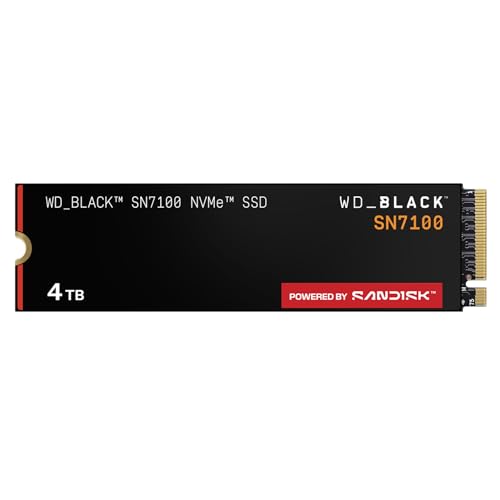
Pros
- Large 4TB capacity
- High stated sequential speeds
- Up to 2,400TBW endurance
Cons
- Replaced by a newer generation
- Who should skip it: shoppers seeking SANDISK's latest generation
Key Numbers at a Glance
- Fastest stated sequential read speed: Samsung 9100 PRO 4TB PCIe 5.0 SSD, up to 14,800 MB/s; this is a manufacturer specification, not a guarantee of game load times.
- Samsung 990 PRO 4TB PCIe 4.0 SSD lists up to 7,450 MB/s read and 6,900 MB/s write, compared with up to 560 MB/s read and 530 MB/s write for the Samsung 870 EVO 4TB SATA SSD.
- Samsung T9 Portable SSD 4TB lists up to 2,000 MB/s transfer speeds; Samsung T7 Portable SSD 4TB lists up to 1,050 MB/s read and 1,000 MB/s write.
- TEAMGROUP T-Force Vulcan Z 4TB SATA SSD lists up to 550 MB/s read and 470 MB/s write, and uses a 2.5-inch SATA form factor.
Best 4TB SATA SSD for a Budget Upgrade: TEAMGROUP T-Force Vulcan Z 4TB SATA SSD
The TEAMGROUP T-Force Vulcan Z 4TB SATA SSD combines 4TB capacity with a 2.5-inch SATA III interface and listed read/write speeds up to 550/470 MB/s. Its QLC NAND and SLC cache are stated features, and its interface makes it a candidate only for a machine with a compatible SATA connection and physical space for this drive format. Skip it if your Steam Machine requires an M.2 NVMe drive or has no available SATA connection.
Best PCIe 4.0 M.2 Pick for Gaming: Samsung 990 PRO 4TB PCIe 4.0 SSD
The Samsung 990 PRO 4TB PCIe 4.0 SSD is an M.2 2280 NVMe drive with listed sequential speeds up to 7,450/6,900 MB/s. It suits a system that specifically supports PCIe 4.0 M.2 storage, but the machine’s slot, clearance, and firmware requirements still need checking. Skip it if your Steam Machine only accepts 2.5-inch SATA drives or external storage.
Best Portable USB Pick: Samsung T9 Portable SSD 4TB
The Samsung T9 Portable SSD 4TB is an external drive with a listed USB 3.2 Gen 2×2 interface and transfer speeds up to 2,000 MB/s. Its portability avoids installing an internal drive, but the host device must support a suitable USB connection, and the stated peak speed does not ensure the same performance on every port. Skip it if you need an internal drive or cannot confirm the Steam Machine supports external game storage.
How to Choose the Best 4TB SSD for Steam Machine
Confirm the storage interface and form factor
Bottom line: Match the drive to the machine’s actual slot or port before comparing speed. The Samsung 990 PRO is M.2 2280 PCIe 4.0 NVMe, the Samsung 870 EVO is a 2.5-inch SATA III SSD, and the Samsung T9 connects externally over USB 3.2 Gen 2×2. These interfaces are not interchangeable, so consult the Steam Machine’s documentation or inspect its existing storage setup before ordering.
If your device is a separate PC running Steam rather than a particular Steam Machine model, its motherboard and case determine internal compatibility. Our SSD category has more storage options, while the storage category covers other drive types.
Treat speed figures as interface and workload clues
Bottom line: A higher sequential speed is useful for transfers, but it does not promise proportionally shorter game loads. The Samsung 9100 PRO lists up to 14,800/13,400 MB/s read/write over PCIe 5.0, while the Samsung 990 PRO lists up to 7,450/6,900 MB/s over PCIe 4.0. A host with a slower interface cannot make use of the faster drive’s full stated capability, and game loading depends on more than sequential transfer speed.
For moving a library between devices, external models list different peak figures: the T9 reaches up to 2,000 MB/s, while the T7 lists up to 1,050 MB/s read. Check the computer’s USB port standard as well as the drive’s interface, especially if you need an external drive for regular use.
Decide whether internal or external storage fits your setup
Bottom line: Choose internal storage for a compatible expansion slot and external storage when portability matters. The 2.5-inch Samsung 870 EVO and M.2 2280 Samsung 990 PRO require matching internal connections; the T9 and T7 are portable USB drives. External storage avoids fitting an internal drive, but it occupies a USB port and depends on the host’s support for the intended use.
Do not assume every Steam Machine supports booting or running games from an external drive. Check the system maker’s guidance for storage expansion and game-library behavior before relying on a USB SSD.
Consider sustained work, NAND type, and endurance details
Bottom line: For repeated large transfers, look beyond the headline speed and check the drive’s stated cache and endurance information. The TEAMGROUP Vulcan Z specifies QLC NAND and SLC cache, while the SANDISK Optimus 5100 lists QLC NAND and up to 1,200 TBW for its 4TB model. The WD_Black SN7100 lists up to 2,400 TBW for its 4TB model, but its product page notes that the model has been replaced by a newer generation.
Sequential peak figures alone do not establish sustained write performance. If your use includes frequent large captures or project transfers, compare manufacturer endurance and sustained-write details where available, and verify the exact model variant before buying.
Check cooling, clearance, and device support
Bottom line: Verify physical clearance and platform support, particularly for a fast internal NVMe drive. The Samsung 9100 PRO is PCIe 5.0 M.2 2280 and lists advanced thermal control; the Samsung T9 describes a thermal solution for managing heat. The listing does not establish that a specific Steam Machine has the slot, heatsink, or clearance either drive needs.
Identify the exact Steam Machine model and check its supported capacity, interface, drive length, and installation instructions. If using USB, confirm that the device supports the required connection and the way you intend to use the storage.
How We Compared These Products
This guide is based on product research, comparing listed capacity, form factor, interface, stated sequential speeds, NAND or cache details, endurance figures, and compatibility claims where available. The product pages do not establish compatibility with every Steam Machine model, and stated speeds are manufacturer specifications rather than independently measured results. Customer feedback data in the product listings is limited, so recommendations focus on matching the drive type to the system.
Which Option Fits Your Home and Devices?
For a Steam Machine with a confirmed PCIe 4.0 M.2 2280 slot: Samsung 990 PRO 4TB PCIe 4.0 SSD lists up to 7,450 MB/s read and 6,900 MB/s write, with 4TB capacity. Skip it if your machine lacks that slot or its documentation does not confirm support.
For a machine with a compatible 2.5-inch SATA bay: TEAMGROUP T-Force Vulcan Z 4TB SATA SSD provides 4TB in a SATA III format and lists up to 550/470 MB/s read/write. Skip it if the device takes M.2 storage only or lacks an internal SATA connection.
For portable storage over a confirmed compatible USB port: Samsung T9 Portable SSD 4TB offers 4TB capacity and a stated maximum transfer speed of 2,000 MB/s. Skip it if you need internal installation or the Steam Machine does not support external storage for your intended use.
For a separate external-drive comparison, see our best 4TB external hard drives guide. If a smaller portable SSD is sufficient, our best portable SSDs under $100 guide covers another capacity and budget angle.
Mistakes to Avoid When Choosing an SSD for Steam Machine
- Buying by capacity alone. A 4TB drive still needs a compatible interface, form factor, and supported capacity. Verify your exact device before choosing.
- Confusing M.2 with a universal connection. M.2 drives can use different protocols; confirm that the system supports the drive’s NVMe and PCIe generation.
- Assuming a USB drive works for every purpose. Check whether the Steam Machine supports external game storage or booting if either is important.
- Choosing by peak speed alone. Compare the drive’s interface with the host port and consider endurance or sustained-write details for frequent large transfers.
Frequently Asked Questions
Will any 4TB SSD work with a Steam Machine?
No. The system must support the drive’s connection and form factor, and the product data does not confirm compatibility with every Steam Machine model. Check the exact device documentation for supported storage types and capacity.
Is an M.2 NVMe drive faster than a SATA SSD for games?
The listed NVMe drives have higher sequential speed specifications than the listed SATA drives. That does not guarantee a matching improvement in game load times, and the host must support the NVMe drive’s interface.
Can I use a portable SSD for my Steam library?
The Samsung T9 and T7 are external USB SSDs, but their listings do not confirm support for game installation or booting on every Steam Machine. Check the device’s instructions and USB compatibility before treating an external SSD as your game drive.
What is the difference between the Samsung T9 and T7?
Both are 4TB portable SSDs. The T9 lists USB 3.2 Gen 2×2 and up to 2,000 MB/s transfer speeds, while the T7 lists USB 3.2 Gen 2 and up to 1,050 MB/s read and 1,000 MB/s write; verify which USB connection your device supports.
Should I choose PCIe 5.0 for a Steam Machine?
Only if the machine supports PCIe 5.0 M.2 storage and the additional capability fits your needs. The Samsung 9100 PRO lists up to 14,800 MB/s read, but a host with an older or different interface will limit compatibility or operation to what that host supports.


Write Your Review
No reviews yet. Be the first to share your experience!