


For Fortnite, prioritize a laptop with dedicated graphics if you want more headroom for demanding settings, and match its display refresh rate to the frame rate you expect to use. The ASUS ROG Strix G16 RTX 5060 Laptop and Acer Nitro V 16S Gaming Laptop, RTX 5060 pair RTX 5060 graphics with high-refresh displays, while less expensive integrated-graphics models suit lighter gaming expectations and broader everyday use.
Compare at a glance
| Product | Brand | Size | Weight | Stands out for | Price |
|---|---|---|---|---|---|
| 1 ASUS ROG Strix G16 RTX 5060 Laptop | ASUS | 13.94 × 0.9 × 10.55 in | 5.8 lb | Intel Core i7-14650HX processor | Check price |
| 2 NIMO Ryzen 7 15.6-Inch Laptop | NIMO | 14.07 × 8.98 × 0.76 in | 3.8 lb | Eight-core Ryzen 7 processor | Check price |
| 3 Acer Nitro V 16S Gaming Laptop, RTX 5060 | Acer | 14.08 × 0.79 × 10.39 in | 4.6 lb | 180Hz display with 100% sRGB coverage | Check price |
| 4 KAIGERR Gaming Laptop, Ryzen 7430U, 16-inch | KAIGERR | 14.07 × 9 × 0.66 in | 3.9 lb | 16GB memory and 512GB NVMe SSD | Check price |
| 5 CHIFUYOU 15.6-Inch Laptop, 16GB RAM | CHIFUYOU | 14 × 9 × 0.8 in | 3.5 lb | 16GB RAM and 512GB SSD | Check price |
| 6 Alienware 16 Aurora RTX 5050 Laptop | Alienware | 10.45 × 14.06 × 0.73 in | 5.5 lb | 16-inch WQXGA 120Hz display | Check price |
| 7 HP Victus 15.6-Inch Gaming Laptop, 144Hz | HP | 20 × 4 × 10.8 in | 7 lb | 144Hz Full HD IPS display | Check price |
| 8 ASUS ROG Strix G16 RTX 5080 Laptop | ASUS | 13.94 × 0.9 × 10.55 in | 3.9 lb | RTX 5080 laptop graphics | Check price |
| 9 MALLRACE Ryzen 7 15.6-Inch Laptop | MALLRACE | 13 × 8 × 0.5 in | 1.8 kg | 16GB RAM and 512GB NVMe SSD | Check price |
| 10 ASUS ROG Strix G16, RTX 5050 | ASUS | 13.94 × 1.21 × 1.55 in | 5.8 lb | 16-inch 165Hz FHD+ display | Check price |
Sizes and weights as listed by the manufacturer on Amazon. Check the retailer for current price and availability.
Pros
- Intel Core i7-14650HX processor
- 165Hz FHD+ display
- 1TB PCIe Gen 4 SSD
- Wi-Fi 7
Cons
- Weighs about 5.84 lb
- Who should skip it: travelers seeking a lighter laptop
Pros
- Eight-core Ryzen 7 processor
- Upgradeable DDR5 memory
- Broad port selection
- Backlit keyboard and fingerprint sensor
Cons
- 8GB RAM and 256GB SSD are modest capacities
- Who should skip it: demanding gamers and editors
Pros
- 180Hz display with 100% sRGB coverage
- 32GB DDR5 memory included
- One available M.2 slot
Cons
- Memory is capped at 32GB
- Who should skip it: travelers prioritizing a lighter laptop

Pros
- 16GB memory and 512GB NVMe SSD
- Two M.2 slots for upgrades
- Wi-Fi 6 and Bluetooth 5.2
- Windows 11 Pro included
Cons
- Gaming graphics capability is not specified
- Who should skip it: players seeking specified graphics performance

Pros
- 16GB RAM and 512GB SSD
- Full HD display
- Windows 11 Pro and Office included
- Backlit keyboard
- Two-year warranty stated
Cons
- Graphics processor is not specified
- Battery runtime is not stated
- Who should skip it: buyers needing confirmed gaming graphics performance

Pros
- 16-inch WQXGA 120Hz display
- RTX 5050 Laptop GPU
- 16GB DDR5 memory
- 1TB SSD
Cons
- Weighs 5.49 pounds
- Who should skip it: travelers seeking a lighter laptop
Best for dedicated graphics

Pros
- 144Hz Full HD IPS display
- RTX 3050 with 6GB GDDR6
- 16GB RAM and 512GB PCIe SSD
- Backlit keyboard and Wi-Fi 6
Cons
- Listed weight is 7 lb
- Who should skip it: frequent travelers prioritizing lighter laptops
Best for a premium GPU

Pros
- RTX 5080 laptop graphics
- 32GB DDR5 memory
- Tool-free access to upgradeable components
- MUX switch with Advanced Optimus
Cons
- Published display refresh rates conflict
- Who should skip it: buyers who need a confirmed refresh rate

Pros
- 16GB RAM and 512GB NVMe SSD
- Full HD 15.6-inch display
- USB-C and HDMI connectivity
- Backlit keyboard
Cons
- No dedicated graphics card is specified
- Who should skip it: buyers needing a dedicated GPU
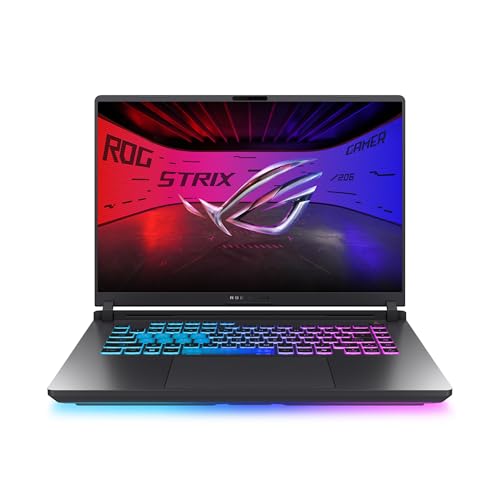
Pros
- 16-inch 165Hz FHD+ display
- 16GB DDR5-5600 memory
- Tool-free access for selected upgrades
- Wi-Fi 7
Cons
- 512GB SSD may fill quickly with large game libraries
- Who should skip it: travelers prioritizing a lighter laptop
Best High-Refresh Fortnite Gaming Laptop: Acer Nitro V 16S Gaming Laptop, RTX 5060
Acer Nitro V 16S Gaming Laptop, RTX 5060 combines an RTX 5060 Laptop GPU with a 16-inch, 180Hz WUXGA display and 32GB DDR5 memory. Its 1TB SSD and second M.2 slot, with one slot available, are useful if you want room for games and a storage upgrade path. The listing specifies a maximum of 32GB memory, so the installed capacity is already at that stated limit.
Skip it if you want a smaller 15.6-inch screen or a lower-cost laptop with integrated graphics.
Best RTX 5060 Fortnite Laptop for a 165Hz Screen: ASUS ROG Strix G16 RTX 5060 Laptop
ASUS ROG Strix G16 RTX 5060 Laptop pairs RTX 5060 graphics with a 16-inch FHD+ 165Hz display, a Core i7-14650HX, 16GB DDR5, and a 1TB SSD. The listing also describes a vapor chamber and tri-fan cooling design, but does not give measured noise or sustained performance figures.
Skip it if you need more than 16GB of memory out of the box or prefer the Acer’s 180Hz display and 32GB configuration.
Related guides: Best Gaming Laptops for VR, Best Gaming Laptops for Minecraft and Best Gaming Laptops for Cyberpunk 2077.
Best Budget Dedicated-Graphics Fortnite Laptop: HP Victus 15.6-Inch Gaming Laptop, 144Hz
HP Victus 15.6-Inch Gaming Laptop, 144Hz lists an RTX 3050 with 6GB GDDR6, 16GB RAM, a 512GB SSD, and a 15.6-inch FHD 144Hz display. That dedicated GPU makes it a more direct gaming configuration than the integrated-graphics laptops in this roundup, though the listing does not establish Fortnite frame rates.
Skip it if you want a newer RTX 50-series GPU, a 16-inch screen, or more storage without upgrading.
Best Premium Fortnite Display: ASUS ROG Strix G16 RTX 5080 Laptop
ASUS ROG Strix G16 RTX 5080 Laptop has an RTX 5080, 32GB DDR5, and a 16-inch 2.5K ROG Nebula HDR display described with a 240Hz rate in the title and 300Hz in the feature text. That refresh-rate discrepancy is worth confirming with the seller or manufacturer before purchase. Its 1TB SSD and tool-free access for upgrades are useful details, but its higher graphics tier can be more than a Fortnite-focused buyer needs.
Skip it if you do not need a premium GPU and high-resolution display or would rather spend less on an RTX 5060 configuration.
Key Numbers at a Glance
- The Acer Nitro V 16S Gaming Laptop, RTX 5060 has a 16-inch 180Hz WUXGA display; the ASUS ROG Strix G16 RTX 5060 Laptop has a 16-inch FHD+ 165Hz display.
- Listed memory ranges from 8GB in the NIMO Ryzen 7 15.6-Inch Laptop to 32GB in the Acer Nitro V 16S Gaming Laptop, RTX 5060 and ASUS ROG Strix G16 RTX 5080 Laptop.
- Listed SSD capacity ranges from 256GB in the NIMO Ryzen 7 15.6-Inch Laptop to 1TB in the Acer Nitro V 16S Gaming Laptop, RTX 5060 and several other configurations.
- The HP Victus 15.6-Inch Gaming Laptop, 144Hz lists a 144Hz screen, while the Alienware 16 Aurora RTX 5050 Laptop lists a 120Hz screen.
How to Choose the Best Gaming Laptops for Fortnite
Graphics hardware and realistic expectations
Bottom line: Choose a dedicated GPU for a gaming-first laptop, and do not assume a product called a gaming laptop has dedicated graphics. The RTX configurations include the RTX 3050 in the HP Victus and RTX 5050, RTX 5060, or RTX 5080 models. The NIMO Ryzen 7 15.6-Inch Laptop lists Radeon 680M integrated graphics, while the MALLRACE Ryzen 7 15.6-Inch Laptop lists AMD Radeon Graphics without specifying a discrete GPU. For Fortnite, check the graphics chip and confirm current game requirements and desired settings rather than relying on the marketing label.
Refresh rate, resolution, and screen size
Bottom line: A high refresh rate matters only if the system can deliver enough frames for you to benefit from it. Listed displays range from the HP Victus at 144Hz and ASUS ROG Strix G16 RTX 5060 at 165Hz to the Acer Nitro V 16S at 180Hz. Higher resolution also asks more of the graphics hardware: the Alienware 16 Aurora has a WQXGA 120Hz screen, while the Acer lists WUXGA at 180Hz. Check the exact panel resolution and refresh rate for the configuration you are buying.
Memory and game-library storage
Bottom line: Favor 16GB or more for a gaming-focused setup, and consider SSD capacity against the games and files you keep installed. The Acer Nitro V 16S lists 32GB DDR5 and 1TB storage; the ASUS ROG Strix G16 RTX 5050 lists 16GB DDR5 and a 512GB SSD. By contrast, the NIMO has 8GB RAM and a 256GB SSD, which makes it a less compelling fit for gaming alongside many open applications. The Acer product page lists two M.2 slots, with one available, but confirm upgrade details for any model you consider.
Processor, cooling, and sustained play
Bottom line: Compare the complete CPU and GPU configuration, not processor branding or core count alone. The ASUS ROG Strix G16 RTX 5060 lists an Intel Core i7-14650HX, while the Acer lists an AMD Ryzen 7 260; their graphics and display configurations also differ. ASUS describes a vapor chamber and tri-fan system on its ROG models, but the product data gives no measured temperatures, fan noise, or sustained frame rates. If quiet operation matters, seek model-specific noise information before choosing.
Ports, wireless, and room to upgrade
Bottom line: Match the listed connections and upgrade details to your desk setup before ordering. Wi-Fi 7 appears on the ASUS ROG Strix G16 models and Alienware 16 Aurora, while the Acer Nitro V 16S lists Wi-Fi 6. The NIMO product page specifies two USB-C ports with PD, DisplayPort video, and USB 3.2 Gen 2 data, plus HDMI 2.0; do not assume another laptop’s USB-C port has the same capabilities. If you plan to connect an external monitor, verify the exact model’s display outputs and supported resolution.
Browse the gaming laptops category for other configurations. If your main constraint is a lower-cost everyday machine, compare the budget laptops category and our best laptops under $300 guide. For school or office use alongside gaming, the business laptops category offers a different set of priorities.
How We Compared These Products
This guide is based on product research, comparing the listed processor, graphics, memory, storage, display, cooling features, ports, wireless standards, and upgrade information. Product pages do not establish comparative Fortnite frame rates, noise levels, or battery life under gaming load, so recommendations focus on stated configurations rather than performance guarantees.
Which Option Fits Your Setup?
For a fast-refresh 16-inch gaming display: Acer Nitro V 16S Gaming Laptop, RTX 5060 combines 180Hz with an RTX 5060 and 32GB memory. Skip it if the listed 32GB memory ceiling or 16-inch size does not suit your plans.
For dedicated graphics on a 15.6-inch screen: HP Victus 15.6-Inch Gaming Laptop, 144Hz lists an RTX 3050, 16GB RAM, and a 144Hz FHD display. Skip it if you want an RTX 50-series GPU or more than 512GB of listed SSD storage.
For a premium GPU and higher-resolution panel: ASUS ROG Strix G16 RTX 5080 Laptop lists an RTX 5080, 32GB RAM, and a 2.5K display. Skip it if your priority is a straightforward Fortnite system rather than a high-end graphics configuration, and verify the conflicting refresh-rate details before buying.
Mistakes to Avoid When Choosing a Fortnite Laptop
- Buying by the gaming label alone. Check whether the laptop has dedicated graphics; several listed models use integrated Radeon graphics.
- Matching refresh rate without considering resolution. Compare both figures and the GPU, since a higher-resolution display can demand more graphics performance.
- Ignoring the storage configuration. A 256GB SSD, such as the NIMO’s, is a different fit from a 1TB SSD; consider your installed games and files.
- Assuming ports are interchangeable. Confirm the exact USB-C and video-output capabilities if you plan to connect a monitor, dock, or charger.
Frequently Asked Questions
Is an integrated-graphics laptop suitable for Fortnite?
The NIMO Ryzen 7 15.6-Inch Laptop lists Radeon 680M integrated graphics, not a dedicated GeForce GPU. It may suit buyers whose priority is everyday computing and lighter gaming, but the product data does not establish Fortnite frame rates or settings. Check the game’s current requirements and independent performance information for the exact configuration.
Is a 144Hz screen better than a 180Hz screen?
A 180Hz panel supports a higher refresh rate than a 144Hz panel, but that difference is useful only if the laptop can deliver enough frames and you value the extra smoothness. The HP Victus lists 144Hz with an RTX 3050; the Acer Nitro V 16S lists 180Hz with an RTX 5060. Their GPUs and other specifications differ, so refresh rate alone does not determine which is faster in Fortnite.
How much RAM should a Fortnite laptop have?
Among these configurations, several gaming-focused models list 16GB and the Acer Nitro V 16S and ASUS ROG Strix G16 RTX 5080 list 32GB. The NIMO lists 8GB, a smaller amount for gaming while multitasking. Check the exact model’s memory configuration and upgrade limits before purchase.
Can I connect an external monitor to these laptops?
Some listed models specify video-capable connections: the NIMO lists HDMI 2.0 and USB-C with DisplayPort video, and the KAIGERR lists HDMI 1.4 and a full-function Type-C port. The product data does not detail monitor resolution support for every model. Verify the exact output specifications and your monitor’s input before buying.
Which is better for Fortnite, the HP Victus or the Acer Nitro V 16S?
The Acer Nitro V 16S lists an RTX 5060, 32GB RAM, a 1TB SSD, and a 180Hz display, while the HP Victus lists an RTX 3050, 16GB RAM, a 512GB SSD, and a 144Hz display. The Acer’s listed configuration is the more gaming-focused choice on these specifications; the HP suits someone prioritizing a 15.6-inch screen and a more modest dedicated-GPU configuration. Neither listing establishes Fortnite frame rates.
Does Wi-Fi 7 improve Fortnite performance?
Wi-Fi 7 is listed on several models, but the product data does not establish lower game latency or better Fortnite performance. Your network equipment, signal conditions, and internet connection also affect online play. Check that your router and laptop support the wireless standard you plan to use.


Write Your Review
No reviews yet. Be the first to share your experience!