


A student setting up a desk for online classes has to decide whether a monitor is already available, how much room a desktop can take, and whether coursework includes demanding creative or gaming tasks. For everyday browsing, documents, and video calls, a compact or refurbished desktop may be enough; an all-in-one or monitor bundle can simplify setup, while a discrete graphics card is more relevant to gaming and editing.
This guide to the best desktop computers for school compares those trade-offs, along with memory, storage, ports, wireless connectivity, and the details to check before choosing a system.
Compare at a glance
| Product | Brand | Size | Stands out for | Price |
|---|---|---|---|---|
| 1 Dell OptiPlex 7060 SFF, 32GB RAM | Dell | 18 × 14 × 6 in | Six-core Intel Core i7-8700 | Check price |
| 2 STGAubron Gaming PC, RX 580 8GB | STGAubron | 16.4 × 14.8 × 8.2 in | 16GB of memory | Check price |
| 3 HP EliteDesk 800 G3 SFF i5 Desktop Bundle | HP | 11.5 × 3.6 × 11.4 in | Monitor, keyboard, and mouse included | Check price |
| 4 STGAubron Gaming PC, RX 550 4GB | STGAubron | 18.1 × 10.2 × 18.9 in | 16GB memory | Check price |
| 5 STGAubron Gaming PC, RTX 3050 6GB | STGAubron | 16.4 × 14.8 × 8.2 in | Dedicated RTX 3050 6GB graphics | Check price |
| 6 Dell OptiPlex 3050 SFF, 16GB RAM | Dell | 11.2 × 3.75 × 11.5 in | Compact small-form-factor case | Check price |
| 7 Dell OptiPlex 7050 SFF, 32GB RAM | Dell | 11.5 × 3.6 × 11.4 in | 32GB of DDR4 memory | Check price |
| 8 KAMRUI AK1PLUS Mini PC, 16GB RAM | KAMRUI | 5.04 × 5.04 × 2.05 in | Dual 4K at 60Hz display support | Check price |
| 9 Qehi 24-Inch All-in-One Desktop | Qehi | Not listed | Space-saving all-in-one design | Check price |
| 10 Dell OptiPlex 7010 Desktop, 16GB RAM | Dell | 12.3 × 3.7 × 11.4 in | New 1TB SSD | Check price |
Sizes and weights as listed by the manufacturer on Amazon. Check the retailer for current price and availability.
Pros
- Six-core Intel Core i7-8700
- 32GB DDR4 memory
- 512GB NVMe M.2 SSD
- Two DisplayPort outputs
Cons
- Who should skip it: users who need a full-size tower
Pros
- 16GB of memory
- 1TB SSD
- Wi-Fi 6 and Bluetooth 5.0
- Includes RGB keyboard and mouse
Cons
- Who should skip it: buyers who need a clearly identified CPU generation
Pros
- Monitor, keyboard, and mouse included
- 256GB SSD
- Windows 11 Pro included
Cons
- 8GB RAM may constrain heavier multitasking
- Who should skip it: users needing demanding workloads

Pros
- 16GB memory
- 512GB SSD
- Wi-Fi 6 and Bluetooth 5.0
- HDMI and DisplayPort
Cons
- Who should skip it: players seeking demanding graphics performance

Pros
- Dedicated RTX 3050 6GB graphics
- 16GB DDR4 memory
- Wi-Fi 6 and Bluetooth 5.2
- Windows 11 Home included
Cons
- Who should skip it: owners needing more than 512GB of listed storage
Best for a low-cost coursework setup

Pros
- Compact small-form-factor case
- 16GB DDR4 memory
- DisplayPort and HDMI outputs
- Keyboard and mouse included
Cons
- Who should skip it: users needing more than 256GB of internal storage

Pros
- 32GB of DDR4 memory
- 1TB SSD
- HDMI and DisplayPort outputs
- Windows 11 Pro included
Cons
- Integrated graphics
- Who should skip it: users needing a dedicated GPU
Best for a crowded desk or dorm setup

Pros
- Dual 4K at 60Hz display support
- 16GB memory
- Expandable storage up to 4TB total
- Compact 5.04-inch footprint
Cons
- Celeron N5095 and Intel UHD Graphics suit routine workloads, not demanding tasks
- Who should skip it: users needing demanding gaming or graphics performance
Best for a tidy study area

Pros
- Space-saving all-in-one design
- 16GB RAM
- Adjustable anti-glare display
- Included keyboard and mouse
Cons
- 256GB storage may constrain larger file collections
- Processor model and port details are unspecified
- Who should skip it: users needing detailed processor or graphics specifications
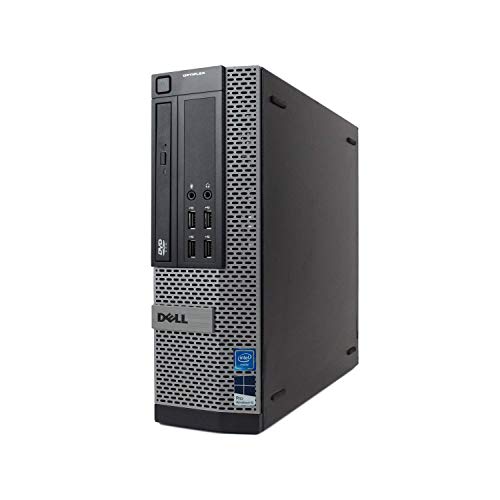
Pros
- New 1TB SSD
- 16GB of memory
- Two DisplayPort outputs
- Windows 11 Pro installed
Cons
- Renewed rather than new
- Graphics details are not provided
- Who should skip it: buyers who need specified graphics hardware
Best Budget School Desktop: Dell OptiPlex 3050 SFF, 16GB RAM
For a low-cost coursework setup: Dell OptiPlex 3050 SFF, 16GB RAM pairs a quad-core i5-6500 with 16GB memory and a 256GB SSD. It includes a USB keyboard and mouse, a Wi-Fi adapter, and both DisplayPort and HDMI for connecting a display.
It is a renewed small-form-factor PC, so confirm its condition and warranty terms on the product page and whether 256GB is enough for your files and applications. Skip it if you need a new computer, more storage, or a monitor included in the bundle.
Best School Desktop Bundle: HP EliteDesk 800 G3 SFF i5 Desktop Bundle
For a student who needs a display too: HP EliteDesk 800 G3 SFF i5 Desktop Bundle includes a 21.5-inch Full HD monitor, keyboard, and mouse, alongside an i5-6500, 8GB RAM, and 256GB SSD. That combination makes the included screen an important part of its appeal for a desk without an existing monitor.
The 8GB memory and 256GB SSD are more modest than the 16GB configurations in this guide, and the PC is renewed. Skip it if you already own a monitor or need more memory for heavier multitasking.
Most Compact School Desktop: KAMRUI AK1PLUS Mini PC, 16GB RAM
For a crowded desk or dorm setup: KAMRUI AK1PLUS Mini PC, 16GB RAM uses a mini PC design and lists 16GB RAM, a 256GB SSD, and an Intel Celeron N5095 processor. Two HDMI 2.0 outputs support connecting two displays, and its storage can be expanded with compatible M.2 and 2.5-inch drives according to the product page.
Its integrated Intel UHD Graphics and Celeron processor are aimed at everyday computing rather than demanding graphics workloads. Skip it if you need a discrete graphics card or want a monitor included.
Best All-in-One School Desktop: Qehi 24-Inch All-in-One Desktop
For a tidy study area with fewer separate pieces: Qehi 24-Inch All-in-One Desktop combines a 23.8-inch Full HD display with 16GB RAM, a 256GB SSD, a webcam, built-in speakers, and Wi-Fi 6. The product page also lists a wired keyboard and mouse, so the display and computer arrive as one integrated unit.
The stated storage is 256GB, and the listing does not identify the exact Core i5 model. Skip it if you need a discrete graphics card or want to choose a separate monitor and tower.
Key Numbers at a Glance
- The included display measures 21.5 inches on the HP EliteDesk 800 G3 SFF i5 Desktop Bundle; the Qehi 24-Inch All-in-One Desktop lists a 23.8-inch display.
- Listed memory ranges from 8GB on the HP EliteDesk 800 G3 SFF i5 Desktop Bundle to 32GB on the Dell OptiPlex 7060 SFF, 32GB RAM.
- Listed SSD capacity ranges from 256GB on the Dell OptiPlex 3050 SFF, 16GB RAM, to 1TB on the Dell OptiPlex 7050 SFF, 32GB RAM, and Dell OptiPlex 7010 Desktop, 16GB RAM.
- The KAMRUI AK1PLUS Mini PC, 16GB RAM lists two HDMI 2.0 outputs, while the Dell OptiPlex 7060 SFF, 32GB RAM lists two DisplayPort outputs.
How to Choose the Best Desktop Computers for School
Match the processor and graphics to coursework
Bottom line: For documents, browsing, and online classes, prioritize a suitable everyday processor and enough memory; choose discrete graphics only when your workload calls for them. The KAMRUI AK1PLUS Mini PC, 16GB RAM uses a four-core, four-thread Celeron N5095, while the STGAubron Gaming PC, RX 580 8GB lists a Core i7 and a discrete Radeon RX 580 graphics card. The latter is aimed at mixed workloads including gaming and video editing, but a gaming-focused configuration is not necessary for basic schoolwork.
Match the PC to required school software and any creative assignments rather than relying on a processor label alone. If gaming is also a priority, compare the graphics configuration and monitor needs with our best desktop computers for streaming guide.
Choose memory and storage for your workload
Bottom line: Compare RAM and SSD capacity with the number of apps and files you expect to keep on the PC. The HP EliteDesk 800 G3 SFF i5 Desktop Bundle lists 8GB RAM and a 256GB SSD; the Dell OptiPlex 7060 SFF, 32GB RAM lists 32GB and a 512GB NVMe M.2 SSD. Several other systems list 16GB, while the Dell OptiPlex 7050 SFF, 32GB RAM lists a 1TB SSD.
More memory and storage can be useful for heavy multitasking and large project files, but the product pages do not establish that every model’s memory is upgradeable. Check the exact configuration and available upgrade details before treating future expansion as a reason to buy.
Decide whether you need a monitor or an all-in-one
Bottom line: If you do not own a screen, compare an included monitor bundle or an all-in-one before buying a tower alone. The HP EliteDesk 800 G3 SFF i5 Desktop Bundle includes a 21.5-inch Full HD monitor, and the Qehi 24-Inch All-in-One Desktop combines its computer with a 23.8-inch Full HD display. The Dell OptiPlex 3050 SFF, 16GB RAM is a separate small-form-factor computer, so plan for a compatible display if you choose it.
Also check display outputs against the monitor you intend to connect. For display options in a different category, see our best 240Hz gaming monitors guide, though a high refresh rate matters most when the computer and your applications can make use of it.
Check ports, wireless, and multi-monitor needs
Bottom line: Verify the actual display and USB connections you need before choosing a desktop. The KAMRUI AK1PLUS Mini PC, 16GB RAM lists two HDMI 2.0 outputs and four USB 3.2 ports; the Dell OptiPlex 7060 SFF, 32GB RAM lists two DisplayPort outputs and seven USB ports across USB 3.0 and USB 2.0. Wireless details also vary: product pages list Wi-Fi 6 for the KAMRUI and the Qehi, while refurbished Dell configurations may include a USB Wi-Fi adapter.
Check whether your monitor uses HDMI or DisplayPort and whether your keyboard, mouse, printer, or other accessories need particular ports. Do not assume that two display outputs alone confirm support for your desired monitor resolution or refresh rate.
Weigh refurbished value against condition and support
Bottom line: A refurbished desktop can offer a useful configuration, but check the seller’s condition and warranty terms before purchase. The Dell OptiPlex 3050 SFF, 16GB RAM is identified as Certified Refurbished with a minimum 90-day warranty; the Dell OptiPlex 7050 SFF, 32GB RAM is professionally renewed and lists a 90-day seller warranty. The STGAubron gaming configurations state a one-year parts-and-labor warranty.
Warranty coverage and refurbishment terms differ, so verify the exact listing and seller conditions rather than assuming every renewed PC has the same support. Families comparing a desktop with a portable school computer can also browse best laptops under $300 for a different form factor.
How We Compared These Products
This guide is based on product research, comparing the listed processors, graphics, memory, storage, displays, ports, wireless features, included accessories, and stated warranty or refurbishment details. Product descriptions also include manufacturer claims about intended uses; those claims are not independent performance results, and the available customer feedback does not establish how every unit will perform.
Which Option Fits Your Home and Devices?
The HP EliteDesk 800 G3 SFF i5 Desktop Bundle suits a student who needs a monitor and basic peripherals alongside the computer. The KAMRUI AK1PLUS Mini PC, 16GB RAM is the space-conscious choice with two HDMI outputs, while the Qehi 24-Inch All-in-One Desktop combines a Full HD screen, webcam, and computer in one unit.
Choose based on what you already own and the software your schoolwork requires. Skip the compact or all-in-one designs if your coursework requires a discrete graphics card, and check the exact PC and monitor connections before ordering.
Mistakes to Avoid When Choosing a School Desktop
- Buying a tower without checking for a screen. Confirm whether a monitor is included, or budget for a compatible display separately.
- Assuming every Core i5 or Core i7 is equivalent. Check the exact processor model, memory, and graphics listed for the configuration you are considering.
- Choosing storage without considering school files. Compare the listed SSD capacity with the applications and project files you plan to keep locally.
- Overlooking ports and wireless details. Match the PC’s HDMI, DisplayPort, USB, and Wi-Fi information to your monitor and peripherals.
Frequently Asked Questions
Is 8GB of RAM enough for school?
The HP EliteDesk 800 G3 SFF i5 Desktop Bundle lists 8GB, while several other PCs list 16GB or 32GB. The right amount depends on the school software and how many applications you use at once; check your program requirements before choosing.
Can these desktops connect to two monitors?
Some listings specify multiple display outputs. The KAMRUI AK1PLUS Mini PC, 16GB RAM lists two HDMI 2.0 outputs, and the Dell OptiPlex 7060 SFF, 32GB RAM lists two DisplayPort outputs. Verify the monitor connectors and the computer’s support for your intended display setup.
Does a desktop bundle include everything needed for school?
Included items vary. The HP EliteDesk 800 G3 SFF i5 Desktop Bundle lists a monitor, keyboard, and mouse, while the Qehi 24-Inch All-in-One Desktop lists an integrated display, keyboard, and mouse. Check the specific product page for cables and any other items you need.
Are refurbished desktops suitable for schoolwork?
A renewed desktop can suit coursework when its processor, memory, storage, and ports meet your needs. Refurbishment descriptions and warranty terms differ by listing, so confirm the seller’s condition details and coverage before purchasing.
Is a mini PC enough for online classes?
The KAMRUI AK1PLUS Mini PC, 16GB RAM lists an Intel Celeron N5095, 16GB RAM, a 256GB SSD, Wi-Fi, and two HDMI outputs. Those stated features cover common desktop connections, but it does not include a monitor in the listed configuration; verify the software requirements for your classes.





Write Your Review
No reviews yet. Be the first to share your experience!