


For World of Warcraft, choose a laptop with dedicated graphics if you want more headroom for demanding scenes or plan to play other modern games; a 16-inch FHD+ model such as the ASUS ROG Strix G16 RTX 5060 Laptop is a more compact gaming setup than an 18-inch QHD+ machine. If you prioritize screen space and memory, the MSI Crosshair 18 HX AI, 240Hz Gaming Laptop pairs a 2560×1600 display with 32GB of RAM. This guide to the best gaming laptops for world of warcraft compares those trade-offs and flags listings that are a poor fit for this workload.
Compare at a glance
| Product | Brand | Size | Weight | Stands out for | Price |
|---|---|---|---|---|---|
| 1 ASUS ROG Strix G16 RTX 5060 Laptop | ASUS | 13.94 × 0.9 × 10.55 in | 5.8 lb | Intel Core i7-14650HX processor | Check price |
| 2 Acer Nitro V 16S Gaming Laptop, RTX 5060 | Acer | 14.08 × 0.79 × 10.39 in | 4.6 lb | 180Hz display with 100% sRGB coverage | Check price |
| 3 MSI Crosshair 18 HX AI, 240Hz Gaming Laptop | msi | 15.9 × 11.02 × 1.17 in | 13 lb | 18-inch, 2560 x 1600 240Hz display | Check price |
| 4 HP Pavilion Gaming 15-dk0041nr, GTX 1650 | HP | 19 × 12 × 3 in | 5.1 lb | Dedicated GTX 1650 graphics | Check price |
| 5 MSI Cyborg 15 Gaming Laptop, RTX 5060 | msi | 9.65 × 14.14 × 0.91 in | 4.6 lb | Dedicated RTX 5060 graphics with 8GB GDDR7 | Check price |
| 6 NIMO Ryzen 7 15.6-Inch Laptop | NIMO | 14.07 × 8.98 × 0.76 in | 3.8 lb | Eight-core Ryzen 7 processor | Check price |
| 7 ASUS ROG Strix G18 RTX 5070 Laptop | ASUS | 15.71 × 11.73 × 0.93 in | Not listed | Intel Core Ultra 9 275HX processor | Check price |
| 8 MadeToStick Horde Gaming Sticker, 4 x 2.4 Inches | MadeToStick | 4 × 2.4 × 0.1 in | Not listed | Compact 4 x 2.4-inch format | Check price |
| 9 NIMO 16-Inch Laptop, Ryzen AI Max+ 395 | NIMO | 13.87 × 10.63 × 0.98 in | 5.4 lb | 128GB unified memory | Check price |
Sizes and weights as listed by the manufacturer on Amazon. Check the retailer for current price and availability.
Pros
- Intel Core i7-14650HX processor
- 165Hz FHD+ display
- 1TB PCIe Gen 4 SSD
- Wi-Fi 7
Cons
- Weighs about 5.84 lb
- Who should skip it: travelers seeking a lighter laptop
Pros
- 180Hz display with 100% sRGB coverage
- 32GB DDR5 memory included
- One available M.2 slot
Cons
- Memory is capped at 32GB
- Who should skip it: travelers prioritizing a lighter laptop
Pros
- 18-inch, 2560 x 1600 240Hz display
- 32GB DDR5 memory
- 2TB NVMe storage
- RTX 5070 graphics with 8GB GDDR7
Cons
- Who should skip it: travelers seeking a lightweight laptop
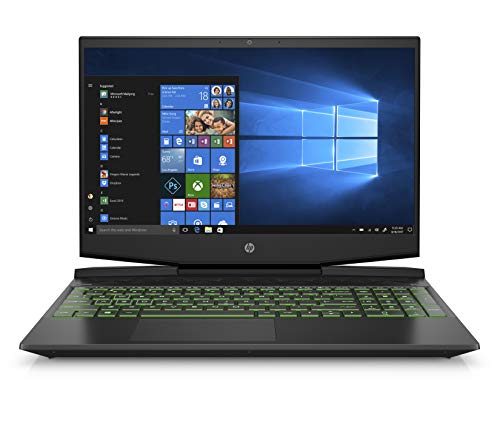
Pros
- Dedicated GTX 1650 graphics
- Two accessible memory slots
- Full HD IPS anti-glare display
- Ethernet and HDMI ports
Cons
- 256GB SSD limits storage space
- Who should skip it: gamers seeking a high-refresh display

Pros
- Dedicated RTX 5060 graphics with 8GB GDDR7
- 144Hz IPS display
- USB-C, HDMI 2.1, and Ethernet
- Windows 11 Pro included
Cons
- 512GB SSD may limit space for large game libraries
- Who should skip it: buyers needing more than 512GB

Pros
- Eight-core Ryzen 7 processor
- Upgradeable DDR5 memory
- Broad port selection
- Backlit keyboard and fingerprint sensor
Cons
- 8GB RAM and 256GB SSD are modest capacities
- Who should skip it: demanding gamers and editors

Pros
- Intel Core Ultra 9 275HX processor
- NVIDIA RTX 5070 graphics
- 32GB DDR5 memory and 1TB SSD
Cons
- Who should skip it: buyers who need confirmed display or battery specifications

Pros
- Compact 4 x 2.4-inch format
- Waterproof, weather-resistant vinyl
- Suitable for several smooth surfaces
Cons
- Who should skip it: buyers seeking a larger decal

Pros
- 128GB unified memory
- 8TB SSD with dual M.2 slots
- 165Hz, 2560 x 1600 display
- OCuLink and USB4 connectivity
Cons
- 5.4 lb weight and 230W power adapter
- Who should skip it: travelers prioritizing a lighter laptop
Best Overall Gaming Laptop for World of Warcraft: ASUS ROG Strix G16 RTX 5060 Laptop
ASUS ROG Strix G16 RTX 5060 Laptop combines an Intel Core i7-14650HX, RTX 5060 Laptop GPU, 16GB DDR5, and a 1TB SSD with a 16-inch FHD+ 165Hz display. That mix suits players who want dedicated graphics and a high-refresh screen without moving to an 18-inch laptop. The listing also specifies Wi-Fi 7 and a vapor chamber with tri-fan cooling, but does not give measured noise or performance results. Skip it if you need more than 16GB of memory out of the box or prefer a higher-resolution screen.
Best for a Large High-Resolution Screen: MSI Crosshair 18 HX AI, 240Hz Gaming Laptop
MSI Crosshair 18 HX AI, 240Hz Gaming Laptop stands out for its 18-inch 2560×1600 IPS display, 240Hz refresh rate, and 100% DCI-P3 color gamut. It also lists an RTX 5070 with 8GB GDDR7, 32GB DDR5, and a 2TB NVMe SSD, which provide more listed memory and storage than the Strix G16. The trade-off is a larger screen and chassis footprint, and the product data does not state laptop weight. Skip it if you want a compact machine for commuting or playing in tight spaces.
Best for 32GB Memory in a 16-Inch Format: Acer Nitro V 16S Gaming Laptop, RTX 5060
Acer Nitro V 16S Gaming Laptop, RTX 5060 has 32GB DDR5, an RTX 5060 Laptop GPU, and a 16-inch 1920×1200 screen with a 180Hz refresh rate. Its product details also list two M.2 slots, with one available, giving you a documented route to add storage. The screen is WUXGA rather than the MSI’s 2560×1600 QHD+ resolution. Skip it if you specifically want a QHD+ panel or a listed high-end color gamut.
Best for a 15.6-Inch RTX 5060 Setup: MSI Cyborg 15 Gaming Laptop, RTX 5060
MSI Cyborg 15 Gaming Laptop, RTX 5060 pairs an RTX 5060 with a 15.6-inch FHD IPS display at 144Hz, plus 16GB DDR5 and a 512GB SSD. Its listed connections include HDMI 2.1, Ethernet, and USB-C with DisplayPort and Power Delivery 3.0 support, useful if you connect a wired network or external display. The product data does not specify memory or storage upgrade slots, so check the exact configuration before buying. Skip it if you need the larger 1TB or 2TB SSD capacities listed for some other gaming models.
Key Numbers at a Glance
- Screen sizes range from 15.6 inches on the MSI Cyborg 15 Gaming Laptop, RTX 5060 to 18 inches on the MSI Crosshair 18 HX AI, 240Hz Gaming Laptop.
- Listed refresh rates range from 144Hz on the MSI Cyborg 15 Gaming Laptop, RTX 5060 to 240Hz on the MSI Crosshair 18 HX AI, 240Hz Gaming Laptop.
- Listed memory ranges from 16GB on the ASUS ROG Strix G16 RTX 5060 Laptop to 32GB on the Acer Nitro V 16S Gaming Laptop, RTX 5060 and MSI Crosshair 18 HX AI, 240Hz Gaming Laptop.
- Listed SSD capacities range from 512GB on the MSI Cyborg 15 Gaming Laptop, RTX 5060 to 2TB on the MSI Crosshair 18 HX AI, 240Hz Gaming Laptop.
How to Choose a Gaming Laptop for World of Warcraft
Graphics for Your Games
Bottom line: prioritize a dedicated GPU if you want a gaming-focused laptop that can also handle other graphics-heavy titles. The ASUS ROG Strix G16 RTX 5060 Laptop, Acer Nitro V 16S Gaming Laptop, RTX 5060, and MSI Cyborg 15 Gaming Laptop, RTX 5060 list RTX 5060 Laptop GPUs, while the MSI Crosshair 18 HX AI, 240Hz Gaming Laptop lists an RTX 5070 with 8GB GDDR7. Graphics power in a laptop can vary by model and power limits, which are not stated for these listings. Compare the exact GPU configuration and check current World of Warcraft requirements before purchase; for more graphics-focused options, see our best laptops for gamers on a budget.
Screen Size, Resolution, and Refresh Rate
Bottom line: match the panel to your desk space and preferred resolution, not just its refresh-rate number. The MSI Crosshair 18 HX AI, 240Hz Gaming Laptop lists an 18-inch 2560×1600 panel at 240Hz; the 16-inch ASUS ROG Strix G16 RTX 5060 Laptop lists FHD+ at 165Hz, while the Acer Nitro V 16S Gaming Laptop, RTX 5060 lists 1920×1200 at 180Hz. Higher refresh rates matter most when the game and system can deliver enough frames, and the product information does not provide frame-rate results. If you often connect an external monitor, check which video outputs the exact laptop configuration supports.
Memory and Game Storage
Bottom line: 32GB of listed memory gives you more room for multitasking than 16GB, while SSD capacity determines how much you can keep installed. The Acer Nitro V 16S Gaming Laptop, RTX 5060 and MSI Crosshair 18 HX AI, 240Hz Gaming Laptop each list 32GB, compared with 16GB on the ASUS ROG Strix G16 RTX 5060 Laptop and MSI Cyborg 15 Gaming Laptop, RTX 5060. Storage ranges from the MSI Cyborg’s 512GB to the Crosshair’s 2TB; the Acer’s product data lists two M.2 slots with one available. Verify memory upgradeability and free storage slots on the exact model, especially if you intend to keep a large game library.
Ports and Network Connections
Bottom line: check the ports you will actually use, especially Ethernet and display output for a fixed gaming desk. The MSI Cyborg 15 Gaming Laptop, RTX 5060 lists RJ45 Ethernet, HDMI 2.1, and USB-C with DisplayPort and Power Delivery 3.0; the ASUS ROG Strix G16 RTX 5060 Laptop lists Wi-Fi 7, while the MSI Crosshair 18 HX AI, 240Hz Gaming Laptop lists Wi-Fi 6E. A USB-C connector does not guarantee identical display, data, or charging features across models. For a wired connection, confirm that the chosen laptop has Ethernet or plan for a compatible adapter.
Cooling, Portability, and Sustained Use
Bottom line: choose a size you can comfortably keep on your desk, and treat cooling descriptions as design information rather than measured results. The ASUS ROG Strix G16 RTX 5060 Laptop lists a vapor chamber and tri-fan cooling, while the MSI Crosshair 18 HX AI, 240Hz Gaming Laptop has an 18-inch display. The product details do not state measured fan noise, sustained gaming performance, weight, or battery runtime for these picks. If you plan to carry a laptop regularly, verify its weight, charger size, and battery details on the exact product page before deciding.
How We Compared These Products
This guide is based on product research, not firsthand evaluation. We compared listed processors, graphics, memory, SSD capacity, displays, connectivity, and stated cooling or expansion features, and avoided assigning frame rates or noise levels where none are listed. The product group also includes models that are not close matches for a gaming-focused World of Warcraft purchase, so check that the exact model meets your game and setup needs. See our gaming laptop guide for budget-focused comparisons if your priority is a different balance of graphics and screen features.
Which Option Fits Your Setup?
For a 16-inch FHD+ gaming setup with an RTX 5060 and 1TB SSD, the ASUS ROG Strix G16 RTX 5060 Laptop is the most straightforward match among these picks. Choose the MSI Crosshair 18 HX AI, 240Hz Gaming Laptop if you value its 18-inch QHD+ 240Hz panel, 32GB memory, and 2TB SSD and have room for a larger machine. Skip either of these directions if portability is your main concern and the listing does not confirm the dimensions or weight you need.
If you want 32GB memory in a 16-inch format, the Acer Nitro V 16S Gaming Laptop, RTX 5060 combines that capacity with an RTX 5060 and an available M.2 slot. If your focus is a 15.6-inch display and listed wired-network and video connections, consider the MSI Cyborg 15 Gaming Laptop, RTX 5060. Skip both if you need a higher-resolution panel than the stated 1920×1200 or FHD screens.
Mistakes to Avoid When Choosing a WoW Laptop
- Choosing by GPU name alone. Laptop graphics configurations can differ, and power limits are not stated here. Confirm the exact laptop GPU configuration and consult current game requirements.
- Assuming a high refresh rate guarantees high frame rates. A 240Hz panel does not establish how many frames a laptop will render. Weigh the screen specification alongside the GPU and independent performance information.
- Paying for screen resolution without considering your setup. The 2560×1600 Crosshair panel and FHD+ or WUXGA alternatives suit different display preferences. Decide whether higher resolution or a smaller screen is more useful to you.
- Overlooking storage and upgrade details. A 512GB SSD and a 2TB SSD offer different amounts of room for games. Check the listing for free slots and upgrade limits before planning an expansion.
Frequently Asked Questions
Which laptop has the largest screen?
The MSI Crosshair 18 HX AI, 240Hz Gaming Laptop has an 18-inch display, larger than the 16-inch Acer and ASUS models and the 15.6-inch MSI Cyborg. Its panel is listed at 2560×1600 and 240Hz. Choose it if screen area is more important than a smaller footprint.
Is 16GB of RAM enough for World of Warcraft?
The listed configurations include both 16GB and 32GB, but this product data does not establish game-specific memory requirements or measured performance. Check the current system requirements and consider what else you run while playing. The Acer Nitro V 16S Gaming Laptop, RTX 5060 and MSI Crosshair 18 HX AI, 240Hz Gaming Laptop each list 32GB.
Does a 240Hz screen make the MSI Crosshair the right choice?
Not by itself. The MSI Crosshair 18 HX AI, 240Hz Gaming Laptop also has an 18-inch 2560×1600 panel, an RTX 5070 with 8GB GDDR7, 32GB of memory, and a 2TB SSD, but no frame-rate figures are listed. Choose it if those screen and capacity features suit your setup, not simply for the refresh-rate figure.
Which listed laptop has the most storage?
The MSI Crosshair 18 HX AI, 240Hz Gaming Laptop lists a 2TB NVMe SSD, the largest capacity among the gaming-laptop configurations compared here. The Acer Nitro V 16S Gaming Laptop, RTX 5060 lists a 1TB SSD and one available M.2 slot. Check the product page for the exact configuration before purchase.
Can I use an external monitor with these laptops?
The MSI Cyborg 15 Gaming Laptop, RTX 5060 lists HDMI 2.1 and USB-C with DisplayPort support, while the NIMO Ryzen 7 15.6-Inch Laptop lists HDMI 2.0 and USB-C ports with DisplayPort video. Verify the number of displays, resolution, and refresh rate supported by the exact laptop and connection path before buying. A port label alone does not confirm every monitor configuration.
Is the NIMO Ryzen 7 15.6-Inch Laptop a gaming-laptop alternative?
The NIMO Ryzen 7 15.6-Inch Laptop lists Radeon 680M integrated graphics, 8GB DDR5, and a 256GB SSD, and its product details describe casual gaming. It does not list a dedicated GeForce GPU, so it is a different class of machine from the RTX-equipped options in this guide. Consider it only if everyday computing and light gaming matter more than a dedicated gaming configuration.



Write Your Review
No reviews yet. Be the first to share your experience!