


If you are planning storage for GTA 6, first check the requirements and available drive slot for the device you will play on: a fast M.2 NVMe drive will not fit a system that only accepts 2.5-inch SATA storage. This guide to the best ssds for gta 6 compares listed SATA and PCIe 4.0 options, from 512GB drives to high-capacity models, so you can prioritize compatibility, space, and stated speed.
Compare at a glance
| Product | Brand | Size | Weight | Stands out for | Price |
|---|---|---|---|---|---|
| 1 fanxiang S101Q 512GB SATA SSD | fanxiang | 3.94 × 0.28 × 2.76 in | 0.1 lb | 512GB capacity | Check price |
| 2 WD Blue SA510 1TB SATA SSD | Western Digital | 3.95 × 2.75 × 0.28 in | 0.1 lb | 1TB storage capacity | Check price |
| 3 GAMERKING 64GB 2.5-Inch SATA III SSD | GAMERKING | 3.94 × 2.76 × 0.28 in | 0 lb | Compact 2.5-inch, 7mm form factor | Check price |
| 4 KingSpec 512GB SATA III SSD | KingSpec | 5.12 × 3.78 × 0.91 in | 0.1 lb | 512GB capacity for operating systems, applications, and games | Check price |
| 5 fanxiang S101 512GB SATA SSD | fanxiang | 3.94 × 2.72 × 0.28 in | 0.1 lb | 512GB storage capacity | Check price |
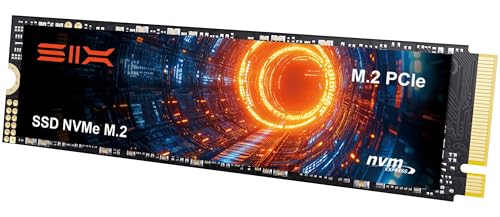
| 6 SIX X7400 512GB M.2 NVMe SSD | SIX | Not listed | Not listed | M.2 2280 form factor | Check price |
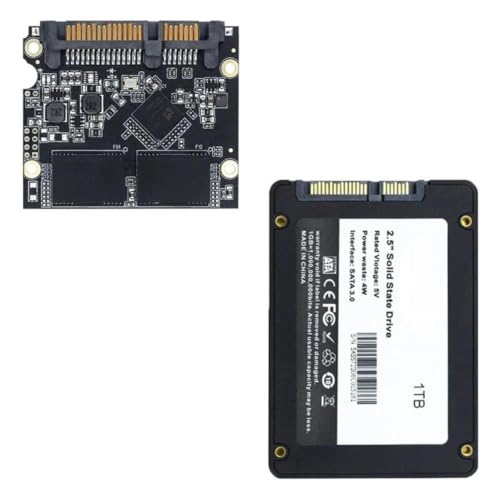
| 7 TICOWTEK 2TB SATA III 2.5-Inch SSD | TICOWTEK | 3.94 × 0.28 × 2.76 in | 0.1 lb | 2TB capacity | Check price |
| 8 Gigastone 1TB High Endurance SSD 6-Pack | Gigastone | Not listed | Not listed | Six 1TB drives in one pack | Check price |
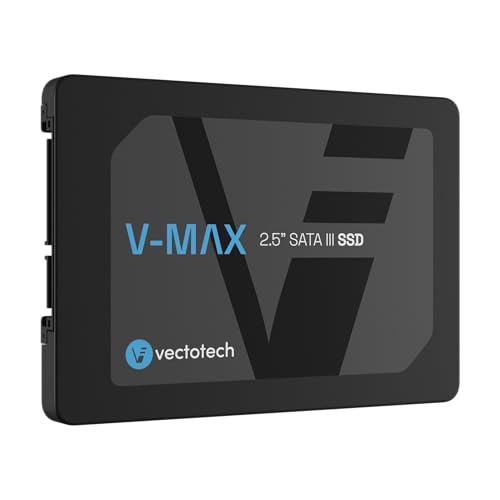
| 9 VectoTech V-MAX 8TB SATA SSD | VectoTech | 3.93 × 0.27 × 2.75 in | 0.2 lb | Large 8TB capacity | Check price |
Sizes and weights as listed by the manufacturer on Amazon. Check the retailer for current price and availability.
Pros
- 512GB capacity
- Standard 2.5-inch SATA form factor
- Backward compatible with SATA II
- Listed three-year after-sales service
Cons
- Who should skip it: users needing NVMe storage or more than 512GB
Pros
- 1TB storage capacity
- Standard 2.5-inch form factor
- SATA III interface
Cons
- Who should skip it: owners of systems requiring another drive form factor or interface
Pros
- Compact 2.5-inch, 7mm form factor
- 3D NAND flash
- Windows TRIM and NCQ support
Cons
- Who should skip it: users needing substantial storage capacity

Pros
- 512GB capacity for operating systems, applications, and games
- Standard 2.5-inch, 7mm form factor
- Silent operation with no moving parts
- Three-year limited warranty
- Supports older laptop and desktop upgrades
Cons
- SATA III is slower than newer NVMe interfaces
- Up-to speeds are manufacturer-stated sequential ratings
- Who should skip it: users needing NVMe-class throughput

Pros
- 512GB storage capacity
- Compact 2.5-inch form factor
- 3D NAND TLC chips
- Three-year quality assurance
Cons
- SATA III interface, not NVMe
- Who should skip it: users needing NVMe storage
Pros
- M.2 2280 form factor
- Heatsink included
- Five-year limited warranty
Cons
- Who should skip it: users needing more than 512GB
Pros
- 2TB capacity
- 2.5-inch SATA III interface
- Up to 560MB/s stated read speed
Cons
- Write speed is not specified
- Who should skip it: buyers who need a stated write-speed specification

Pros
- Six 1TB drives in one pack
- SATA III 2.5-inch, 7mm form factor
- Five-year replacement warranty
- Lifetime technical support
Cons
- Not suggested for server or SAN environments
- Who should skip it: server or SAN users
Pros
- Large 8TB capacity
- Slim 2.5-inch, 7mm form factor
- TRIM and SMART support
- Three-year manufacturer warranty
Cons
- SATA III interface rather than NVMe
- Who should skip it: buyers needing NVMe speeds
Best for PCIe 4.0: SIX NVME X7400 M.2 SSD PCIe 4.0-512GB m.2 2280
SIX NVME X7400 M.2 SSD PCIe 4.0-512GB m.2 2280 lists a PCIe 4.0 x4 interface and read speeds up to 5,000MB/s, making it the speed-oriented pick here for a compatible M.2 slot. Its 512GB capacity is a constraint for a large game library, and the stated speed is a sequential maximum, not a guaranteed game-loading result. Skip it if your device lacks a compatible M.2 PCIe slot or you need more capacity on the drive.
Best for 1TB SATA Storage: SIX 1TB SATA 2.5-Inch SSD
SIX 1TB SATA 2.5-Inch SSD combines 1TB capacity with a standard 2.5-inch, 7mm SATA III form factor and stated read speeds up to 560MB/s. Its listing also names TRIM, ECC, and a 3-year warranty. SATA has a lower stated sequential ceiling than the SIX NVMe drive, and compatibility depends on having a usable SATA bay and connection. Skip it if your system requires M.2 NVMe storage.
Best for Large SATA Libraries: VectoTech V-MAX 8TB Internal SSD SATA III 6 Gb/s
VectoTech V-MAX 8TB Internal SSD SATA III 6 Gb/s lists 8TB capacity, a 2.5-inch form factor, and sequential speeds up to 550MB/s read and 530MB/s write. That capacity suits buyers who want room for a sizable collection on a SATA system, but its interface does not offer the NVMe drive’s stated peak read speed. Skip it if your device cannot accept a 2.5-inch SATA drive or you do not need this much storage.
Key Numbers at a Glance
- Capacity ranges from 64GB on GAMERKING SSD 64GB SATAIII 2.5 inch 6Gb/s 7MM to 8TB on VectoTech V-MAX 8TB Internal SSD SATA III 6 Gb/s.
- Stated maximum read speed: SIX NVME X7400 M.2 SSD PCIe 4.0-512GB m.2 2280 lists up to 5,000MB/s; SIX 1TB SATA 2.5-Inch SSD lists up to 560MB/s.
- Among the listed 512GB SATA models, fanxiang S101Q 512GB SATA SSD specifies up to 560MB/s read and 490MB/s write, while fanxiang S101 512GB SSD SATA III 6Gb/s 2.5" specifies up to 500MB/s read.
- Gigastone 1TB High Endurance SSD (6-Pack) is a six-drive pack of 1TB 2.5-inch SATA SSDs, not one 6TB drive.
How to Choose an SSD for GTA 6
Confirm the game device’s drive interface
Bottom line: Match the SSD interface and physical format to the device before comparing speed. The SIX NVME X7400 is an M.2 2280 PCIe 4.0 x4 drive, while the SIX 1TB SATA 2.5-Inch SSD is a 7mm SATA drive. These formats are not interchangeable just because both are internal SSDs. Check your PC motherboard or console documentation for the supported slot, interface, and drive dimensions; console support can depend on the exact model.
For broader device-fit comparisons, see our guides to best 4TB SSD for ROG Ally X and best 4TB SSD for Legion Go 2. They address particular handheld devices, so do not assume their compatibility advice applies to a different system.
Choose capacity for the library you keep installed
Bottom line: Pick capacity around your installed games and other files, not a game-specific claim absent from these listings. The choices range from 512GB models such as KingSpec 512GB 2.5-inch SATA III Internal SSD to the 8TB VectoTech V-MAX. Smaller capacity can mean managing installs more often; a larger drive takes more budget and must still match the host device’s supported format. GTA 6’s storage requirement is not stated in these product listings, so check the game’s official requirements before deciding whether a drive has enough free space.
Interpret speed figures in context
Bottom line: Treat sequential speed as a specification, not a promise of a particular game-loading time. SIX lists up to 5,000MB/s read for its PCIe 4.0 NVMe model, while several SATA listings specify up to 550MB/s or 560MB/s. Those figures describe different interfaces and do not establish a direct game benchmark. For a SATA-based older PC, a compatible SATA SSD can still be a practical move from a hard drive; for a supported M.2 slot, compare NVMe models and capacity as well as the headline speed.
If your priority is a larger handheld game drive, compare the interface and capacity details in our guides to best 4TB SSD for Steam Machine. For external backup or moving files rather than installing an internal game drive, our best portable SSDs under $100 guide covers a different type of storage.
Weigh warranty, endurance, and missing details
Bottom line: Compare stated warranty and endurance information, and do not infer lifespan from speed alone. Gigastone lists a 5-year replacement warranty and high-endurance positioning, while SIX lists a 5-year limited warranty for the NVMe X7400 and a 3-year warranty for its 1TB SATA model. The VectoTech listing states a 3-year warranty, but the product data does not provide a TBW rating for these models. If heavy writes or long-term retention matter, check the manufacturer’s current warranty terms and endurance specification before purchase.
How We Compared These Products
This guide is based on product research, comparing listed capacity, interface, form factor, stated sequential speeds, named features, compatibility claims, and warranty information. Product pages do not establish how these SSDs perform with GTA 6, and the available customer feedback does not support a meaningful performance comparison. Confirm current game requirements and your device’s manual before ordering.
Which Option Fits Your PC and Game Library?
Choose SIX NVME X7400 M.2 SSD PCIe 4.0-512GB m.2 2280 if your system supports its M.2 PCIe 4.0 x4 format and you prioritize its stated 5,000MB/s read ceiling. Choose SIX 1TB SATA 2.5-Inch SSD for a compatible 2.5-inch SATA bay and more listed capacity, or VectoTech V-MAX 8TB Internal SSD SATA III 6 Gb/s if a large SATA library is the priority. If you are upgrading an older system, check its manual first; our SSD category has additional storage guides.
Mistakes to Avoid When Choosing an SSD for GTA 6
- Buying by speed alone. Compare interface support first; an M.2 PCIe drive will not replace a 2.5-inch SATA drive in a SATA-only bay.
- Assuming every console accepts the same SSD. Check the exact console model’s expansion guidance and supported drive format before purchasing.
- Treating listed capacity as all free space. The operating system and other files also occupy storage, so check how much room your game library needs.
- Reading sequential figures as game benchmarks. Up to 5,000MB/s or 560MB/s is a listed sequential read figure, not a guaranteed loading-time result.
Frequently Asked Questions
Does an SSD make GTA 6 run at a higher frame rate?
The product listings do not provide GTA 6 frame-rate results, and an SSD is storage rather than a graphics processor. Choose a drive for compatibility, available space, and your system’s requirements; assess graphics hardware separately for frame-rate goals.
Is NVMe better than SATA for a GTA 6 drive?
NVMe has the higher stated sequential read figure in this comparison: SIX lists up to 5,000MB/s for its PCIe 4.0 model, compared with up to 560MB/s for several SATA models. The better fit depends on which interface your device supports, and the figures do not guarantee a specific difference in game loading.
Can I use one of these SSDs in a PlayStation or Xbox?
Some product pages mention console compatibility, but that does not establish support for every console generation or model. Check your console’s official expansion instructions for interface, form factor, and any other requirements before buying; do not assume a PC-compatible SSD automatically works as internal console storage.
Is 512GB enough storage for GTA 6?
The product listings do not state GTA 6’s storage requirement, so they cannot confirm whether 512GB is enough. Check the official game requirements and account for your operating system and other installed files before choosing a 512GB drive.
Should I buy a SATA SSD or an M.2 SSD?
Choose based on the slot and interface your computer or console supports. SIX NVME X7400 is M.2 2280 PCIe 4.0 x4, while the SATA models use a 2.5-inch form factor; check the device manual rather than relying on the connector’s appearance alone.



Write Your Review
No reviews yet. Be the first to share your experience!