



If you want a desktop for light gaming, start by comparing its processor, graphics, memory, and display connections. The products in this roundup are speakers and desk lights, not computers, so they can help furnish a gaming setup but cannot determine which PC will run your games; check the desktop itself against your games and monitor before buying.
Compare at a glance
| Product | Brand | Size | Weight | Stands out for | Price |
|---|---|---|---|---|---|
| 1 LENRUE G11 Compact USB Computer Speakers | LENRUE | 2.48 × 14.96 × 2.55 in | 1.4 lb | Compact desktop-friendly design | Check price |
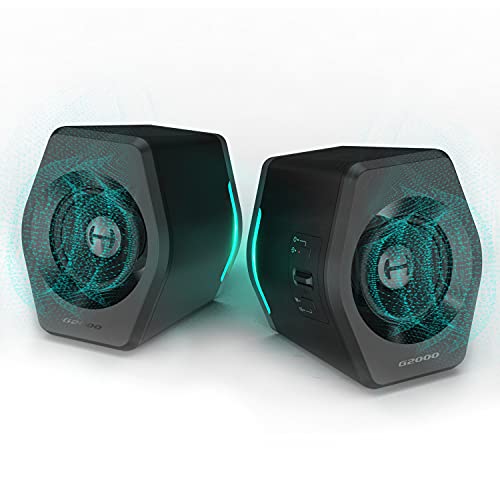
| 2 Edifier G2000 32W Gaming Speakers | Edifier | 5.47 × 8.31 × 9.09 in | 4.2 lb | Three connection options | Check price |
| 3 SAMPHON 15.7-Inch Monitor Light Bar | SAMPHON | 15.75 × 0.78 × 3.3 in | Not listed | Three selectable color temperatures | Check price |
| 4 LENRUE Computer Speakers with Headphone Jack | LENRUE | 3.55 × 3.07 × 6.89 in | 1.4 lb | USB-C-to-USB adapter included | Check price |
| 5 wacuaao 27-Inch Monitor Backlight | wacuaao | Not listed | 0.6 lb | Camera-free screen color sync | Check price |
| 6 Govee Gaming Light G1 for 27–34-Inch Monitors | Govee | Not listed | Not listed | Fits 27–34-inch monitors, including curved models | Check price |
Sizes and weights as listed by the manufacturer on Amazon. Check the retailer for current price and availability.
Pros
- Compact desktop-friendly design
- Touch-controlled lighting
- Top-mounted volume knob
- Plug-and-play setup
Cons
- No Bluetooth, headphone port, or microphone
- Not compatible with TVs
Pros
- Three connection options
- Three selectable EQ modes
- Twelve RGB lighting effects
- Subwoofer output interface
Cons
- 16W RMS output, despite 32W peak rating
- Who should skip it: users prioritizing higher stated RMS output
Pros
- Three selectable color temperatures
- Stepless brightness adjustment
- USB-powered
- Tool-free monitor mounting
Cons
- Requires a monitor edge that accommodates its clip
- Who should skip it: users who need a freestanding lamp

Pros
- USB-C-to-USB adapter included
- Headphone output jack
- Long connection cables
Cons
- Who should skip it: listeners who need wireless audio

Pros
- Camera-free screen color sync
- Static, music, and chasing effects
- Sized for 27-inch monitors
Cons
- Screen sync depends on Skydimo and supported operating systems
- macOS requires Screen Recording permission
- Who should skip it: console and Smart TV users

Pros
- Fits 27–34-inch monitors, including curved models
- Four-sided color-matching coverage
- 123 preset scenes and 11 music modes
- Compatible with Razer Chroma
Cons
- Screen matching requires the Govee Home app and Govee Desktop software
- Some copyright-protected content cannot be selected for screen matching
- Who should skip it: users who need screen matching with protected content
Best Compact Speaker for a Gaming Desk: LENRUE G11 Compact USB Computer Speakers
LENRUE G11 Compact USB Computer Speakers suits a tight desk: the listing describes a compact design intended to sit under a monitor, with USB power and 3.5 mm audio. It also has touch-controlled lights and a top volume knob, but it has no Bluetooth, headphone port, or microphone. Skip it if you need wireless audio or a headphone connection.
Best Speakers for Flexible Placement: OFFSIR 2-in-1 PC Speakers with RGB Lighting
OFFSIR 2-in-1 PC Speakers with RGB Lighting has two removable speakers that can be joined into a soundbar, giving you a choice of layout. It connects through USB power and a 3.5 mm audio cable, with a volume knob and touch lighting. The package contains two speakers, not a separate soundbar. Skip it if you need Bluetooth or want a single speaker unit without rearranging the pair.
Best Speakers With Bluetooth: Edifier G2000 32W Gaming Speakers
Edifier G2000 32W Gaming Speakers lists Bluetooth, USB, and 3.5 mm AUX inputs, plus Game, Music, and Movie sound modes. The product page specifies 16 W RMS and 32 W peak power; it also includes RGB effects and a subwoofer output interface. Its inputs and lighting do not tell you whether a desktop can run a particular game. Skip it if you only need basic wired audio and do not need its extra connection types or sound modes.
Best for Monitor Color Effects: Govee Gaming Light for Monitor G1
Govee Gaming Light for Monitor G1 is intended for 27 to 34 inch monitors, including curved displays, and offers app control with 123 preset scene modes. Screen color matching uses Govee software, and the product page notes that some protected streaming content cannot be selected. Skip it if your monitor falls outside the stated size range or you do not want to set up its software.
Key Numbers at a Glance
- The Govee Gaming Light for Monitor G1 is sized for 27 to 34 inch monitors.
- The Edifier G2000 32W Gaming Speakers list 16 W RMS and 32 W peak power.
- The SAMPHON Monitor Light Bar is 15.7 inches long.
- The Pzloz Led Desk Lamp for Office Home lists 25 light combinations from 5 color temperatures and 5 brightness levels.
Buying Guide: Best Desktop Computer for Light Gaming
Check the PC’s graphics before buying accessories
Bottom line: Choose the computer based on the games and resolution you plan to use, not the accessories in this list. These products do not specify a processor, graphics chip, memory, storage, or game performance. Look for the desktop’s actual hardware details and compare them with the requirements for your games; if you’re considering a portable alternative, see our best laptops for gamers on a budget.
Match audio connections to your devices
Bottom line: Check which audio inputs and outputs you need before choosing speakers. The Edifier G2000 lists Bluetooth, USB, and 3.5 mm AUX, while the LENRUE G11 uses USB power and a 3.5 mm audio cable and has no headphone port. Confirm your PC or laptop has the required connection; USB power alone does not mean USB audio support.
Measure desk and monitor space
Bottom line: Check monitor size and available desk space before choosing lighting or speakers. The Govee light is sized for 27 to 34 inch monitors, and the SAMPHON light bar measures 15.7 inches. Measure your display and check its shape and mounting area, since a screen light, backlight, and desk lamp need different placement.
Account for software and setup needs
Bottom line: Prefer a simple wired accessory if you do not want to configure companion software. The LENRUE G11 and OFFSIR speakers are described as plug-and-play, while the Govee light’s screen color-matching feature uses Govee software. The wacuaao backlight uses Skydimo on Windows or macOS, and its product page gives specific operating system requirements; confirm those requirements against your computer before choosing it.
Separate useful lighting from decorative effects
Bottom line: Choose task lighting for desk visibility and RGB lighting for ambient effects. The Quntis and YEELIGHT monitor lamps are designed to illuminate the desk, while the Govee and wacuaao products focus on colored backlighting. If you also use your computer for classes or schoolwork, our guide to best desktop computers for school covers a different workload.
How We Compared These Products
This article is based on product research, not firsthand evaluation. We compared the listed connection types, dimensions and monitor fit where stated, lighting controls, software requirements, and listed audio features; product descriptions do not establish how a desktop will perform in games.
Which Option Fits Your Home and Devices?
For a compact wired audio setup, the LENRUE G11 has a space-saving design and a volume knob; choose the Edifier G2000 instead if Bluetooth and multiple input types matter. Skip either if what you need is a desktop computer recommendation, since neither is a PC.
For monitor lighting, match the product to your goal: Govee offers screen-synchronized color effects for 27 to 34 inch monitors, while Quntis is a monitor-mounted desk lamp with auto-dimming and manual brightness and color-temperature controls. Skip the Govee if you do not want to install its software, and skip either light if your priority is choosing the computer itself. For other desktop workloads, see our guide to best desktop computers for streaming.
Mistakes to Avoid When Choosing Gaming Desk Accessories
- Buying accessories as if they were a PC. These listings cover speakers and lighting, not processor or graphics specifications. Compare the computer’s hardware separately.
- Assuming every speaker has the same connections. The LENRUE G11 has no Bluetooth or headphone port, while the Edifier G2000 lists Bluetooth, USB, and AUX. Match inputs to your devices and listening setup.
- Ignoring display size and mounting. The Govee light is intended for 27 to 34 inch monitors. Check the light’s stated fit against your monitor before ordering.
- Overlooking software requirements. Screen synchronization depends on companion software for some lighting products. Confirm the operating system and setup steps on the product page first.
Frequently Asked Questions
Are these desktop computers for light gaming?
No. The listed products are speakers and desk lighting accessories. To choose a gaming computer, compare its processor, graphics, memory, storage, and display connections against the games and monitor you plan to use.
Which speakers include Bluetooth?
The Edifier G2000 lists Bluetooth, USB, and 3.5 mm AUX inputs. The LENRUE G11 explicitly has no Bluetooth, so choose based on the connections your computer or other devices support.
Will the Govee monitor light fit any monitor?
The product page says it fits 27 to 34 inch monitors and is suitable for curved screens. Check your monitor’s size and the mounting guidance before buying; the stated fit does not cover every display.
Do the screen-synchronized lights work without software?
The Govee screen color-matching feature uses Govee Home App and Govee Desktop software. The wacuaao backlight uses Skydimo on Windows or macOS. Check the product page for operating system requirements and setup details.
Can I connect headphones to the LENRUE G11 speakers?
No. The LENRUE G11 listing says it has no headphone port. If you need a headphone connection on the speaker, the LENRUE Computer Speakers listing specifies a 3.5 mm headphone output jack.





Write Your Review
No reviews yet. Be the first to share your experience!