


For local AI development with large models, prioritize memory capacity and a compatible software stack; for GPU-heavy training, consider a workstation with multiple discrete GPUs and verify its power requirements first. If your work is inference, coding, or everyday AI-assisted tasks, a compact system may fit better, but integrated graphics and smaller memory pools are not substitutes for workstation-class GPU resources.
This guide to the best desktop computers for AI and machine learning compares the listed systems by memory, graphics, operating system, connectivity, and practical fit. It also separates AI features for everyday productivity from hardware intended for local model development.
Compare at a glance
| Product | Brand | Size | Weight | Stands out for | Price |
|---|---|---|---|---|---|
| 1 HP EliteDesk 800 G3 SFF i5 Desktop Bundle | HP | 11.5 × 3.6 × 11.4 in | Not listed | Monitor, keyboard, and mouse included | Check price |
| 2 Dell OptiPlex 7050 SFF, 32GB RAM | Dell | 11.5 × 3.6 × 11.4 in | 12 lb | 32GB of DDR4 memory | Check price |
| 3 TOPCtec TA1 Mini PC, Ryzen AI 9 HX 470 | TOPCtec | 5.2 × 5.2 × 1.99 in | 1.5 lb | Compact 5.2-inch-wide chassis | Check price |
| 4 HP OmniStudio 27 All-in-One, Ryzen AI 7 | HP | 24.11 × 7.28 × 19.19 in | 13 lb | Large 27-inch display | Check price |
| 5 HP OmniDesk with Core Ultra 7 265 | HP | 13.27 × 12.4 × 6.1 in | 14 lb | 32GB DDR5 memory | Check price |
| 6 AMD Ryzen AI Halo, 128GB | AMD | 6 × 6 × 2 in | Not listed | 128GB unified LPDDR5x memory | Check price |
| 7 Empowered PC Threadripper PRO 9975WX 32-Core | Empowered PC | Not listed | 30 lb | 32-core Threadripper PRO processor | Check price |
Sizes and weights as listed by the manufacturer on Amazon. Check the retailer for current price and availability.
Pros
- Monitor, keyboard, and mouse included
- 256GB SSD
- Windows 11 Pro included
Cons
- 8GB RAM may constrain heavier multitasking
- Who should skip it: users needing demanding workloads
Pros
- 32GB of DDR4 memory
- 1TB SSD
- HDMI and DisplayPort outputs
- Windows 11 Pro included
Cons
- Integrated graphics
- Who should skip it: users needing a dedicated GPU
Pros
- Compact 5.2-inch-wide chassis
- 32GB memory and 1TB SSD included
- Three display outputs
- Additional M.2 storage slot
Cons
- Who should skip it: buyers who need a full-size desktop

Pros
- Large 27-inch display
- 16 GB DDR5 memory
- 512 GB PCIe NVMe SSD
- Windows Hello facial recognition support
Cons
- Who should skip it: buyers who need higher-than-FHD resolution
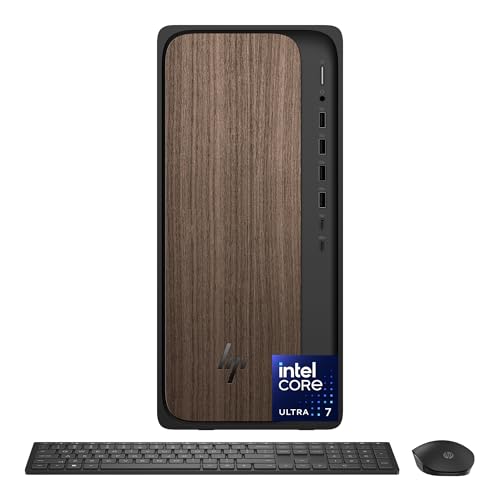
Pros
- 32GB DDR5 memory
- 1TB PCIe M.2 SSD
- Windows 11 Pro
- Keyboard and mouse included
Cons
- Integrated Intel Graphics may not suit graphics-intensive workloads
- Who should skip it: buyers who need discrete graphics

Pros
- 128GB unified LPDDR5x memory
- 2TB M.2 SSD included
- Linux AI tools and ROCm support
- 10GbE LAN and Wi-Fi 7
Cons
- Who should skip it: users seeking a conventional general-purpose desktop

Pros
- 32-core Threadripper PRO processor
- 384GB of ECC memory
- Four RTX 6000 Max-Q GPUs
- 10TB across four NVMe SSDs
Cons
- Who should skip it: buyers limited to 120V/15A
Key Numbers at a Glance
- Memory ranges from 8GB in the HP EliteDesk 800 G3 SFF i5 Desktop Bundle to 384GB ECC RDIMM in the Empowered PC Threadripper PRO 9975WX 32-Core Workstation PC.
- The AMD Ryzen™ AI Halo – Personal AI Desktop Computer has 128GB unified memory, while the Apple 2026 Mac mini desktop computer M6 chip configuration has 24GB unified memory.
- Listed storage ranges from 256GB SSD in the HP EliteDesk 800 G3 SFF i5 Desktop Bundle to 2TB SSD in the AMD Ryzen™ AI Halo – Personal AI Desktop Computer.
- The Empowered PC Threadripper PRO 9975WX 32-Core Workstation PC lists four RTX 6000 Max-Q GPUs with 96GB each and a 2200W power supply.
Best Desktop Computers for AI and Machine Learning: Picks by Workload
Related guides: Best Desktop Computer for Data Analysis, Best Desktop Computers for Content Creators and Best Desktop Computer for AI Development.
Best for Local AI Development: AMD Ryzen™ AI Halo – Personal AI Desktop Computer
AMD Ryzen™ AI Halo – Personal AI Desktop Computer pairs 128GB unified memory with a 16-core Ryzen AI Max+ 395 processor and 2TB SSD, making it the clearest fit here for Linux-based local AI development. Its listing describes ROCm support and support for models up to 200B parameters, but that is a manufacturer claim, not a guarantee for every model or workflow. Skip it if you need a discrete GPU configuration or a Windows desktop.
Best for Multi-GPU Workloads: Empowered PC Threadripper PRO 9975WX 32-Core Workstation PC
Empowered PC Threadripper PRO 9975WX 32-Core Workstation PC combines a 32-core Threadripper PRO processor, 384GB ECC memory, and four RTX 6000 Max-Q GPUs with 96GB each. The listing calls for 240V/20A to use maximum capabilities and says its 2200W power supply operates at reduced compute power on 120V/15A. Skip it if your work does not need multiple high-memory GPUs or your electrical setup cannot meet the stated power guidance.
Most Compact AI-Oriented Pick: Apple 2026 Mac mini desktop computer M6 chip
Apple 2026 Mac mini desktop computer M6 chip offers a five-by-five-inch footprint, 24GB unified memory, and a 512GB SSD in this configuration. It lists three Thunderbolt 4 ports, HDMI, and support for up to three external displays, while its compact design suits a desk with limited room. Skip it if your planned models need more memory than this configuration has or your workflow depends on a discrete GPU.
Best for AI-Aware Office Work: HP OmniDesk Next Gen AI PC Business Desktop PC
HP OmniDesk Next Gen AI PC Business Desktop PC has a 20-core Intel Core Ultra 7 265 processor, 32GB DDR5, and a 1TB SSD for business multitasking and compatible AI productivity features. It includes Windows 11 Pro, Wi-Fi 6, and DisplayPort and HDMI outputs, but its listed graphics are integrated Intel Graphics rather than a discrete AI GPU. Skip it if your priority is training demanding models locally on multiple GPUs.
Best for a Small AI-Ready Desk: TOPCtec TA1 Mini PC,AMD Ryzen AI 9 HX 470 CPU,32GB
TOPCtec TA1 Mini PC,AMD Ryzen AI 9 HX 470 CPU,32GB brings a 12-core, 24-thread processor, 32GB LPDDR5 memory, and a 1TB SSD in a mini PC, with an additional M.2 2280 slot listed for storage expansion. Its Radeon 890M graphics are integrated, and the product page mentions an MCIO interface for connecting a discrete graphics card, so verify the required card, connection, and setup details before planning around that expansion. Skip it if you need a workstation with multiple built-in discrete GPUs.
How to Choose a Desktop for AI and Machine Learning
Model size, memory, and local inference
Bottom line: Match memory capacity to the models you intend to load, not to a general AI label. The AMD Ryzen™ AI Halo – Personal AI Desktop Computer lists 128GB unified memory and support for models up to 200B parameters; the Apple 2026 Mac mini desktop computer M6 chip has 24GB unified memory in this configuration. A model’s actual memory needs depend on its implementation and workload, so confirm requirements for the software and model you plan to run before buying.
Unified memory can be shared across the processor and integrated graphics, while the Empowered PC Threadripper PRO 9975WX 32-Core Workstation PC lists 384GB ECC system memory and separate GPU memory. Those capacities serve different architectures and are not directly interchangeable. If you work with large datasets or keep multiple tools open, also check whether the operating system and development environment fit your workflow.
GPU hardware and the difference between AI features
Bottom line: For GPU-heavy training, prioritize specified discrete GPUs; an NPU or AI-branded processor alone does not establish workstation-level training capability. The Empowered PC workstation lists four RTX 6000 Max-Q GPUs, each with 96GB, while the AMD Ryzen™ AI Halo – Personal AI Desktop Computer uses Radeon 8060S integrated graphics and an XDNA 2 NPU rated up to 50 TOPS. These are distinct configurations, and the listing figures do not establish how a particular model will perform.
For coding, office tools, or supported on-device features, a processor NPU can be relevant; for training or GPU-accelerated frameworks, verify software support and graphics requirements. The HP OmniDesk Next Gen AI PC Business Desktop PC lists integrated Intel Graphics, so its Copilot and processor features should not be mistaken for a discrete machine-learning GPU. Readers comparing graphics-focused systems can also browse our graphics card category.
Software platform and framework compatibility
Bottom line: Check your framework and operating system before choosing a processor or graphics architecture. The AMD Ryzen™ AI Halo – Personal AI Desktop Computer is described as a Linux developer platform with ROCm support, while the Empowered PC workstation and HP OmniDesk Next Gen AI PC Business Desktop PC list Windows 11 Pro. The Mac mini runs macOS, so confirm that your development tools and model libraries support the platform you plan to use.
A compatible hardware specification does not guarantee that every package, driver, or model workflow is supported. Check the documentation for your frameworks, GPU acceleration, and deployment tools. If you also need a system for video creation or live content, our best desktop computers for streaming guide covers a different workload mix.
Storage, ports, and room to expand
Bottom line: Choose storage and connections around your model library, datasets, and existing peripherals. The AMD Ryzen™ AI Halo – Personal AI Desktop Computer lists a 2TB M.2 SSD, while the TOPCtec TA1 Mini PC,AMD Ryzen AI 9 HX 470 CPU,32GB has a 1TB SSD and an additional M.2 2280 slot. The Mac mini lists Thunderbolt 4, HDMI, front USB-C, and support for up to three external displays.
Storage needs grow with datasets, checkpoints, and model files, so compare the installed capacity with your anticipated working set and backup plan. Port labels matter too: check the exact data, display, and network connections needed by your equipment rather than assuming every USB-C port supports the same functions. Browse our desktop PC category for related system options.
Power, cooling, and workspace fit
Bottom line: Confirm the system’s power and physical requirements before committing to sustained, GPU-heavy work. The Empowered PC workstation lists a 2200W power supply and specifies reduced compute power on 120V/15A, with 240V/20A recommended for maximum capabilities. The Mac mini’s five-by-five-inch footprint is a very different desk-space proposition, but its compact size does not make it equivalent to a multi-GPU workstation.
Product data does not establish fan noise or sustained performance under a particular workload. Ask the seller or manufacturer for operating and cooling details if the computer will run long jobs in a quiet office or confined area. For general PC setup and component topics, see our PC components category.
How We Compared These Products
This comparison is based on product research, including the listed processors, graphics, memory, storage, operating systems, ports, physical design details, and power guidance. Product-page performance and model-capacity statements are treated as manufacturer claims, not independently verified results. No firsthand evaluation is documented here, and customer feedback is not used to establish performance.
Which Option Fits Your Workload?
For Linux-based local development with a large shared memory pool: the AMD Ryzen™ AI Halo – Personal AI Desktop Computer stands out for its 128GB unified memory, 2TB SSD, and listed ROCm platform. Skip it if you need Windows or several discrete GPUs.
For a GPU-heavy workstation environment: the Empowered PC Threadripper PRO 9975WX 32-Core Workstation PC has four listed RTX 6000 Max-Q GPUs and 384GB ECC memory. Skip it if you cannot accommodate its stated power needs or do not need multi-GPU compute.
For a compact desk and everyday on-device workflows: the Apple 2026 Mac mini desktop computer M6 chip combines a five-by-five-inch footprint with 24GB unified memory and three-display support. Skip it if your model requirements exceed its memory configuration or require a discrete GPU.
Mistakes to Avoid When Choosing an AI Desktop
- Buying by an AI label alone. Check whether the listed hardware is an NPU, integrated graphics, or discrete GPU, then match it to the framework and workload.
- Ignoring model memory needs. Compare the memory required by your intended model with the system’s actual configuration, and account for the operating system and other applications.
- Assuming ports are interchangeable. Confirm the exact display, storage, network, and accelerator connections your peripherals require.
- Overlooking power requirements. For the Empowered PC workstation, follow the listing’s distinction between reduced compute power on 120V/15A and maximum capabilities with 240V/20A.
Frequently Asked Questions
Is an NPU enough for machine learning?
An NPU can accelerate supported AI tasks, but its presence does not establish suitability for every training workload. Check the software’s hardware requirements and whether it supports the processor’s NPU or graphics architecture. The AMD Ryzen™ AI Halo – Personal AI Desktop Computer lists an XDNA 2 NPU, while the TOPCtec TA1 Mini PC,AMD Ryzen AI 9 HX 470 CPU,32GB also describes a dedicated NPU.
Which listed desktop has the most memory?
The Empowered PC Threadripper PRO 9975WX 32-Core Workstation PC lists 384GB DDR5 ECC RDIMM. The AMD Ryzen™ AI Halo – Personal AI Desktop Computer lists 128GB unified memory, a different memory design intended to be shared across its processor components.
Can the Mac mini replace a multi-GPU AI workstation?
Not for workloads that specifically require multiple discrete GPUs: the Mac mini configuration here lists a 12-core GPU and 24GB unified memory, while the Empowered PC workstation lists four RTX 6000 Max-Q GPUs. The Mac mini may suit compact, compatible on-device workflows, but compare your framework and model requirements before deciding.
Does a larger memory figure always mean faster AI work?
No. Capacity, memory architecture, graphics hardware, software support, and the workload all affect suitability. Compare the specific model and framework requirements rather than treating system memory figures as directly equivalent.
What power setup does the Empowered PC workstation need?
The listing says the 2200W power supply operates at reduced compute power with 120V/15A and calls for 240V/20A for maximum capabilities and utilization. Confirm that your location and electrical setup meet the requirements before purchasing.





Write Your Review
No reviews yet. Be the first to share your experience!