


For day trading, choose a desktop based on the number of monitors you need, the ports available to connect them, and how much memory your trading apps and browser tabs require. A compact tower with 32GB of RAM may suit a chart-heavy setup, while a bundle with several monitors may save separate display shopping, though older refurbished systems deserve extra compatibility checks.
Compare at a glance
| Product | Brand | Size | Stands out for | Price |
|---|---|---|---|---|
| 1 STGAubron Gaming PC, RTX 3050 6GB | STGAubron | 16.4 × 14.8 × 8.2 in | Dedicated RTX 3050 6GB graphics | Check price |
| 2 Dell OptiPlex 7050 SFF, 32GB RAM | Dell | 11.5 × 3.6 × 11.4 in | 32GB of DDR4 memory | Check price |
| 3 HP EliteDesk 800 G3 SFF, i7-6700 | HP | 24 × 20 × 16 in | 32GB DDR4 memory | Check price |
| 4 Qehi 24-Inch All-in-One Desktop | Qehi | Not listed | Space-saving all-in-one design | Check price |
| 5 TechMagnet Trading Desktop, 16GB RAM | TechMagnet | Not listed | Four 22-inch Full HD monitors included | Check price |
| 6 TechMagnet Siwa 6 Trading PC, 4 Monitors | TechMagnet | Not listed | Four 24-inch 1080p monitors included | Check price |
| 7 Dell Pro Slim QCS1250, 32GB RAM | Dell | 11.95 × 3.74 × 11.54 in | 14-core Intel Core i5-14500 | Check price |
Sizes and weights as listed by the manufacturer on Amazon. Check the retailer for current price and availability.
Pros
- Dedicated RTX 3050 6GB graphics
- 16GB DDR4 memory
- Wi-Fi 6 and Bluetooth 5.2
- Windows 11 Home included
Cons
- Who should skip it: owners needing more than 512GB of listed storage
Pros
- 32GB of DDR4 memory
- 1TB SSD
- HDMI and DisplayPort outputs
- Windows 11 Pro included
Cons
- Integrated graphics
- Who should skip it: users needing a dedicated GPU
Pros
- 32GB DDR4 memory
- Combined SSD and hard drive storage
- Two 24-inch monitors included
- Windows 11 Pro preinstalled
Cons
- Older-generation Intel Core i7-6700 processor
- Who should skip it: buyers needing confirmed monitor resolution or refresh rate

Pros
- Space-saving all-in-one design
- 16GB RAM
- Adjustable anti-glare display
- Included keyboard and mouse
Cons
- 256GB storage may constrain larger file collections
- Processor model and port details are unspecified
- Who should skip it: users needing detailed processor or graphics specifications
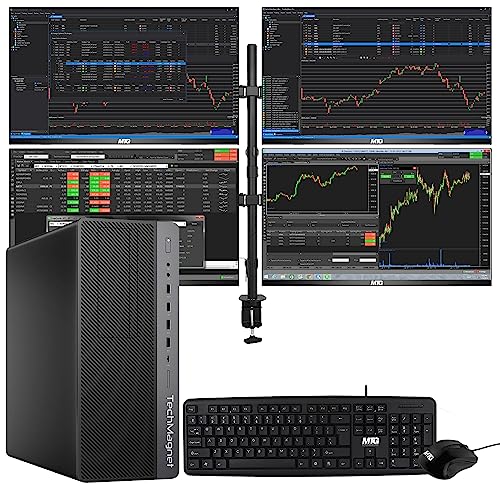
Pros
- Four 22-inch Full HD monitors included
- 512GB SSD plus 4TB hard drive
- 16GB of RAM
- Windows 11 64-bit
Cons
- Graphics card model is not specified
- Renewed condition
- Who should skip it: buyers needing a newer-generation processor

Pros
- Four 24-inch 1080p monitors included
- 16GB of memory
- 2TB hard drive for storage
Cons
- 120GB SSD offers limited space for apps
- Who should skip it: users needing specified graphics performance

Pros
- 14-core Intel Core i5-14500
- 32GB DDR5 memory
- 1TB PCIe SSD
- Dual 4K monitor support
- Compact slim case
Cons
- Graphics capabilities are not specified
- Who should skip it: buyers needing specified graphics performance
Best for a Newer Multi-Monitor Tower: Dell Pro Slim QCS1250 Desktop
Dell Pro Slim QCS1250 Desktop pairs a 14th Gen Intel Core i5-14500 with 32GB DDR5 memory and a 1TB PCIe SSD, making it a strong fit for traders who keep several applications open. HDMI 2.1 and DisplayPort 1.4a are listed for connecting displays, but the product page does not specify the exact number of monitors supported. Skip it if you need a complete monitor bundle or want confirmed display-count details before ordering.
Best for a Four-Screen Bundle: TechMagnet Trading Desktop PC, i5-9, 16GB RAM
TechMagnet Trading Desktop PC, i5-9, 16GB RAM is listed with four 22-inch 1080p monitors, 16GB RAM, a 512GB SSD, and a 4TB HDD. That bundle can simplify sourcing a multi-screen arrangement, but the processor is a 9th-generation Core i5 and the PC is renewed. Skip it if you would rather buy a newer tower or choose your monitors individually.
Most Affordable Renewed Tower: Dell OptiPlex 7050 SFF, 32GB RAM
Dell OptiPlex 7050 SFF, 32GB RAM combines an Intel Core i7-7700, 32GB DDR4 memory, and a 1TB SSD in a small-form-factor renewed desktop. HDMI and DisplayPort are listed, but the product details do not confirm a monitor bundle or the number and resolutions of supported displays. Skip it if you prefer newer hardware or need the seller to confirm display compatibility before purchase.
Key Numbers at a Glance
- Memory ranges from 8GB in the HP 24-inch OmniStudio All-in-One to 32GB in the Dell Pro Slim QCS1250 Desktop and Dell OptiPlex 7050 SFF, 32GB RAM.
- Listed SSD capacity ranges from 120GB in the TechMagnet Siwa 6 Trading PC, i5-6, 16GB RAM to 1TB in the Dell Pro Slim QCS1250 Desktop and Dell OptiPlex 7050 SFF, 32GB RAM.
- The TechMagnet Trading Desktop PC, i5-9, 16GB RAM lists four 22-inch monitors; the HP EliteDesk 800 G3 SFF, i7-6700 lists two 24-inch monitors.
- The Dell Pro 2027 Desktop Tower 16GB DDR5 RAM 512GB measures 12.76 inches high, 6.06 inches wide, and 11.53 inches deep.
How to Choose a Desktop for Day Trading
Memory and processor for open charts and apps
Bottom line: For several active apps and browser tabs, prioritize 16GB or more of RAM and check the processor generation. The Dell Pro Slim QCS1250 Desktop lists a 14th Gen Core i5-14500 and 32GB DDR5, while the Dell Pro 2027 Desktop Tower 16GB DDR5 RAM 512GB lists a 14th Gen Core i3-14100 and 16GB DDR5. These are useful reference points, not guarantees of trading-platform performance. Choose based on your platform’s requirements and typical workload, and verify whether memory can be upgraded because upgrade details are not specified for every model.
Monitor connections and screen count
Bottom line: Match the desktop’s video outputs to your monitors before you buy. The Dell Pro 2027 Desktop Tower lists DisplayPort 1.4 and HDMI 2.1, and the Dell Pro Slim QCS1250 Desktop lists DisplayPort 1.4a and HDMI 2.1. Bundles can reduce shopping steps: the TechMagnet Trading Desktop PC includes four 22-inch 1080p displays, whereas the HP EliteDesk 800 G3 SFF includes two 24-inch monitors. Check the product page or seller for supported display count and resolution, then compare that with your planned layout. For display-specific choices, see our best 240Hz gaming monitors guide, though trading needs do not necessarily call for a high refresh rate.
SSD capacity and extra storage
Bottom line: Make sure the main SSD has enough room for your applications and working files. The Dell Pro Slim QCS1250 Desktop lists a 1TB PCIe SSD, while the TechMagnet Siwa 6 Trading PC lists a 120GB SSD plus a 2TB HDD. A large hard drive adds file capacity, but it is not the same as having a larger SSD for software and active files. Trading platforms may have their own storage requirements, so check those before selecting a smaller SSD configuration.
Newer towers versus renewed desktops
Bottom line: Treat a renewed desktop’s age and warranty as part of the buying decision. Several listed bundles use older processor generations, including the 6th-generation Core i5 in the TechMagnet Siwa 6 Trading PC and the Core i7-6700 in the HP EliteDesk 800 G3 SFF. The Dell OptiPlex 7050 SFF is described as professionally renewed and lists a 90-day seller warranty. Confirm the return terms, included components, operating-system suitability, and any seller warranty details for the exact configuration.
Desk space, networking, and reliability
Bottom line: Choose a tower or all-in-one that fits your desk, and check wired networking if you plan to use Ethernet. The Dell Pro 2027 Desktop Tower’s listed dimensions give you a concrete way to assess placement; the Qehi 24-Inch All-in-One Desktop combines its computer and 24-inch display in one unit. The TechMagnet trading bundles list dual network cards, while other models specify Wi-Fi or Ethernet, so verify the connection type you need rather than assuming every desktop has the same network hardware. A desktop cannot prevent an internet or platform outage, so consider how you would handle interruptions during trading.
If you also use your desktop for live video or broadcasts, our best desktop computers for streaming guide covers a related workload. You can browse the wider Desktop PCs category for other configurations.
How We Compared These Products
This guide is based on product research, not firsthand evaluation. We compared the listed processor, memory, storage, video outputs, networking, form factor, included monitors, and warranty details where stated. Product pages do not provide the same level of detail for every configuration, so confirm display support, upgrade options, and seller terms for the specific model before ordering.
Which Option Fits Your Setup?
For a newer tower with 32GB memory and a 1TB SSD, the Dell Pro Slim QCS1250 Desktop is the clearest match among these picks; confirm the exact monitor count your setup requires. If buying several displays together matters more, the TechMagnet Trading Desktop PC, i5-9, 16GB RAM lists four 22-inch screens, while the HP EliteDesk 800 G3 SFF lists two 24-inch screens and 32GB memory.
Mistakes to Avoid When Choosing a Day-Trading Desktop
- Assuming every video port supports every monitor setup. Check the desktop’s display outputs, supported screen count, and resolution against your monitors.
- Choosing memory by processor label alone. Compare the listed RAM capacity with your platform’s requirements and the number of apps you keep open.
- Counting a hard drive as SSD capacity. Check SSD and HDD capacities separately, especially when a bundle has a small system SSD.
- Skipping renewed-product details. Confirm the exact condition, included accessories, return policy, and warranty terms with the seller.
Frequently Asked Questions
How much RAM should a day-trading desktop have?
The listings include configurations with 8GB, 16GB, and 32GB of RAM. If you run multiple charts, browser tabs, and other applications at once, compare their memory needs with the software requirements and consider the 32GB configurations. The product pages do not establish a universal minimum for every trading platform.
Can these desktops run multiple monitors?
Several list display outputs, and some renewed bundles include multiple monitors. The TechMagnet Trading Desktop PC lists four monitors, while the HP EliteDesk 800 G3 SFF lists two. For other models, verify supported monitor count and resolution with the seller or manufacturer before connecting a full setup.
Is a monitor bundle or a tower-only PC a better choice?
A bundle suits you if its stated monitor sizes and quantities match your desk and workflow. A tower-only system gives you more choice over screen size and arrangement, but you need to confirm compatible video outputs and source the displays separately.
Is a renewed desktop suitable for trading?
A renewed desktop can fit a budget-conscious setup if its processor, memory, storage, ports, and seller terms meet your needs. Several listings use older processor generations, so check software requirements and confirm warranty and return details for the exact configuration. The product data does not establish long-term reliability.
Do I need a dedicated graphics card for day trading?
The product data does not show that every listed desktop has a dedicated graphics card, and ordinary chart and office workflows do not automatically require one. Start by checking the graphics and display requirements of your trading software and the outputs needed for your monitors. The STGAubron Gaming PC, RTX 3050 6GB is the listing here that explicitly names a dedicated graphics card.





Write Your Review
No reviews yet. Be the first to share your experience!