



Running Plex for one or two direct-play streams is a different job from serving remote viewers who need video transcoding, and choosing the wrong PC can limit how you use your library. For a compact setup, consider a mini PC with modern connectivity; for more memory and a familiar small-form-factor desktop, compare the refurbished Dell systems. This guide to the best desktop computers for Plex server use helps you weigh processor, storage, network ports, and upgrade flexibility.
Compare at a glance
| Product | Brand | Size | Stands out for | Price |
|---|---|---|---|---|
| 1 Dell OptiPlex 7060 SFF, 32GB RAM | Dell | 18 × 14 × 6 in | Six-core Intel Core i7-8700 | Check price |
| 2 Beelink EQi13 Mini PC, Core i5-13420H | Beelink | Not listed | 24GB of included memory | Check price |
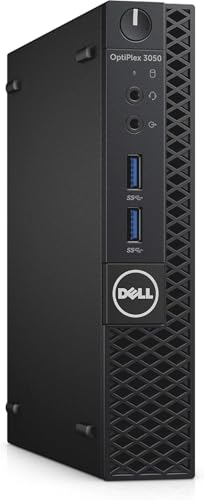
| 3 Dell OptiPlex 3050 Micro, 8GB RAM | Dell | 7.1 × 1.3 × 7 in | Compact Micro form factor | Check price |
| 4 Dell OptiPlex 3050 SFF, 16GB RAM | Dell | 11.2 × 3.75 × 11.5 in | Compact small-form-factor case | Check price |
| 5 DreamQuest Mini PC, Intel N95 | DreamQuest | Not listed | Three HDMI display outputs | Check price |
| 6 Dell OptiPlex 7050 SFF, 32GB RAM | Dell | 11.5 × 3.6 × 11.4 in | 32GB of DDR4 memory | Check price |
| 7 Dell OptiPlex 7050 Micro, 16GB RAM | Dell | 7.2 × 1.4 × 7 in | Compact 2-pound design | Check price |
| 8 Beelink SER5 Mini PC, Ryzen 5 5500U | Beelink | Not listed | Six-core, 12-thread Ryzen 5 5500U | Check price |
| 9 Beelink SER5 MAX Ryzen 7 Mini PC | Beelink | Not listed | Eight-core, 16-thread Ryzen 7 processor | Check price |
| 10 Beelink EQi13 Mini PC, Core i5-13420H | Beelink | Not listed | 24GB LPDDR5 memory | Check price |
Sizes and weights as listed by the manufacturer on Amazon. Check the retailer for current price and availability.
Pros
- Six-core Intel Core i7-8700
- 32GB DDR4 memory
- 512GB NVMe M.2 SSD
- Two DisplayPort outputs
Cons
- Who should skip it: users who need a full-size tower
Pros
- 24GB of included memory
- Dual 2.5Gbps Ethernet ports
- Two HDMI display outputs
- Two M.2 PCIe 4.0 slots
Cons
- Who should skip it: users who need discrete graphics
Pros
- Compact Micro form factor
- 256GB solid-state drive
- Windows 11 Pro included
Cons
- Who should skip it: users needing demanding workloads

Pros
- Compact small-form-factor case
- 16GB DDR4 memory
- DisplayPort and HDMI outputs
- Keyboard and mouse included
Cons
- Who should skip it: users needing more than 256GB of internal storage

Pros
- Three HDMI display outputs
- Dual Gigabit Ethernet
- Upgradeable M.2 SSD
- Compact, VESA-mountable design
Cons
- Who should skip it: users needing more than 256GB of included storage

Pros
- 32GB of DDR4 memory
- 1TB SSD
- HDMI and DisplayPort outputs
- Windows 11 Pro included
Cons
- Integrated graphics
- Who should skip it: users needing a dedicated GPU

Pros
- Compact 2-pound design
- 16GB DDR4 memory
- HDMI and DisplayPort outputs
- Six USB 3.0 ports
Cons
- Who should skip it: users needing more than 256GB of included storage

Pros
- Six-core, 12-thread Ryzen 5 5500U
- Dual 4K display outputs
- Upgradeable memory and storage
- 2.5Gb Ethernet and Wi-Fi 6
Cons
- Who should skip it: buyers needing more included storage
Pros
- Eight-core, 16-thread Ryzen 7 processor
- 24GB LPDDR5 memory
- 2.5GbE Ethernet
- HDMI, DisplayPort, and USB-C outputs
Cons
- Who should skip it: buyers needing a dedicated gaming GPU
Pros
- 24GB LPDDR5 memory
- 1TB PCIe 4.0 SSD
- Dual 4K 60Hz HDMI outputs
- 2.5Gbps Ethernet
Cons
- Who should skip it: buyers needing dedicated graphics
Best for a Compact Plex Server: Beelink EQi13 Mini PC, Core i5-13420H
Beelink EQi13 Mini PC, Core i5-13420H combines an 8-core, 12-thread processor, 24GB RAM, a 500GB NVMe SSD, and dual 2.5Gbps Ethernet ports. The two network ports and dual M.2 slots offer useful connection and storage flexibility, but the internal SSD is not a substitute for a large media library drive. Skip it if you need substantial built-in media capacity without adding storage.
Best for a Large Library Drive: Dell OptiPlex 7050 SFF, 32GB RAM
Dell OptiPlex 7050 SFF, 32GB RAM has 32GB RAM and a listed 1TB SSD, giving it more included storage than the 256GB and 500GB configurations in several other picks. It is a renewed desktop with a 7th-generation Core i7-7700, and the listing does not specify free drive bays or a precise network speed. Skip it if you require confirmed expansion capacity or a newer processor generation.
Best for a Low-Cost Entry Setup: Dell OptiPlex 3050 Micro Form Factor Desktop
Dell OptiPlex 3050 Micro Form Factor Desktop pairs a quad-core Core i5-7500T with 8GB RAM and a 256GB SSD in a compact Micro Form Factor case. Its small footprint suits a space-conscious basic server, though the listing does not specify memory or storage expansion details. Skip it if you expect several demanding transcodes or want more memory out of the box.
Best for a More Demanding Compact Setup: Beelink Mini PC, SER5 MAX Ryzen 7 7735U 8C/16T
Beelink Mini PC, SER5 MAX Ryzen 7 7735U 8C/16T lists an 8-core, 16-thread Ryzen 7, 24GB LPDDR5, a 500GB NVMe SSD, and 2.5G Ethernet. Its listed USB-C supports display output, but the product data does not identify Plex-specific transcoding support or a second Ethernet port. Skip it if your priority is a confirmed hardware-transcoding configuration rather than general CPU capacity.
Key Numbers at a Glance
- Listed memory ranges from 8GB in the Dell OptiPlex 3050 Micro Form Factor Desktop to 32GB in the Dell OptiPlex 7060 SFF, 32GB RAM and Dell OptiPlex 7050 SFF, 32GB RAM.
- Included SSD capacity ranges from 256GB in the Dell OptiPlex 3050 SFF, 16GB RAM to 1TB in the Dell OptiPlex 7050 SFF, 32GB RAM.
- The Beelink EQi13 Mini PC, Core i5-13420H lists two 2.5Gbps Ethernet ports, while the Beelink SER5 Mini PC, Ryzen 5 5500U 6C/12T lists one 2.5G LAN port.
- The DreamQuest Mini PC, Intel N95 measures 5.45 × 5.45 × 1.45 inches, a stated dimension useful for checking a shelf or media cabinet.
Buying Guide: Best Desktop Computers for Plex Server
Processor and Transcoding Workload
Bottom line: Match the processor to the number of streams that need conversion, not just the number of people with access. Direct play generally places less processing demand on a server than transcoding, which converts media to suit a client or connection. The Beelink SER5 MAX lists an 8-core, 16-thread Ryzen 7 7735U, while the refurbished Dell OptiPlex 3050 Micro lists a quad-core i5-7500T. Those core counts are not Plex performance measurements, so check your codecs, client devices, and intended stream workload before deciding.
Hardware-accelerated transcoding depends on the processor or graphics hardware, software configuration, and Plex plan eligibility. The product listings do not establish Plex-specific hardware-transcoding compatibility for these systems. Verify the exact processor support and Plex requirements before buying if transcoding is central to your setup.
Memory for the Server and Other Tasks
Bottom line: Choose memory for the server’s other jobs as well as Plex. Options range from 8GB in the Dell OptiPlex 3050 Micro to 32GB in the Dell OptiPlex 7060 SFF and Dell OptiPlex 7050 SFF. A server dedicated to media playback has a different workload from a PC also hosting other applications, but the listing does not give a reliable stream count per memory configuration.
Some listings specify upgrade paths: the Beelink SER5 Mini PC, Ryzen 5 5500U 6C/12T says its dual-channel memory can reach 64GB. The Beelink EQi13 listings describe 24GB RAM but do not establish that it is user-upgradeable. Confirm memory type and upgrade access in the exact product details before planning a later expansion.
Media Storage and Expansion
Bottom line: Treat the included SSD as system storage unless its capacity suits your library. The listed drives range from 256GB to 1TB, while the Beelink EQi13 Mini PC, Core i5-13420H has dual M.2 slots and a stated maximum of 4TB. The Beelink SER5 Mini PC, Ryzen 5 5500U 6C/12T also lists a 2.5-inch drive expansion bay, with the added drive not included.
Media libraries can outgrow a boot drive, so plan where the files will live and how you will back them up. Check whether a chosen system supports the drive type and capacity you intend to add; do not assume every micro or small-form-factor desktop has the same internal bays.
Network Ports and Streaming Clients
Bottom line: Prefer wired Ethernet when the server and router can connect by cable. The EQi13 with 500GB lists dual 2.5Gbps RJ45 ports, the DreamQuest N95 lists dual Gigabit Ethernet, and the SER5 MAX lists one 2.5G RJ45 port. Multiple Ethernet ports do not automatically improve Plex streaming; check your router or switch, client connections, and whether your setup can use the extra port.
Wi-Fi is listed on several systems, but wireless performance depends on the network and placement. For help choosing the network equipment around a server, see our guide to best long range wireless router options.
Footprint, Power-On Behavior, and Operating System
Bottom line: Check the physical location and server-management features before choosing a small PC. The DreamQuest Mini PC has stated dimensions of 5.45 × 5.45 × 1.45 inches and lists Wake on LAN, RTC Wake, and Auto Power On. The Beelink SER5 Mini PC, Ryzen 5 5500U 6C/12T also lists Wake on LAN and Auto Power On, while the Dell systems are renewed business desktops with different case formats.
Most listed computers include Windows 11 Pro, while the DreamQuest listing also names Linux support. Confirm the operating system and Plex server software requirements you plan to use, along with ventilation and power access at the intended location. Browse best desktop computers for streaming if your main workload is a broader streaming or media workstation rather than a dedicated Plex server.
How We Compared These Products
This comparison is based on product research, including the listed processors, memory, storage, case formats, ports, and stated expansion or management features. The product data does not establish Plex-specific transcoding results, noise, power consumption, or sustained performance, so those factors should be verified against your workload and exact configuration.
Which Option Fits Your Home and Devices?
For a compact build with dual 2.5Gbps Ethernet and two M.2 slots, the Beelink EQi13 Mini PC, Core i5-13420H is the clearest match; for a larger included SSD, the Dell OptiPlex 7050 SFF, 32GB RAM lists 1TB. If a small enclosure and listed Wake on LAN matter more, the DreamQuest Mini PC, Intel N95 gives a specified 5.45-inch-square footprint, but its N95 processor is a different class from the higher-core options.
Skip a mini PC if you need confirmed internal expansion beyond its stated drive support, and skip a renewed desktop if you require a new unit or a specific warranty beyond the listing. For related system choices, browse desktop PCs.
Mistakes to Avoid When Choosing a Plex Server PC
- Buying by core count alone. Check whether clients direct-play your media or require transcoding, then verify support for the codecs and hardware acceleration you need.
- Assuming the boot SSD holds the library. Compare the listed 256GB to 1TB capacities with your media plans and confirm compatible expansion options.
- Overlooking the network path. Check the PC’s Ethernet speed alongside the router, switch, and client connection instead of assuming extra server ports raise streaming speeds.
- Choosing by case size without measuring. Compare the stated dimensions where available and leave room for cables and airflow in the intended shelf or cabinet.
Frequently Asked Questions
Can these computers transcode Plex video?
The listings specify processors and graphics but do not confirm Plex hardware-transcoding support or performance. Check Plex’s current requirements, the media codecs, and any plan requirements before selecting a server for transcoding.
Is 8GB of RAM enough for a Plex server?
The Dell OptiPlex 3050 Micro Form Factor Desktop includes 8GB. Whether that fits depends on the server’s other workloads and how you use Plex; the product data does not state a supported stream count for that memory amount.
Can I store a large media library on the included SSD?
Included SSD capacities in this comparison range from 256GB to 1TB. A large library may call for additional storage, so confirm each model’s drive bays, supported interfaces, and expansion limits before purchase.
Should a Plex server use Ethernet or Wi-Fi?
These PCs list Ethernet, and several also list wireless networking. A wired connection is a straightforward choice when the server is near the router, but actual results depend on the full network path and client devices.
Can these PCs run Plex on Linux?
The DreamQuest Mini PC listing names Linux support. The other product descriptions generally specify Windows 11 Pro, so confirm operating-system support for the exact model and Plex software version you plan to install.





Write Your Review
No reviews yet. Be the first to share your experience!