


For a small business handling documents, browser tabs, and video calls, a compact desktop with sufficient memory and the right display outputs can keep the setup practical without occupying a full desk. The best desktop computers for small business depend on whether you prioritize a low-cost office PC, stronger listed memory and storage, a ready-to-use monitor bundle, or an all-in-one design.
Compare at a glance
| Product | Brand | Size | Stands out for | Price |
|---|---|---|---|---|
| 1 HP ProDesk 600 G3 SFF, Core i5-7500 | HP | Not listed | Quad-core Intel Core i5-7500 processor | Check price |
| 2 Dell OptiPlex 7060 SFF, 32GB RAM | Dell | 18 × 14 × 6 in | Six-core Intel Core i7-8700 | Check price |
| 3 HP ProDesk SFF Desktop, 32GB RAM | HP | 10.6 × 3.9 × 12.1 in | 32GB RAM and 1TB SSD | Check price |
| 4 HP EliteDesk 800 G3 SFF i5 Desktop Bundle | HP | 11.5 × 3.6 × 11.4 in | Monitor, keyboard, and mouse included | Check price |
| 5 Dell OptiPlex 3040 SFF, 256GB SSD | Dell | 18 × 14 × 6 in | Compact small-form-factor design | Check price |
| 6 Dell Tower Desktop, Core i7-7700 | Dell | 19 × 16 × 7 in | 1TB SSD | Check price |
| 7 Dell OptiPlex 7050 SFF, 32GB RAM | Dell | 11.5 × 3.6 × 11.4 in | 32GB of DDR4 memory | Check price |
| 8 HP EliteDesk 800 G1 SFF, 16GB RAM | HP | 14.9 × 13.3 × 3.9 in | 16GB RAM | Check price |
| 9 Qehi 24-Inch All-in-One Desktop | Qehi | Not listed | Space-saving all-in-one design | Check price |
Sizes and weights as listed by the manufacturer on Amazon. Check the retailer for current price and availability.
Pros
- Quad-core Intel Core i5-7500 processor
- 256GB solid-state drive
- Keyboard and mouse included
- Windows 11 Pro
Cons
- 8GB RAM may constrain heavier multitasking
- Who should skip it: users needing demanding graphics performance
Pros
- Six-core Intel Core i7-8700
- 32GB DDR4 memory
- 512GB NVMe M.2 SSD
- Two DisplayPort outputs
Cons
- Who should skip it: users who need a full-size tower
Pros
- 32GB RAM and 1TB SSD
- Dual-display output support
- Compact small-form-factor chassis
- Windows 11 Pro included
Cons
- Celeron G6900 is aimed at everyday computing
- Who should skip it: users needing graphics-heavy performance

Pros
- Monitor, keyboard, and mouse included
- 256GB SSD
- Windows 11 Pro included
Cons
- 8GB RAM may constrain heavier multitasking
- Who should skip it: users needing demanding workloads

Pros
- Compact small-form-factor design
- HDMI and DisplayPort outputs
- Eight external USB ports
- Keyboard and mouse included
Cons
- Who should skip it: users needing substantial storage
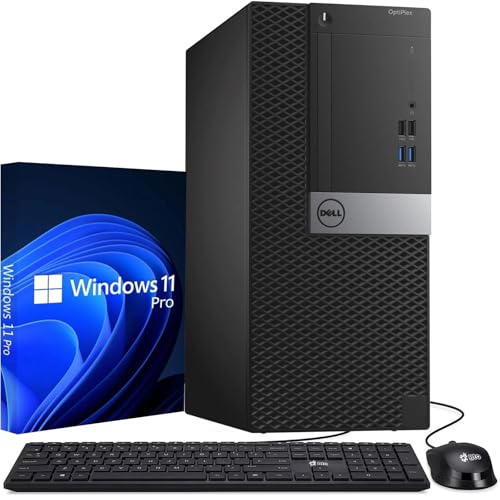
Pros
- 1TB SSD
- 16GB DDR4 memory
- Built-in Wi-Fi
- Keyboard and mouse included
Cons
- 7th-generation processor
- Who should skip it: users needing a newer-generation processor

Pros
- 32GB of DDR4 memory
- 1TB SSD
- HDMI and DisplayPort outputs
- Windows 11 Pro included
Cons
- Integrated graphics
- Who should skip it: users needing a dedicated GPU

Pros
- 16GB RAM
- SSD and hard drive included
- Ten USB ports
- Compact small-form-factor case
Cons
- Older Core i5-4590 processor
- Who should skip it: buyers needing a newer processor platform

Pros
- Space-saving all-in-one design
- 16GB RAM
- Adjustable anti-glare display
- Included keyboard and mouse
Cons
- 256GB storage may constrain larger file collections
- Processor model and port details are unspecified
- Who should skip it: users needing detailed processor or graphics specifications
Best Budget Desktop for Small Business: HP ProDesk 600 G3 SFF, Core i5-7500
HP ProDesk 600 G3 SFF, Core i5-7500 is a budget-oriented fit for basic office work, with a listed quad-core i5-7500, 8GB RAM, and 256GB SSD. It includes a keyboard and mouse, plus a USB Wi-Fi and Bluetooth adapter; confirm that 8GB memory and 256GB storage meet your workload before choosing it.
Skip it if you routinely keep many applications open or need more storage without adding a drive.
Best Compact Desktop for Multitasking: Dell OptiPlex 7060 SFF, 32GB RAM
Dell OptiPlex 7060 SFF, 32GB RAM pairs an Intel Core i7-8700 with 32GB RAM and a 512GB NVMe SSD, making its listed configuration a stronger fit for heavier office multitasking. Two DisplayPort outputs support a dual-monitor setup, and the listing includes Wi-Fi, Bluetooth, and Windows 11 Pro.
Skip it if you need HDMI on the PC itself or want a new rather than renewed computer.
Related guides: Best Desktop Computer for Data Analysis, Best Desktop Computers for Content Creators and Best Desktop Computer for AI Development.
Best Desktop Bundle for a Quick Office Setup: HP EliteDesk 800 G3 SFF i5 Desktop Bundle
HP EliteDesk 800 G3 SFF i5 Desktop Bundle includes a 21.5-inch FHD monitor, keyboard, and mouse, so the listing covers more of a basic workstation setup. Its Core i5-6500, 8GB RAM, and 256GB SSD suit straightforward productivity, but are more modest than configurations with 16GB or 32GB RAM.
Skip it if you already own a monitor or need more memory for demanding multitasking.
Best All-in-One for a Tidy Desk: Qehi 24-Inch All-in-One Desktop
Qehi 24-Inch All-in-One Desktop combines a 23.8-inch 1080p display, webcam, microphones, speakers, 16GB RAM, and 256GB SSD in one unit. Its listing specifies Wi-Fi 6 and a webcam privacy slider, useful features for a compact video-call workspace.
Skip it if you want a separate tower for easier component changes or require more than 256GB of built-in storage.
Key Numbers at a Glance
- Listed memory ranges from 8GB on the HP ProDesk 600 G3 SFF, Core i5-7500 to 32GB on the Dell OptiPlex 7060 SFF, 32GB RAM.
- Listed SSD capacity ranges from 256GB on the HP EliteDesk 800 G3 SFF i5 Desktop Bundle to 1TB on the Dell OptiPlex 7050 SFF, 32GB RAM.
- The Qehi 24-Inch All-in-One Desktop has a 23.8-inch display; the HP EliteDesk 800 G3 SFF i5 Desktop Bundle includes a 21.5-inch monitor.
- The Dell OptiPlex 7060 SFF, 32GB RAM lists two DisplayPort outputs, while the Dell OptiPlex 3040 SFF, 256GB SSD lists one DisplayPort 1.2 and one HDMI 1.4 output.
How to Choose the Best Desktop Computers for Small Business
Processor, memory, and workload
Bottom line: Match the processor and memory to the applications you use at once, not a label such as “business desktop.” The listed configurations range from a Core i3-6100 and 8GB RAM in the Dell OptiPlex 3040 SFF, 256GB SSD to a six-core Core i7-8700 and 32GB RAM in the Dell OptiPlex 7060 SFF, 32GB RAM. Basic email and document work can favor a lower-spec configuration, while large spreadsheets and many open applications make higher listed memory worth considering.
Processor generations and model names alone do not establish performance for every program. Check the software’s requirements, and remember that the HP ProDesk SFF Desktop, 32GB RAM lists a Celeron G6900 despite its 32GB memory configuration. That pairing may suit everyday office tasks, but memory capacity does not replace processor capability.
Storage capacity and drive type
Bottom line: Choose SSD capacity around your files and applications, then verify any expansion claim before relying on it. Listed SSDs range from 256GB on several configurations to 1TB on the Dell Tower Desktop, Core i7-7700 and Dell OptiPlex 7050 SFF, 32GB RAM. The HP EliteDesk 800 G1 SFF, 16GB RAM lists both a 256GB boot SSD and a 1TB hard drive, a distinct setup from a single 1TB SSD.
The HP ProDesk SFF Desktop, 32GB RAM product page describes configurations up to 2TB SSD and 64GB RAM, but check the exact selected configuration rather than assuming those maximums are installed. Keep business files backed up separately; an SSD does not replace a backup plan.
Display outputs and ports
Bottom line: Match the computer’s actual video outputs to your monitors before ordering. The Dell OptiPlex 7060 SFF, 32GB RAM lists two DisplayPort outputs, while the Dell OptiPlex 3040 SFF, 256GB SSD lists HDMI 1.4 and DisplayPort 1.2. The HP EliteDesk 800 G3 SFF i5 Desktop Bundle includes a 21.5-inch FHD monitor, which can simplify a first setup.
Do not assume that a stated dual-display feature means every combination of resolution and refresh rate will work with your screens. Confirm the output connectors and monitor requirements, and check whether you need an adapter. For a screen-focused workstation, our monitor category can help you compare display options.
Form factor, all-in-one design, and upgrade plans
Bottom line: Pick a compact tower or all-in-one based on desk layout and whether you expect to change components. The Qehi 24-Inch All-in-One Desktop integrates the display and webcam, while the Dell and HP SFF models use separate monitors. The HP Business Tower Desktop, 1TB SSD lists dimensions of 13.2 x 11.9 x 6.1 inches, but the product data does not give comparable dimensions for every desktop.
Small-form-factor computers can be convenient where desk space is limited, but do not assume a particular memory slot, spare drive bay, or graphics-card clearance. Check the exact model’s service documentation and chassis measurements before planning an upgrade. If streaming is part of the workload, compare the needs in our guide to best desktop computers for streaming.
Windows edition, wireless, and renewed condition
Bottom line: Confirm the operating system edition, network connection, and seller terms for the exact configuration. Several listings state Windows 11 Pro, while the HP Business Tower Desktop, 1TB SSD specifies Windows 11 Home. Wireless also differs: the Qehi all-in-one lists Wi-Fi 6, and other listings describe built-in wireless or an included USB adapter.
Many products are described as renewed, so check the seller’s condition details and warranty terms rather than assuming that every listing offers identical coverage. Businesses that rely on centralized device management or a specific Windows feature should verify that the stated edition supports their requirements. Browse more models in our desktop PC category.
How We Compared These Products
This guide is based on product research, comparing the listed processor, memory, storage, operating system, display outputs, wireless details, form factor, included accessories, and stated condition. Product pages do not give equally detailed information for every model, and no firsthand evaluation is claimed; confirm configuration-specific details with the seller before purchase.
Which Option Fits Your Business Setup?
For a compact office PC with more listed memory and two DisplayPort outputs, consider the Dell OptiPlex 7060 SFF, 32GB RAM. Skip it if your monitors require HDMI and you do not want to use an adapter.
For a ready-to-connect workstation with a bundled monitor, the HP EliteDesk 800 G3 SFF i5 Desktop Bundle includes a 21.5-inch FHD screen, keyboard, and mouse. Skip it if you already have a monitor or need more than its listed 8GB RAM.
For an integrated desk setup with a webcam and 23.8-inch 1080p display, the Qehi 24-Inch All-in-One Desktop keeps the display and computer together. Skip it if a separate tower or larger built-in SSD is important to your plans.
Mistakes to Avoid When Choosing a Small-Business Desktop
- Choosing memory by itself. Compare the processor and memory together, and check the software you run; 32GB RAM does not make every processor suitable for every workload.
- Assuming all 1TB storage is the same. Distinguish a 1TB SSD, such as the Dell OptiPlex 7050 SFF, 32GB RAM, from the HP EliteDesk 800 G1 SFF, 16GB RAM, which lists a 1TB hard drive plus a 256GB boot SSD.
- Forgetting monitor connections. Match HDMI or DisplayPort outputs to your existing displays and verify resolution needs before buying adapters.
- Planning an upgrade without checking the chassis. Confirm memory and storage limits, internal space, and service instructions for the exact model instead of assuming SFF computers share the same expansion options.
Frequently Asked Questions
How much RAM should a small-business desktop have?
The listed models include 8GB, 16GB, and 32GB configurations. For basic office applications, compare the software requirements against the 8GB models; for heavier multitasking, a 16GB or 32GB configuration offers more listed memory, but processor capability still matters.
Can these desktops run two monitors?
Some listings explicitly describe dual-display support, and the Dell OptiPlex 7060 SFF, 32GB RAM lists two DisplayPort outputs. The Dell OptiPlex 3040 SFF, 256GB SSD lists one HDMI and one DisplayPort output; check the exact monitor resolution and connection requirements before relying on a particular setup.
Is an all-in-one or a small-form-factor tower better for a small office?
An all-in-one such as the Qehi 24-Inch All-in-One Desktop combines a 23.8-inch display and computer, which reduces the number of separate components on the desk. An SFF tower such as the Dell OptiPlex 7060 SFF, 32GB RAM uses a separate monitor and lists two DisplayPort outputs; choose based on desk layout, ports, and upgrade plans.
Should I choose an SSD or a hard drive for office files?
Most listed configurations specify SSD storage, while the HP EliteDesk 800 G1 SFF, 16GB RAM lists a 256GB SSD for booting and a 1TB hard drive. Compare total capacity and drive type, and keep a separate backup of important business files.
Do these desktops include a keyboard and mouse?
Several product pages explicitly list a keyboard and mouse, including the HP EliteDesk 800 G3 SFF i5 Desktop Bundle and Dell OptiPlex 7060 SFF, 32GB RAM. Check the exact listing for the configuration you plan to order, since included accessories are not stated consistently for every model.





Write Your Review
No reviews yet. Be the first to share your experience!