


For 4K timelines, effects, and frequent exports, prioritize a desktop with a dedicated graphics card, 32GB of memory, and enough fast storage for active projects; the Dell towers with RTX 5060 graphics list that combination. For lighter edits or a tight desk, the Mac mini and HP mini PC offer smaller-footprint alternatives, while older renewed workstations trade newer components for lower-cost configurations.
This guide to the best desktop computers for video editing compares the listed configurations by workload, space, and connectivity. Before choosing, check your editing software’s system requirements, monitor connections, project storage needs, and whether the desktop allows the upgrades you may want later.
Compare at a glance
| Product | Brand | Size | Weight | Stands out for | Price |
|---|---|---|---|---|---|
| 1 STGAubron Gaming PC, RX 580 8GB | STGAubron | 16.4 × 14.8 × 8.2 in | Not listed | 16GB of memory | Check price |
| 2 WOWPC Dell Business Tower, Core i7-14700 | WOWPC | 12.77 × 6.06 × 11.54 in | Not listed | 20-core Intel Core i7-14700 | Check price |
| 3 Apple Mac mini M6, 16GB Memory | Apple | 5 × 5 × 1.97 in | 1.5 lb | Compact five-by-five-inch design | Check price |
| 4 Dell ECT1250 Tower, Ultra 7 265F | Dell | Not listed | Not listed | 20-core Ultra 7 265F processor | Check price |
| 5 Dell Tower Desktop, Ultra 7 265F | Dell | 11.54 × 6.06 × 12.77 in | 15 lb | 20-core Intel Ultra 7 processor | Check price |
| 6 HP Mini Desktop PC, Core i7-12700T | HP | Not listed | Not listed | 12-core processor | Check price |
| 7 HP Workstation PC, Quadro K1200 | HP | 11.4 × 3.7 × 11.5 in | 12 lb | 32GB DDR4 memory | Check price |
| 8 Dell Workstation Desktop, K1200 4GB | Dell | 3.6 × 11.5 × 11.4 in | 12 lb | 16GB DDR4 memory | Check price |
| 9 Dell Pro Desktop Tower, Core i3-14100 | Dell | 11.54 × 6.06 × 12.77 in | 9.2 lb | 512GB PCIe SSD | Check price |
| 10 Dell Tower Desktop, Core Ultra 9 285 | Dell | 16.8 × 6.81 × 14.68 in | 19 lb | Intel Core Ultra 9 285 processor | Check price |
Sizes and weights as listed by the manufacturer on Amazon. Check the retailer for current price and availability.
Pros
- 16GB of memory
- 1TB SSD
- Wi-Fi 6 and Bluetooth 5.0
- Includes RGB keyboard and mouse
Cons
- Who should skip it: buyers who need a clearly identified CPU generation
Pros
- 20-core Intel Core i7-14700
- Configurable memory and SSD capacity
- Dual 4K monitor support
- Windows 11 Pro included
Cons
- Who should skip it: buyers needing a confirmed graphics card
Best for a small Mac editing desk
Pros
- Compact five-by-five-inch design
- Three Thunderbolt 4 ports
- Supports up to three displays
Cons
- 256GB SSD may constrain large local libraries
- Who should skip it: buyers needing more storage
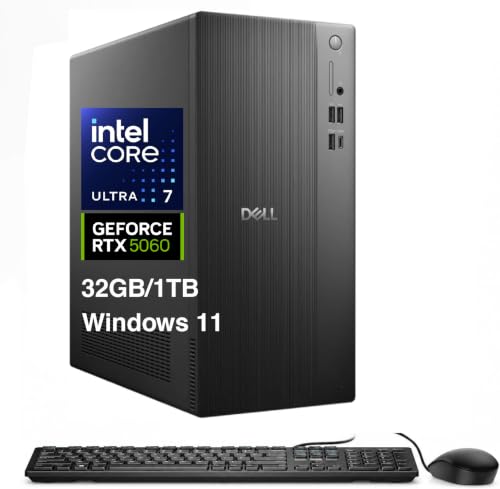
Best for GPU-assisted editing in a tower
Pros
- 20-core Ultra 7 265F processor
- Dedicated RTX 5060 graphics
- 32GB DDR5 memory
- Multiple display and USB connections
- Keyboard and mouse included
Cons
- Who should skip it: users needing more than 8GB of graphics memory

Pros
- 20-core Intel Ultra 7 processor
- GeForce RTX 5060 with 8GB GDDR7
- 32GB DDR5 memory and 1TB SSD
- Windows 11 Pro included
Cons
- Who should skip it: buyers needing more than 1TB storage
Best for compact Windows multitasking

Pros
- 12-core processor
- 32GB memory and 1TB NVMe SSD
- Three 4K display outputs
- Keyboard and mouse included
Cons
- Graphics specifications are not provided
- Who should skip it: buyers needing specified graphics performance

Pros
- 32GB DDR4 memory
- 1TB SSD plus 4TB HDD
- Two DisplayPort outputs
- USB-C and nine USB-A ports
Cons
- Who should skip it: buyers needing newer-generation processor or graphics hardware
Pros
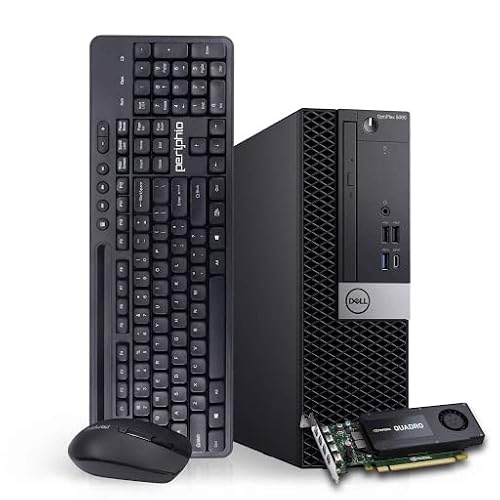
- 16GB DDR4 memory
- Separate NVMe boot drive and 500GB SSD
- Two DisplayPort outputs
- Windows 11 Pro
Cons
- Primary NVMe drive is 120GB
- Who should skip it: users needing a larger primary NVMe drive

Pros
- 512GB PCIe SSD
- DisplayPort and HDMI outputs
- Eight USB ports
- Windows 11 Pro
Cons
- Memory capacity is inconsistent across product details
- Who should skip it: buyers who need a confirmed RAM configuration

Pros
- Intel Core Ultra 9 285 processor
- NVIDIA GeForce RTX 5070 with 12GB GDDR7
- 32GB DDR5 memory and 2TB SSD
- Memory, storage, and expansion slots
Cons
- 19-pound tower needs dedicated space
- Who should skip it: buyers seeking a compact desktop
Best Dedicated Graphics Configuration: Dell ECT1250 Tower, Ultra 7 265F
Dell ECT1250 Tower, Ultra 7 265F pairs a 20-core Intel Ultra 7 265F with an RTX 5060 8GB, 32GB DDR5, and a 1TB NVMe SSD. Those listed components make it a strong fit to consider for editing workflows that can use discrete graphics, while its 360W power supply and exact upgrade limits merit checking before planning component changes. Skip it if you need a compact desktop or a larger listed power supply for future upgrades.
Best for High-End Creative Workloads: Dell Tower Desktop, Intel Core Ultra 9 285
Dell Tower Desktop, Intel Core Ultra 9 285 lists an Intel Core Ultra 9 285, RTX 5070 12GB, 32GB DDR5, and a 2TB SSD. Its stated graphics memory and storage capacity exceed the RTX 5060 towers’ listed 8GB and 1TB, but the product page gives limited detail on specific editing-app performance and upgrade configuration. Skip it if your projects are modest and you would rather prioritize a smaller footprint or a simpler configuration.
Best Compact Mac Desktop: Apple Mac mini M6, 16GB Memory
Apple Mac mini M6, 16GB Memory has a five-by-five-inch footprint, 16GB of unified memory, and a 256GB SSD. It supports up to three external displays and includes three Thunderbolt 4 ports, which can suit a compact Mac-based editing desk; the base storage and memory are more limited than the 32GB, 1TB configurations listed for several Windows towers. Skip it if you need Windows-only software, a dedicated graphics card, or substantial internal project storage.
Best Compact Windows Desktop: HP Mini Desktop PC, Core i7-12700T
HP Mini Desktop PC, Core i7-12700T combines a 12-core Intel Core i7-12700T with 32GB DDR4 and a 1TB NVMe SSD in a 6.97-inch design. Its three 4K display outputs and 7 USB ports are useful for a small editing workstation with several peripherals, but its listed specifications do not include a discrete GPU. Skip it if your editing workflow depends on a dedicated graphics card or you want DDR5 memory.
Key Numbers at a Glance
- Listed memory ranges from 8GB on the Dell Pro 2027 Desktop Tower 8GB DDR5 RAM 512GB to 64GB as a selectable configuration on the WOWPC Dell Business Tower, Core i7-14700.
- Listed SSD capacity ranges from 256GB on the Apple Mac mini M6, 16GB Memory to 2TB on the Dell Tower Desktop, Intel Core Ultra 9 285.
- The Dell Pro 2027 Desktop Tower 8GB DDR5 RAM 512GB measures 12.76 inches high, 6.06 inches wide, and 11.53 inches deep.
- The Apple Mac mini M6, 16GB Memory has a five-by-five-inch footprint, according to its product description.
How to Choose a Desktop for Video Editing
Processor and graphics for your editing workload
Bottom line: Match the processor and graphics hardware to the effects, resolution, and software you actually use. The Dell ECT1250 Tower and Dell Tower Desktop, Ultra 7 265F both list a 20-core Intel Ultra 7 265F and RTX 5060 8GB; the Dell Tower Desktop with Core Ultra 9 285 lists an RTX 5070 12GB. These specifications identify discrete graphics configurations, not guaranteed render times, so check your editor’s current GPU and CPU requirements before buying.
Integrated graphics can make sense for light edits, but the Dell Pro 2027 lists Intel UHD Graphics 730 rather than a discrete card. The STGAubron Gaming PC lists a Radeon RX 580 8GB, while its product title only identifies the processor as Core i7 and the description gives a maximum speed of 3.9GHz. Verify the exact processor generation and software compatibility if either detail affects your decision.
Memory for multitasking and larger timelines
Bottom line: Favor 32GB or more when your editing workload regularly runs alongside other demanding applications. The Dell ECT1250 and Dell Tower Desktop, Ultra 7 265F list 32GB DDR5, and the HP Mini Desktop lists 32GB DDR4. The Apple Mac mini configuration here has 16GB unified memory, while the Dell Pro 2027 starts at 8GB; the WOWPC Dell Business Tower listing describes configurable memory up to 64GB.
Memory type and upgrade options vary. The product pages do not establish that every system has an open memory slot or user-upgradeable memory, so confirm the exact configuration and manufacturer documentation before counting on an upgrade.
Storage for footage, cache, and project files
Bottom line: Choose enough SSD capacity for active work, then plan separate storage for footage and backups. Listed SSD capacities include 256GB on the Mac mini, 512GB on the Dell Pro 2027, 1TB on several desktops, and 2TB on the Dell Core Ultra 9 model. The HP Workstation PC also lists a 4TB HDD alongside a 1TB SSD, providing a larger stated local capacity but using an older renewed workstation configuration.
Video files can quickly fill a system drive, and the listings do not specify sustained transfer speeds for these configurations. Check available drive bays and M.2 slots in the exact model documentation, and budget for external or network storage if your footage library exceeds the included capacity.
Monitor outputs, USB, and wireless connections
Bottom line: Count the ports you need for monitors, card readers, and external drives before choosing a tower. The HP Mini Desktop lists two DisplayPort 1.4 outputs and HDMI 2.1, with support for three 4K monitors at 60Hz. The Dell ECT1250 lists HDMI, three DisplayPort outputs, USB-C, and an SD card reader; the Mac mini lists HDMI and three Thunderbolt 4 ports.
Port names alone do not confirm every display’s supported resolution and refresh rate in a particular setup. Match the computer’s outputs to your monitors and adapters, and check whether your editing workflow benefits from a built-in SD card reader. For a display-focused purchase, compare our best 240Hz gaming monitors guide, while remembering that high refresh rates are not the same as color accuracy.
Desk space, cooling, and future upgrades
Bottom line: A compact chassis saves desk space, while a tower is usually the more sensible starting point when expansion matters. The Mac mini is described as five by five inches, and the HP Mini Desktop is described as a 6.97-inch compact design. The Dell Pro 2027 measures 12.76 by 6.06 by 11.53 inches; Dell says its Core Ultra 9 tower has available memory, storage, and expansion slots, but does not specify their count in the product details.
Video editing can keep a CPU and GPU busy for extended periods, so chassis design and cooling matter as practical purchase checks. The listings do not provide comparable noise or sustained-load measurements. Check the exact desktop’s service documentation, airflow design, expansion clearances, and power supply details before planning upgrades.
How We Compared These Products
This guide is based on product research, not firsthand evaluation. We compared the listed processor, graphics, memory, storage, display outputs, connectivity, chassis details, and included accessories, and treated manufacturer performance language as a claim rather than a measured result. Product pages provide uneven detail, so confirm the exact configuration, upgrade options, and software requirements before purchase.
Which Option Fits Your Editing Setup?
For GPU-assisted editing in a tower: Dell ECT1250 Tower, Ultra 7 265F lists an RTX 5060 8GB and 32GB DDR5, plus a 1TB NVMe SSD. Skip it if you need a compact chassis or the listing’s 360W power supply does not suit your planned upgrades.
For a small Mac editing desk: Apple Mac mini M6, 16GB Memory has a five-by-five-inch footprint, three Thunderbolt 4 ports, and support for up to three external displays. Skip it if 256GB of SSD storage and 16GB of memory do not fit your project needs.
For compact Windows multitasking: HP Mini Desktop PC, Core i7-12700T lists 32GB RAM, a 1TB NVMe SSD, and three 4K display outputs. Skip it if a discrete graphics card is a requirement for your editing software or effects workflow.
Mistakes to Avoid When Choosing a Video Editing Desktop
- Choosing by processor name alone. Compare the full CPU and GPU configuration, and check the requirements for your editor and effects.
- Underestimating project storage. Compare the listed SSD capacity with your active footage needs, and plan separate backup storage rather than treating one drive as a complete backup strategy.
- Assuming every tower is easy to upgrade. Confirm exact memory slots, drive connections, expansion clearances, and power supply details in the model documentation.
- Counting ports without checking display support. Match the available HDMI, DisplayPort, and Thunderbolt outputs to your monitors, cables, and required display modes.
Frequently Asked Questions
How much memory should a video editing desktop have?
Among these configurations, several towers and the HP Mini Desktop list 32GB, while the Mac mini lists 16GB and the Dell Pro 2027 starts at 8GB. The right amount depends on your editing software, footage, effects, and other applications; check the editor’s system requirements and whether the exact computer can be upgraded.
Do I need a dedicated graphics card for video editing?
Not every editing task requires the same graphics hardware, but a dedicated GPU may matter for software features and effects that use GPU acceleration. The RTX 5060 and RTX 5070 desktops, STGAubron PC, and renewed workstations list discrete graphics; the Dell Pro 2027 lists Intel UHD Graphics 730. Check the requirements for your specific editor and workload.
Is the Mac mini or HP Mini Desktop better for a small editing desk?
The Mac mini has a five-by-five-inch footprint, 16GB unified memory, and 256GB SSD storage, while the HP Mini Desktop lists 32GB RAM and a 1TB SSD in a 6.97-inch design. The Mac mini suits a compact Mac setup with Thunderbolt 4; the HP lists Windows 11 Pro and three 4K display outputs. Neither listing specifies a discrete GPU.
Can these desktops connect to multiple monitors?
Several listings include multiple display outputs. The HP Mini Desktop specifies three 4K monitors at 60Hz, and the Mac mini says it supports up to three external displays. Check the exact output combinations and display requirements for the other desktops, as port presence alone does not establish the supported setup.
Is a renewed workstation suitable for editing?
The Dell and HP renewed workstation listings describe 8th-generation Intel Core i5 systems with Quadro K1200 4GB graphics; the HP lists 32GB DDR4, a 1TB SSD, and a 4TB HDD, while the Dell lists 16GB DDR4, a 120GB NVMe drive, and a 500GB SSD. These older configurations may suit a constrained budget or compatible legacy workflow, but compare their exact specifications with the requirements of your current editing software before deciding.
Should I use the system drive for video backups?
No single included drive should be treated as a complete backup plan. Keep an additional copy of important footage and project files on separate storage, and verify the connection type and capacity of any external drive you plan to use. The listed desktops vary from 256GB to 2TB of SSD storage, with some configurations also listing a hard drive.





Write Your Review
No reviews yet. Be the first to share your experience!