


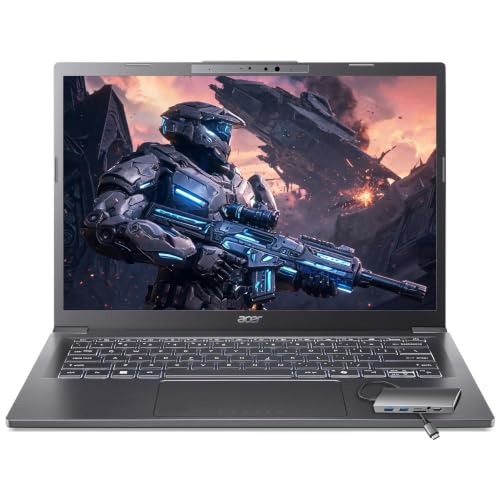
If you edit large photo collections, a laptop with more memory and storage is a better starting point than a low-cost model with only 4GB of RAM. The Acer Aspire Laptop 2026, Touchscreen lists 32GB of memory, a 2TB SSD, and Intel Arc 140V graphics, while the two listed HP laptops have 4GB of RAM; this guide to the best laptops for Lightroom helps you weigh that gap and check the display and ports you need.
Compare at a glance
| Product | Brand | Size | Weight | Stands out for | Price |
|---|---|---|---|---|---|
| 1 HP 14-dq6199nr 14-Inch Laptop | HP | 12.76 × 8.86 × 0.71 in | 3.2 lb | Includes a one-year Microsoft 365 Personal subscription | Check price |
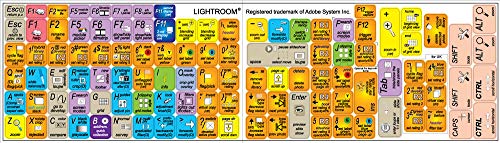
| 2 4Keyboard Lightroom Keyboard Stickers | 4Keyboard | Not listed | 0.1 lb | Designed for multiple keyboard types | Check price |
| 3 4Keyboard Lightroom Keyboard Stickers | 4Keyboard | Not listed | 0.1 lb | Fits several keyboard types | Check price |
| 4 4Keyboard Lightroom Keyboard Stickers | 4Keyboard | Not listed | Not listed | Designed for several keyboard types | Check price |
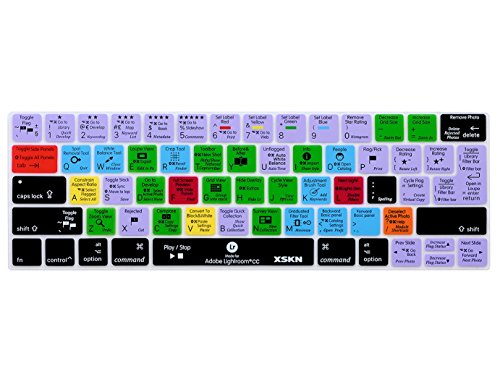
| 5 XSKN Lightroom Keyboard Skin for MacBook Pro | XSKN | 8.54 × 0.04 × 3.58 in | 0 lb | Lightroom shortcut labels | Check price |
| 6 HIOUME Laptop Monitor Light Bar | HIOUME | 10.24 × 0.79 × 0.79 in | 0.2 lb | No bulky base or lamp arm | Check price |
| 7 SanDisk Creator USB-C Flash Drive, 256GB | SANDISK | 1 × 1 × 1 in | 0 lb | USB-C file transfers | Check price |
| 8 SanDisk Creator USB-C Flash Drive 512GB | SANDISK | 1 × 1 × 1 in | 0.1 lb | 512GB storage capacity | Check price |
| 9 HP 14-Inch Laptop, 4GB RAM | HP | 16 × 3 × 14 in | 5 lb | 14-inch anti-glare display | Check price |
| 10 Acer Aspire Laptop, Ultra 7 258V | Acer | 12.6 × 8.9 × 0.67 in | 1 lb | 32GB memory and 2TB SSD | Check price |
Sizes and weights as listed by the manufacturer on Amazon. Check the retailer for current price and availability.
Best for a low-cost laptop
Pros
- Includes a one-year Microsoft 365 Personal subscription
- Slim bezel 14-inch HD display
- Fast charging is advertised
Cons
- Who should skip it: users needing substantial multitasking or demanding workloads
Pros
- Designed for multiple keyboard types
- Non-transparent matte vinyl
Cons
- Who should skip it: users needing confirmed compatibility with a specific keyboard layout
Pros
- Fits several keyboard types
- Matte, non-transparent vinyl
- Customizes an existing keyboard
Cons
- Who should skip it: users seeking a full keyboard

Pros
- Designed for several keyboard types
- Matte, non-transparent vinyl
- Focuses on Lightroom shortcuts
Cons
- Who should skip it: users seeking a full keyboard
Pros
- Lightroom shortcut labels
- Washable silicone material
- US and EU layout options
Cons
- Who should skip it: users who do not need Lightroom shortcut labels

Pros
- No bulky base or lamp arm
- Adjustable color temperature and brightness
- USB-powered with setting memory
Cons
- Clip fits monitors 0.2 to 0.4 inches thick
- Who should skip it: users with monitors outside the stated thickness range

Pros
- USB-C file transfers
- Up to 400MB/s stated read speed
- Three months of Adobe Lightroom included
Cons
- Who should skip it: users needing more than 256GB
Pros
- 512GB storage capacity
- USB-C file transfers
- Up to 400MB/s read speed
- Three months of Adobe Lightroom included
Cons
- Who should skip it: users who need more than 512GB

Pros
- 14-inch anti-glare display
- Microsoft 365 subscription included
- 512GB SD card listed
Cons
- 4GB of RAM
- Who should skip it: users with intensive multitasking needs
Best for Lightroom editing
Pros
- 32GB memory and 2TB SSD
- Touchscreen with stated stylus support
- Included hub with multiple port types
Cons
- Who should skip it: buyers who require a stated screen resolution
Key Numbers at a Glance
- The Acer Aspire Laptop 2026, Touchscreen lists 32GB of RAM; both the HP 14 inch Laptop, HD Display, Intel N150 and HP New Gen 14" Laptop · MS Office · 128GB · 512GB list 4GB.
- The Acer Aspire Laptop 2026, Touchscreen lists a 2TB SSD, compared with 128GB of UFS storage on the HP 14 inch Laptop, HD Display, Intel N150.
- The SANDISK Creator USB-C Flash Drive capacities in this list are 256GB and 512GB, with the 512GB model offering twice the stated capacity of the 256GB model.
- The Acer Aspire Laptop 2026, Touchscreen has a 14-inch touchscreen; both HP laptop listings specify a 14-inch HD display.
Best Laptop for Lightroom: Acer Aspire Laptop 2026, Touchscreen
The Acer Aspire Laptop 2026, Touchscreen earns the strongest Lightroom fit in this list on paper, with 32GB RAM, a 2TB PCIe SSD, and Intel Arc 140V graphics. The product page also identifies Lightroom photo editing as a use case and specifies a 14-inch touchscreen. Its display resolution and brightness are not stated, so confirm those details if color-critical editing is central to your work. Skip it if you need a documented high-resolution, color-calibrated screen and cannot verify those display details.
Related guides: Best Laptops for Cyber Security Students, Best Laptops for Designers and Best Laptops for Basic Home Use.
Lowest-Cost Laptop for Basic Tasks: HP 14 inch Laptop, HD Display, Intel N150
The HP 14 inch Laptop, HD Display, Intel N150 is the lowest-priced laptop listing here, but its 4GB RAM and 128GB UFS storage make it a cautious choice for Lightroom. The product page describes it as an everyday laptop and specifies an HD display, not a configuration aimed at demanding photo workflows. Skip it if you expect to work with large catalogs or multitask with editing software.
Best for Extra Photo Storage: SANDISK 512GB Creator USB-C Flash Drive
The SANDISK 512GB Creator USB-C Flash Drive offers twice the listed capacity of the 256GB version and a stated read speed of up to 400MB/s. The product page says it connects to USB-C devices and includes three months of Adobe Lightroom; it is external storage, not a laptop or a substitute for a verified backup plan. Skip it if your computer lacks a compatible USB-C port or you need internal storage for applications.
How to Choose a Laptop for Lightroom
Memory and processor for your editing workload
Bottom line: Favor the 32GB configuration for larger catalogs and multitasking, and treat 4GB models as basic-use laptops rather than confident Lightroom picks. The Acer lists an Intel Core Ultra 7 258V processor and 32GB LPDDR5X memory; the HP models each list 4GB RAM. The product pages do not specify whether laptop memory is upgradeable, so check the exact model configuration before buying.
Graphics and sustained creative work
Bottom line: Choose a listed graphics feature that matches your intended editing, but do not infer performance from a chip name alone. The Acer specifies Intel Arc 140V graphics with 8 Xe cores and describes GPU-accelerated photo editing; the HP 14-inch model lists Intel Graphics. No comparative benchmarks, power limits, cooling details, or sustained-load results are stated, so demanding workloads deserve further model-specific research.
Display size and image review
Bottom line: Check resolution, brightness, and color coverage before relying on any of these screens for precise image decisions. The Acer specifies a 14-inch touchscreen, while the HP laptop listings describe 14-inch HD displays. The pages do not state color coverage or brightness, and an HD display may provide less working detail than you want when inspecting photographs. If you edit at a desk, consider whether a separate monitor fits your workflow and budget.
Storage for catalogs and photo files
Bottom line: Keep active catalogs and applications on adequate computer storage, and choose external capacity according to how many files you move. The Acer lists a 2TB PCIe SSD, while the HP 14-inch model lists 128GB UFS storage. The SANDISK Creator drives offer 256GB or 512GB and up to 400MB/s read speed; that stated read figure does not establish sustained write speed. Confirm the laptop’s port type and your backup needs before using a flash drive as part of a photo workflow.
Ports, portability, and desk setup
Bottom line: Match the actual ports and screen setup to your card readers, external drives, and workspace. The Acer listing says an included USB hub provides HDMI, USB-A, USB-C, SD card, and Ethernet ports, but does not identify the hub’s interface versions. It also lists a weight of 3.09 lb. Check the exact port specifications and whether the included hub meets your monitor and transfer needs; USB-C alone does not guarantee a particular display or data capability.
How We Compared These Products
This guide is based on product research, not firsthand evaluation. We compared the listed processor, graphics, memory, storage, screen descriptions, port claims, and accessory features; the product pages do not supply benchmark results or enough display detail to establish precise Lightroom performance or color accuracy.
Which Option Fits Your Workflow?
For Lightroom editing and substantial local storage: Acer Aspire Laptop 2026, Touchscreen combines 32GB RAM with a 2TB SSD and lists Intel Arc 140V graphics. Skip it if you require confirmed display color coverage or resolution and cannot verify those specifications.
For moving photo files between USB-C devices: SANDISK 256GB Creator USB-C Flash Drive lists 256GB capacity, up to 400MB/s read speed, and three months of Adobe Lightroom. Skip it if you need a laptop, greater capacity, or verified write-speed information.
For a low-cost laptop for everyday tasks rather than a demanding photo workflow: HP 14 inch Laptop, HD Display, Intel N150 lists a 14-inch HD display and 128GB UFS storage. Skip it if your Lightroom work needs more memory or substantial local storage. If your budget is the main constraint, compare options in our best laptops under $300 guide, and browse the broader laptop category for other configurations.
Mistakes to Avoid When Choosing a Lightroom Laptop
- Choosing by processor name alone. Compare memory, graphics, and storage too; the Acer’s listed 32GB RAM differs substantially from the HP models’ 4GB.
- Assuming a touchscreen guarantees a good editing display. Check resolution, brightness, and color coverage because the Acer listing does not state these details.
- Treating an external drive as a full backup plan. A flash drive adds portable storage, but keep another copy of important photographs in a separate location.
- Assuming every USB-C port supports the same features. Verify data speed, display output, and compatibility with your accessories before ordering.
Frequently Asked Questions
Which listed laptop is the strongest Lightroom fit?
The Acer Aspire Laptop 2026, Touchscreen has the strongest listed configuration for this purpose: 32GB RAM, a 2TB PCIe SSD, and Intel Arc 140V graphics. Its display resolution and color coverage are not stated, so verify those before relying on it for color-critical work.
Are the HP laptops suitable for large Lightroom catalogs?
Both HP listings specify 4GB RAM, and the HP 14 inch Laptop, HD Display, Intel N150 lists 128GB UFS storage. Those figures make them less compelling for large catalogs than the Acer configuration; check Adobe’s current requirements and the exact software version before purchase.
Does the SANDISK Creator drive replace laptop storage?
No. It is a USB-C flash drive for moving or storing files, with 256GB or 512GB capacity depending on the model. Confirm your laptop has a compatible USB-C port, and maintain a separate backup of important photographs.
Do the listed laptops have color-accurate screens?
The product data does not state color coverage or brightness for these laptops. The Acer listing specifies a 14-inch touchscreen, and the HP listings specify 14-inch HD displays, but those details alone do not establish color accuracy.
Does USB-C guarantee that a laptop can connect to an external monitor?
No. USB-C describes the connector shape, not every supported data or display feature. Check the laptop’s exact port specifications and the monitor’s connection requirements before choosing a cable or hub.






Write Your Review
No reviews yet. Be the first to share your experience!