


For coding on a laptop, prioritize a 4K monitor with USB-C power delivery, such as the LG 27UP850K-W, which specifies up to 90W. For a larger code-and-preview workspace, consider a 32-inch display; if you also game, the Dell S2725QS pairs 4K with 120Hz. Choosing the wrong size or connection can leave you with cramped windows or a desk full of adapters.
This guide to the best 4k monitor for software development compares screen size, resolution, panel and refresh features, connections, and ergonomics. For broader desk-work options, see our guide to best monitors for office work.
Compare at a glance
| Product | Brand | Size | Weight | Stands out for | Price |
|---|---|---|---|---|---|
| 1 LG 27UP650K-W 27-inch 4K Monitor | LG | 9.42 × 24.15 × 22.41 in | 12 lb | 27-inch 4K IPS display | Check price |
| 2 Dell S3225QS 32-Inch 4K Monitor | Dell | 8.73 × 28.05 × 17.55 in | 19 lb | 4K resolution on a 31.5-inch screen | Check price |
| 3 Dell S2725QS 27-Inch 4K Monitor | Dell | 7.89 × 24.08 × 15.3 in | 14 lb | 4K UHD IPS display | Check price |
| 4 CRUA 27-Inch 4K 120Hz Monitor | CRUA | 1.7 × 24 × 18 in | 9.5 lb | 4K UHD resolution | Check price |
| 5 LG 27US500-W 27-Inch 4K Monitor | LG | 8.46 × 24.15 × 17.87 in | 12 lb | 27-inch 4K UHD resolution | Check price |
| 6 ASUS TUF Gaming VG27UQ1A 27-Inch 4K Monitor | ASUS | 8.4 × 24.2 × 17.9 in | 11 lb | 27-inch 4K Fast IPS panel | Check price |
| 7 LG 27U711-B 27-inch 4K IPS Monitor 3-Pack | LG | 26.8 × 19 × 6.4 in | 54 lb | Three 27-inch 4K IPS monitors | Check price |
Sizes and weights as listed by the manufacturer on Amazon. Check the retailer for current price and availability.
Pros
- 27-inch 4K IPS display
- Height-, tilt-, and pivot-adjustable stand
- DisplayHDR 400 compatibility
Cons
- Who should skip it: competitive gamers needing higher refresh rates
Pros
- 4K resolution on a 31.5-inch screen
- 120Hz refresh rate with FreeSync Premium
- Wide stated color coverage
- Anti-glare screen
Cons
- HDR performance details are limited
- Who should skip it: buyers prioritizing clearly specified HDR performance
Pros
- 4K UHD IPS display
- Up to 120Hz with FreeSync Premium
- Height-adjustable, swivel-and-pivot stand
- 99% sRGB color coverage
Cons
- Who should skip it: users who need refresh rates above 120Hz

Pros
- 4K UHD resolution
- 120Hz refresh rate
- IPS panel with 178° viewing angles
- HDMI 2.1 and DisplayPort 1.4
Cons
- 350-nit brightness is specified for everyday indoor environments
- Who should skip it: users who require a brightness rating above 350 nits
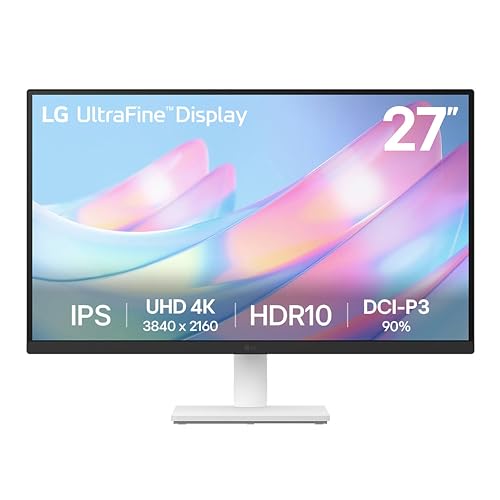
Pros
- 27-inch 4K UHD resolution
- IPS panel with wide viewing angles
- HDR10 and stated DCI-P3 coverage
- Onscreen Control workspace options
Cons
- Who should skip it: users needing more than tilt adjustment from the stand

Pros
- 27-inch 4K Fast IPS panel
- 160Hz refresh rate
- G-SYNC Compatible and FreeSync Premium
- HDMI 2.1 console support
Cons
- Brightness and stand-adjustment details are not provided
- Who should skip it: buyers who need confirmed ergonomics or brightness specifications

Pros
- Three 27-inch 4K IPS monitors
- 90% DCI-P3 color coverage
- Three HDMI cables included
- OnScreen Control software
Cons
- Refresh rate and port details are not provided
- Who should skip it: buyers requiring stated refresh-rate or port specifications
Best for Laptop Docking: LG 27UP850K-W 27-Inch 4K Monitor
The LG 27UP850K-W 27-Inch 4K Monitor supports USB-C power delivery up to 90W, plus DisplayPort, two HDMI connections, and two USB 3.0 ports. That port mix can simplify a compatible laptop desk, while the 27-inch IPS panel and adjustable height, tilt, and pivot suit a focused workstation. Its refresh rate is 60Hz, so it is less suited to someone prioritizing high-refresh gaming.
Skip it if your laptop needs more than 90W charging or you specifically want a refresh rate above 60Hz.
Best 32-Inch Workspace: Dell S3225QS 32-Inch 4K Monitor
The Dell S3225QS 32-Inch 4K Monitor gives developers a 31.5-inch screen and a stated 120Hz refresh rate. Its VA panel lists 99% sRGB and 95% DCI-P3 coverage, with HDMI and DisplayPort connections. A larger panel takes more desk space, and the product details do not list USB-C.
Skip it if your desk is shallow or USB-C laptop charging is central to your setup.
Best 27-Inch High-Refresh Pick: Dell S2725QS 27-Inch 4K Monitor
The Dell S2725QS 27-Inch 4K Monitor combines a 27-inch IPS panel with 120Hz, 99% sRGB, and a height-adjustable, swivel, and pivot stand. That makes it a flexible choice if you want sharper desktop text and smoother motion without moving to a 32-inch display. Its listed connections are HDMI and DisplayPort; verify the product page for the exact USB-C functions before buying, since the listing title alone does not establish charging or data capability.
Skip it if USB-C charging or a built-in docking hub is a requirement you cannot verify.
Best for a Triple-Display Desk: LG Ultrafine U7 27″ UHD 4K IPS Monitors 27U711-B
The LG Ultrafine U7 27″ UHD 4K IPS Monitors 27U711-B is a bundle of three 27-inch 4K IPS monitors, each listing HDR10 and 90% DCI-P3 color coverage. A three-screen layout can keep an editor, documentation, and terminal visible at once, but it needs substantial desk space and graphics outputs that can drive the setup. The listing describes HDMI cables in the bundle, but does not specify each monitor’s full port range or refresh rate.
Skip it if you want a single-screen setup or your desk and computer cannot accommodate three displays.
Best Compact 4K Option: LG 27US500-W 27-Inch 4K Monitor
The LG 27US500-W 27-Inch 4K Monitor offers a 27-inch 4K IPS display, HDR10, and up to 90% DCI-P3 coverage. Its HDMI and DisplayPort inputs cover common desktop connections, and OnScreen Control supports workspace splitting. The listed stand offers tilt adjustment, not height or pivot adjustment, and the product page does not list USB-C.
Skip it if you need USB-C laptop docking or more stand adjustment without a separate mount.
Key Numbers at a Glance
- The LG 27UP650K-W and LG 27UP850K-W list 60Hz, while the Dell S2725QS and Dell S3225QS list 120Hz.
- The Samsung ViewFinity S7 has a 32-inch display; the LG 27US500-W has a 27-inch display.
- The LG 27UP850K-W lists USB-C power delivery up to 90W, while the LG 27UP650K-W lists HDMI and DisplayPort.
- The LG Ultrafine U7 bundle contains three 27-inch 4K monitors.
How to Choose a 4K Monitor for Software Development
Screen size, resolution, and scaling
Bottom line: Match screen size to desk depth and how you arrange code, documentation, and previews. Every full-size desktop monitor here specifies 3840 by 2160 resolution, but a 27-inch panel and a 32-inch panel do not occupy the same desk area. The Samsung ViewFinity S7 and Dell S3225QS are 32-inch choices, while most other desktop models are 27 inches. Check your viewing distance and operating-system scaling: 4K provides detail, but small interface text may call for scaling rather than being viewed at native size.
If you also edit media, our best monitors for video editing guide offers a related comparison focused on resolution and color.
Panel type and color claims
Bottom line: Favor IPS viewing angles for shared screens, and treat color figures as specifications rather than proof of calibration. LG’s 27-inch models and the Samsung ViewFinity S7 specify IPS panels; the Dell S3225QS specifies a VA panel. Color figures vary: the LG 27UP850K-W lists up to 95% DCI-P3, while the Dell S2725QS lists 99% sRGB. For programming, text clarity and comfortable layout are often more relevant than wide-gamut color, but color-focused work benefits from checking calibration needs and the software workflow. See best monitors for MacBook Air if laptop connection needs are part of your decision.
Refresh rate and adaptive sync
Bottom line: Choose 60Hz for standard development work unless smoother motion or gaming is a priority. The LG 27UP650K-W and 27UP850K-W list 60Hz; the Dell S2725QS and S3225QS list 120Hz, and the ASUS TUF VG27UQ1A lists 160Hz. Higher refresh rates can make scrolling and supported games appear smoother, but your computer must output the desired resolution and refresh rate through a compatible port and cable. If competitive play matters, compare options in our best monitors for competitive FPS guide.
Ports, USB-C, and laptop charging
Bottom line: Confirm the exact port and power needs of your computer before choosing a monitor. The LG 27UP850K-W specifically lists USB-C power delivery up to 90W, along with two USB 3.0 ports, HDMI, and DisplayPort. USB-C capability differs among monitors, so do not assume that a USB-C connector provides video, data, or charging unless those functions are stated. Check your laptop’s charging requirement and display-output support, and verify whether the monitor can replace any dock you currently use.
Stand adjustment, mounting, and desk space
Bottom line: Check the adjustment you actually need, not just the screen size. The LG 27UP650K-W and 27UP850K-W list height, tilt, and pivot adjustment; the LG 27US500-W lists tilt adjustment. The CRUA 27-Inch 4K 120Hz Monitor lists tilt adjustment and a 75 by 75 mm wall-mount pattern. Measure available desk width and depth before choosing a large or multi-monitor setup, and confirm mounting compatibility if you plan to use an arm.
How We Compared These Products
This guide is based on product research, comparing listed screen sizes, resolutions, panel types, refresh rates, color claims, ports, and stand features. Product pages do not state every detail for every model, and no firsthand evaluation is represented here; confirm missing port functions, mounting details, and computer compatibility before purchase.
Which Option Fits Your Setup?
For a single laptop-centered workspace, the LG 27UP850K-W stands out for its stated 90W USB-C power delivery and adjustable stand. For a larger coding canvas, compare the Dell S3225QS and Samsung ViewFinity S7, and verify the physical footprint and port needs; for three separate work areas, consider the LG Ultrafine U7 bundle only if your desk and graphics outputs support three monitors.
Mistakes to Avoid When Choosing a 4K Monitor
- Assuming all USB-C ports do the same thing. Check whether the specific model lists video, data, and power delivery, and compare its charging wattage with your laptop’s needs.
- Buying by resolution alone. Compare size, viewing distance, and scaling so code and interface text remain comfortable to read.
- Paying for refresh rate you cannot use. Confirm your computer’s graphics output and the monitor’s connection support the resolution and refresh rate you want.
- Underestimating desk and output requirements. Measure your workspace and check the computer’s available display outputs before choosing a larger screen or three-monitor bundle.
Frequently Asked Questions
Is a 4K monitor useful for software development?
It can provide detailed text and room for multiple windows, but the usable workspace depends on screen size, scaling, and your viewing distance. These desktop models specify 3840 by 2160 resolution, with sizes ranging from 27 to 32 inches among the full-size displays.
Can I connect a laptop to the LG 27UP850K-W with one USB-C cable?
The monitor lists USB-C power delivery up to 90W, but check that your laptop supports video output over USB-C and that 90W meets its charging needs. The product details do not establish that every laptop will work as a one-cable setup.
Should I choose a 27-inch or 32-inch 4K monitor for coding?
A 27-inch screen can suit a more constrained desk, while a 32-inch model gives you a physically larger display for arranging windows. The Dell S3225QS and Samsung ViewFinity S7 are 32-inch models; consider desk depth and scaling before deciding.
Does a 120Hz monitor make coding faster?
A higher refresh rate does not make code compile faster. It can make scrolling and other motion look smoother, but your computer must support the chosen resolution and refresh rate through its display connection.
Can one computer run three 4K monitors?
The LG Ultrafine U7 listing describes a bundle of three 27-inch 4K monitors, but whether one computer can drive all three depends on its graphics hardware and available display outputs. Check the computer specifications and the monitor connection details before choosing the bundle.


Write Your Review
No reviews yet. Be the first to share your experience!