


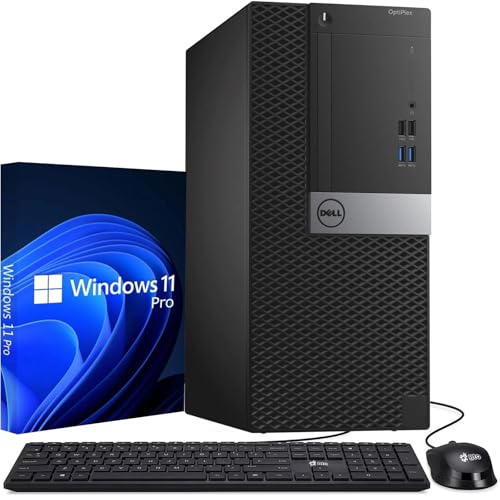

If you are setting up virtual machines, a network services box, or a small Proxmox system, the wrong desktop can leave you short on memory, storage, or wired connectivity. For a compact, low-demand setup, consider the GMKtec G3S Mini PC; for more memory and storage in a refurbished business desktop, compare the Dell OptiPlex 7050 SFF with 32GB RAM.
This guide to the best desktop computers for home lab use focuses on the differences that matter for your workloads: processor and memory, storage, Ethernet and display ports, physical size, and what to verify before buying a renewed PC.
Compare at a glance
| Product | Brand | Size | Stands out for | Price |
|---|---|---|---|---|
| 1 HP ProDesk 600 G3 SFF, Core i5-7500 | HP | Not listed | Quad-core Intel Core i5-7500 processor | Check price |
| 2 Dell OptiPlex 7050 Micro, 16GB RAM | Dell | 7.2 × 1.4 × 7 in | Compact 2-pound design | Check price |
| 3 Dell Tower Desktop, Core i7-7700 | Dell | 19 × 16 × 7 in | 1TB SSD | Check price |
| 4 Dell OptiPlex 3050 SFF, 16GB RAM | Dell | 11.2 × 3.75 × 11.5 in | Compact small-form-factor case | Check price |
| 5 Dell OptiPlex 7050 SFF, 32GB RAM | Dell | 11.5 × 3.6 × 11.4 in | 32GB of DDR4 memory | Check price |
| 6 Dell Tower Desktop, Core i7-7700 | Dell | 19 × 16 × 7 in | 512GB SSD | Check price |
| 7 GMKtec G3S Mini PC, Intel N95 | GMKtec | Not listed | Dual 4K display support | Check price |
| 8 Qehi 24-Inch All-in-One Desktop | Qehi | Not listed | Space-saving all-in-one design | Check price |
Sizes and weights as listed by the manufacturer on Amazon. Check the retailer for current price and availability.
Pros
- Quad-core Intel Core i5-7500 processor
- 256GB solid-state drive
- Keyboard and mouse included
- Windows 11 Pro
Cons
- 8GB RAM may constrain heavier multitasking
- Who should skip it: users needing demanding graphics performance
Pros
- Compact 2-pound design
- 16GB DDR4 memory
- HDMI and DisplayPort outputs
- Six USB 3.0 ports
Cons
- Who should skip it: users needing more than 256GB of included storage
Pros
- 1TB SSD
- 16GB DDR4 memory
- Built-in Wi-Fi
- Keyboard and mouse included
Cons
- 7th-generation processor
- Who should skip it: users needing a newer-generation processor

Pros
- Compact small-form-factor case
- 16GB DDR4 memory
- DisplayPort and HDMI outputs
- Keyboard and mouse included
Cons
- Who should skip it: users needing more than 256GB of internal storage

Pros
- 32GB of DDR4 memory
- 1TB SSD
- HDMI and DisplayPort outputs
- Windows 11 Pro included
Cons
- Integrated graphics
- Who should skip it: users needing a dedicated GPU
Pros
- 512GB SSD
- 16GB DDR4 memory
- Keyboard and mouse included
Cons
- Who should skip it: buyers needing confirmed graphics specifications

Pros
- Dual 4K display support
- Gigabit Ethernet and Wi-Fi 5
- Compact design with VESA mount
Cons
- 8GB RAM may constrain heavier multitasking
- Who should skip it: users needing demanding workloads

Pros
- Space-saving all-in-one design
- 16GB RAM
- Adjustable anti-glare display
- Included keyboard and mouse
Cons
- 256GB storage may constrain larger file collections
- Processor model and port details are unspecified
- Who should skip it: users needing detailed processor or graphics specifications
Best Compact Home Lab Desktop: GMKtec G3S Mini PC, Intel N95
GMKtec G3S Mini PC, Intel N95 is the compact pick for a light-duty setup, with an Intel N95 processor, 8GB RAM, 256GB M.2 SSD, and Gigabit Ethernet. Its two HDMI 2.0 outputs support dual 4K displays, though display support alone does not indicate how many services or virtual machines it can handle.
Skip it if your planned services need more than 8GB of memory or you need a larger internal storage configuration, which the product details do not specify.
Best for Several Virtual Machines: Dell OptiPlex 7050 SFF, 32GB RAM
Dell OptiPlex 7050 SFF, 32GB RAM stands out among these listings for its 32GB DDR4 memory and 1TB SSD. Its Core i7-7700 and Ethernet port make it a plausible starting point for a home server or virtualization host, but the listing does not describe available memory slots or internal expansion capacity.
Skip it if you need a newer processor generation, confirmed upgrade headroom, or a warranty longer than the seller’s stated 90 days.
Related guides: Best Desktop Computers for Home Office, Best Desktop Computer for Data Analysis and Best Desktop Computers for Content Creators.
Best Small-Form-Factor Balance: Dell OptiPlex 3050 SFF, 16GB RAM
Dell OptiPlex 3050 SFF, 16GB RAM combines a Core i5-6500, 16GB DDR4, and a 256GB SSD in a small-form-factor business desktop. The listed front and rear USB ports, RJ-45 Ethernet, DisplayPort, and HDMI give you multiple connections for peripherals and displays.
Skip it if your services need more than 16GB of memory or 256GB of included storage, or if you need the listing to confirm expandability before purchase.
Best Tower Storage Capacity: Dell Tower Desktop, Core i7-7700
Dell Tower Desktop, Core i7-7700 is the tower pick with a listed 1TB SSD, useful if your local files or containers need more included storage than the 256GB options. Its product data identifies a Core i7-7700 but does not state memory capacity or detailed port information, so check those specifications before using it as a server.
Skip it if you need confirmed 16GB or 32GB memory, a specific network port configuration, or an explicitly documented upgrade path.
Key Numbers at a Glance
- Memory ranges from 8GB on the GMKtec G3S Mini PC, Intel N95, to 32GB on the Dell OptiPlex 7050 SFF, 32GB RAM.
- Listed SSD capacity ranges from 256GB on the Dell OptiPlex 3050 SFF, 16GB RAM, to 1TB on the Dell OptiPlex 7050 SFF, 32GB RAM.
- The Dell OptiPlex 7050 Micro Computer lists six USB 3.0 ports, while the Dell OptiPlex 3050 SFF, 16GB RAM lists four USB 3.0 ports.
- The GMKtec G3S Mini PC, Intel N95 lists two HDMI 2.0 outputs and Gigabit Ethernet.
How to Choose a Desktop Computer for a Home Lab
Match Memory to Your Services
Bottom line: Start with the memory your planned services require, not the processor name. The GMKtec G3S Mini PC, Intel N95 and HP ProDesk 600 G3 SFF, Core i5-7500 each list 8GB, while the Dell OptiPlex 7050 SFF, 32GB RAM lists 32GB. More installed memory can give you more room to allocate to several virtual machines, but the listing does not establish how much any particular workload will need.
For a light service, small test environment, or single-purpose machine, 8GB may be adequate depending on your software. If you want to host several services at once, compare the 16GB and 32GB configurations and check whether the memory can be upgraded, how many slots are available, and the maximum supported capacity before purchase.
Consider Processor Age and Workload
Bottom line: Choose a processor with enough capacity for your services, and weigh age against cost and support needs. The refurbished desktops here include older Core i5-6500, i5-6500T, i5-7500, and i7-7700 processors. The HP Desktop Pro Tower, Core i3-13100 lists a 13th Gen Core i3-13100 with 4 cores and 8 threads, but its 8GB of memory may be the more immediate constraint for virtualization.
Processor model alone does not determine performance for every service. Write down whether you plan to run containers, virtual machines, file sharing, or occasional desktop tasks, then check each application’s requirements and the operating system’s support before selecting a machine.
Size Storage for System and Data
Bottom line: Make sure the included drive fits your operating system, services, and working data. Several PCs list a 256GB SSD, while the Dell OptiPlex 7050 SFF, 32GB RAM and Dell Tower Desktop, Core i7-7700 list 1TB SSDs. The larger listed capacity can reduce how soon you need external or additional storage, but the product details do not confirm spare drive bays or free M.2 slots.
If you plan to store backups, large media libraries, or virtual machine images, estimate capacity separately from the system drive. Confirm the drive interface and upgrade options for the exact configuration; do not assume that a tower or business chassis has an unused slot.
Check Ethernet, USB, and Display Connections
Bottom line: Favor wired Ethernet for a stationary server, then confirm the ports your peripherals actually use. The GMKtec G3S Mini PC, Intel N95 lists Gigabit Ethernet, while the Dell OptiPlex 7050 Micro Computer lists RJ-45 and six USB 3.0 ports. The Dell OptiPlex 3050 SFF, 16GB RAM lists RJ-45, DisplayPort, HDMI, and USB 3.0 and USB 2.0 ports.
Display outputs are useful for initial setup or local administration, but dual-display support is not the same as server capacity. Check whether you need a keyboard and monitor permanently attached, how many USB devices will stay connected, and whether your router or switch has an available Ethernet port. For network planning, see our networking equipment guides.
Account for Form Factor, Renewal, and Support
Bottom line: Pick a chassis that fits your space, and verify the exact used-PC condition and support terms. The GMKtec G3S Mini PC is described as a mini PC with VESA mounting, while the Dell OptiPlex 7050 Micro Computer is a micro desktop and several other options are SFF or tower systems. Renewed product listings can include seller-specific terms, so check the current condition details, included accessories, return terms, and warranty for the selected listing.
The Dell OptiPlex 7050 Micro Computer listing describes a minimum 90-day warranty; the Dell OptiPlex 7050 SFF, 32GB RAM listing states a 90-day seller warranty. These are different configurations and should not be treated as interchangeable. See our mini PC category if desk space is the main constraint, and compare other desktop computers for streaming if the computer will also serve as a media system.
How We Compared These Products
This guide is based on product research, not firsthand evaluation. We compared the listed processor models, memory and SSD configurations, form factors, ports, display outputs, wireless features, and stated support terms; the product page does not provide a consistent account of upgrade options, sustained server workloads, or power and cooling behavior across these models.
Which Option Fits Your Home and Devices?
For a compact system with Gigabit Ethernet and dual HDMI outputs, start with the GMKtec G3S Mini PC, Intel N95. Its 8GB RAM and 256GB SSD make it a more limited fit for memory-intensive virtualization, so choose a higher-memory configuration if your services require more room.
For a refurbished small-form-factor PC with 32GB RAM and a 1TB SSD, the Dell OptiPlex 7050 SFF, 32GB RAM has the clearest listed memory and storage combination here. Skip it if you need verified internal expansion, a newer processor, or support terms beyond its stated 90-day seller warranty.
For an SFF business desktop with 16GB RAM and multiple listed USB, Ethernet, and display connections, consider the Dell OptiPlex 3050 SFF, 16GB RAM. Skip it if 256GB of storage is insufficient and you cannot confirm a suitable storage upgrade.
Mistakes to Avoid When Choosing a Home Lab Desktop
- Choosing by processor label alone. Compare the exact processor, installed memory, and requirements of your planned services together.
- Assuming RAM or storage is expandable. Verify slot counts, drive interfaces, and supported capacities for the exact configuration before relying on an upgrade.
- Confusing display support with server capability. Dual 4K output describes monitor connectivity, not the number of virtual machines a PC can run.
- Ignoring wired network and device ports. Check the Ethernet connection and count the USB ports you need for storage, peripherals, and setup.
Frequently Asked Questions
Is the GMKtec G3S Mini PC suitable for Proxmox?
The product page names Proxmox among possible uses and lists an Intel N95, 8GB RAM, 256GB SSD, and Gigabit Ethernet. Check the requirements for your intended Proxmox version and workloads, especially memory needs, before choosing it.
How much memory should a home lab desktop have?
It depends on the operating system and services you plan to run. These listings range from 8GB to 32GB, so compare that figure with your software requirements and verify upgrade options rather than assuming the installed memory is enough.
Is a mini PC or an SFF desktop better for a small home lab?
A mini PC can suit a tight desk or mounting plan; the GMKtec G3S Mini PC, Intel N95 includes VESA mounting and lists Gigabit Ethernet. An SFF model such as the Dell OptiPlex 3050 SFF, 16GB RAM offers listed DisplayPort, HDMI, and multiple USB connections, but compare exact dimensions and upgrade options because they are not consistently stated for these listings.
Do these desktops include Wi-Fi?
Some listings specify Wi-Fi or a USB Wi-Fi adapter, including the HP ProDesk 600 G3 SFF, Core i5-7500 and Dell OptiPlex 3050 SFF, 16GB RAM. The GMKtec G3S Mini PC, Intel N95 lists Wi-Fi 5 and Gigabit Ethernet. Check the exact product configuration, and consider wired Ethernet if the desktop will remain in one place.
Can these PCs run multiple virtual machines?
The listed memory and processor configurations provide a starting point for comparison, but the product information does not establish a supported number of virtual machines. Check the requirements of the hypervisor and each guest workload, then allow for memory and storage used by the host system.





Write Your Review
No reviews yet. Be the first to share your experience!