

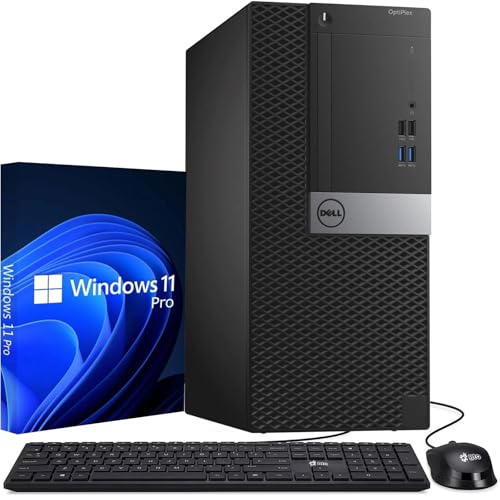


For a home office, start with the work you do and the space you have: a compact refurbished PC can suit documents and video calls, while a newer slim desktop or a bundled system can reduce setup compromises. The best desktop computers for home office use depend on your monitor connections, memory and storage needs, and whether you prefer a smaller case or an all-in-one bundle with screens and peripherals.
Compare at a glance
| Product | Brand | Size | Stands out for | Price |
|---|---|---|---|---|
| 1 Dell OptiPlex 7060 SFF, 32GB RAM | Dell | 18 × 14 × 6 in | Six-core Intel Core i7-8700 | Check price |
| 2 Dell Tower Desktop, Core i7-7700 | Dell | 19 × 16 × 7 in | 1TB SSD | Check price |
| 3 Dell OptiPlex 3050 SFF, 16GB RAM | Dell | 11.2 × 3.75 × 11.5 in | Compact small-form-factor case | Check price |
| 4 Dell OptiPlex 7050 SFF, 32GB RAM | Dell | 11.5 × 3.6 × 11.4 in | 32GB of DDR4 memory | Check price |
| 5 Dell Tower Desktop, Core i7-7700 | Dell | 19 × 16 × 7 in | 512GB SSD | Check price |
| 6 HP EliteDesk 800 G4, 16GB RAM | HP | 12.1 × 13.3 × 4 in | Includes two 24-inch monitors | Check price |
| 7 Dell OptiPlex 7040 SFF, 16GB RAM | Dell | 11.4 × 3.6 × 11.5 in | 16GB DDR4 memory | Check price |
| 8 HP ProDesk SFF, 16GB RAM | HP | 12.1 × 13.3 × 5 in | Compact Small Form Factor case | Check price |
Sizes and weights as listed by the manufacturer on Amazon. Check the retailer for current price and availability.
Best for a compact office
Pros
- Six-core Intel Core i7-8700
- 32GB DDR4 memory
- 512GB NVMe M.2 SSD
- Two DisplayPort outputs
Cons
- Who should skip it: users who need a full-size tower
Pros
- 1TB SSD
- 16GB DDR4 memory
- Built-in Wi-Fi
- Keyboard and mouse included
Cons
- 7th-generation processor
- Who should skip it: users needing a newer-generation processor
Pros
- Compact small-form-factor case
- 16GB DDR4 memory
- DisplayPort and HDMI outputs
- Keyboard and mouse included
Cons
- Who should skip it: users needing more than 256GB of internal storage

Pros
- 32GB of DDR4 memory
- 1TB SSD
- HDMI and DisplayPort outputs
- Windows 11 Pro included
Cons
- Integrated graphics
- Who should skip it: users needing a dedicated GPU
Pros
- 512GB SSD
- 16GB DDR4 memory
- Keyboard and mouse included
Cons
- Who should skip it: buyers needing confirmed graphics specifications
Best for a ready-made multi-screen desk

Pros
- Includes two 24-inch monitors
- 1TB SSD storage
- 16GB DDR4 memory
- Windows 11 Pro
Cons
- Renewed condition
- Monitor resolution is not specified
- Who should skip it: buyers needing specified graphics details
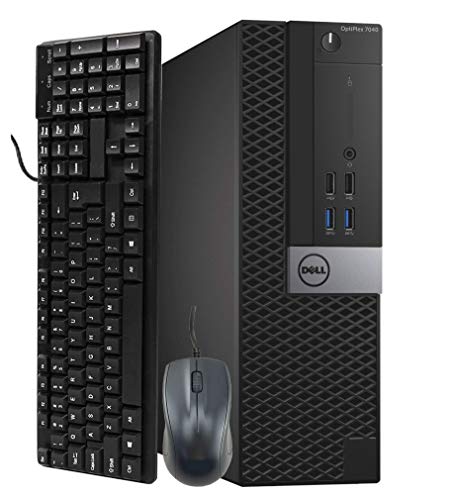
Pros
- 16GB DDR4 memory
- 256GB SSD storage
- HDMI and DisplayPort outputs
- Windows 11 Pro included
Cons
- 256GB storage may be limiting for large local libraries
- Who should skip it: users needing more than 256GB of local storage

Pros
- Compact Small Form Factor case
- 16GB RAM and 500GB SSD
- Monitor and peripherals included
Cons
- Monitor brand and model may vary
- Who should skip it: buyers needing a specified monitor model
Key Numbers at a Glance
- Memory ranges from 16GB in the Dell Tower Desktop, Core i7-7700 to 32GB in the Dell OptiPlex 7060 SFF, 32GB RAM and Dell OptiPlex 7050 SFF, 32GB RAM.
- Listed SSD capacity ranges from 256GB in the Dell Optiplex 7040 Business SFF Computer Small and Dell OptiPlex 3050 SFF, 16GB RAM to 1TB in the Dell Tower Desktop, Core i7-7700 and HP Business Tower Desktop, 1TB SSD.
- The HP EliteDesk 800 G4, 16GB RAM includes two 24-inch LCD monitors, while the HP Windows 11 Desktop Computer includes one 24-inch monitor.
- The Dell Slim Desktop, Intel Core Ultra 5-225 lists 16GB DDR5 memory and a 512GB SSD.
Best Newer Processor Option: Dell Slim Desktop, Intel Core Ultra 5-225
Dell Slim Desktop, Intel Core Ultra 5-225 stands apart from the refurbished choices with an Intel Core Ultra 5-225 processor, 16GB DDR5 memory, and 512GB SSD. Its listed display connections include HDMI 2.1 and DisplayPort 1.4a, and the product page says it can connect two 4K displays using those outputs. The trade-off is that it has Intel UHD Graphics, not a listed dedicated graphics card.
Skip it if you need a dedicated graphics card or want a bundled monitor.
Related guides: Best Desktop Computers for Home Lab, Best Desktop Computer for Data Analysis and Best Desktop Computers for Content Creators.
Best for Dual-Monitor Work: Dell OptiPlex 7060 SFF, 32GB RAM
Dell OptiPlex 7060 SFF, 32GB RAM combines an Intel Core i7-8700, 32GB RAM, a 512GB NVMe M.2 SSD, and two DisplayPort outputs. Those listed connections and memory make it a practical candidate for office multitasking across compatible DisplayPort monitors. It is a renewed system, and the listing does not specify included display cables or a monitor.
Skip it if you need HDMI display output or want a new desktop with manufacturer onsite service.
Best Complete Desk Bundle: HP EliteDesk 800 G4, 16GB RAM
HP EliteDesk 800 G4, 16GB RAM is listed with two 24-inch LCD monitors, a 1TB SSD, 16GB RAM, wireless keyboard and mouse, and speakers. That package can reduce the separate shopping needed to establish a multi-screen workstation, though monitor model details are not stated. Its Intel Core i5-8500 is an 8th-generation processor, and the product is renewed.
Skip it if you already own suitable monitors or need specific panel resolution and refresh-rate details before choosing.
Best Low-Cost Compact Pick: Dell OptiPlex 3050 SFF, 16GB RAM
Dell OptiPlex 3050 SFF, 16GB RAM lists an Intel Core i5-6500, 16GB DDR4, a 256GB SSD, HDMI, DisplayPort, and a USB Wi-Fi adapter. It covers common office connectivity and states support for two displays, including 4K output. The smaller storage capacity leaves less room for locally stored files than the 1TB options in this lineup.
Skip it if you keep a large local archive or want a newer-generation processor.
How to Choose a Desktop Computer for a Home Office
Processor and workload
Bottom line: Match the processor to your daily applications, and do not treat the Core i7 label alone as a guarantee of suitability. The listings include older Intel Core i5 and i7 processors, an 8th-generation six-core i5-8500 in the HP EliteDesk, and the newer Core Ultra 5-225 in the Dell Slim Desktop. For browser tabs, office applications, and video calls, weigh the complete configuration rather than the processor tier; the product pages do not give benchmark results. If your work includes sustained creative workloads, compare the systems in our best desktop computers for streaming guide as another workload reference.
Memory and storage
Bottom line: Choose 16GB for ordinary multitasking, and consider 32GB when your workload regularly keeps many demanding apps open. Several refurbished Dell systems list 32GB, while the HP and newer Dell options list 16GB. Storage spans 256GB SSDs to 1TB SSDs; choose capacity based on the files and applications you keep on the computer, and check whether a cloud or external-drive workflow suits you better. The Dell OptiPlex 7060 specifies an NVMe M.2 SSD, while several other listings simply say SSD.
Desk footprint and bundle contents
Bottom line: Check the case format and included screen before assuming a desktop will fit your workspace. Several products are explicitly described as small form factor or slim desktops, but exact dimensions are absent for most of them. The HP EliteDesk bundle includes two 24-inch monitors, while the HP Windows 11 Desktop Computer includes one 24-inch monitor, a webcam, keyboard, mouse, and speakers. Bundles reduce separate purchases but may limit your choice of monitor model; compare screen needs with our monitor category.
Monitor outputs and peripherals
Bottom line: Confirm the desktop’s actual video ports match your monitors before ordering. The OptiPlex 7060 lists two DisplayPort outputs; the OptiPlex 3050 lists HDMI and DisplayPort and states dual-display support. The Dell Slim Desktop lists HDMI 2.1 and DisplayPort 1.4a, with support described for two 4K displays using those outputs. Check your monitors’ input ports and resolution requirements, and verify any adapters or cables separately because they are not consistently specified.
Renewed condition, Windows, and support
Bottom line: Compare the condition and support terms as carefully as the hardware. Many products here are renewed, and some listings state a 90-day seller warranty; the Dell Slim Desktop instead lists one year of onsite service. Windows editions also differ: several refurbished PCs list Windows 11 Pro, while the Dell Slim Desktop lists Windows 11 Home and the HP Business Tower lists Windows 11 Home. Confirm the exact operating system edition, warranty provider, and renewal terms on the product page before deciding.
How We Compared These Products
This guide is based on product research, comparing the listed processors, memory, SSD capacity, case descriptions, display outputs, bundled equipment, operating system, and stated support terms. Product descriptions do not consistently include exact dimensions, upgrade details, monitor specifications, or warranty terms, so those are items to verify rather than assumptions. No firsthand evaluation is claimed.
Which Option Fits Your Home and Devices?
For a compact office with two DisplayPort monitors: Dell OptiPlex 7060 SFF, 32GB RAM lists 32GB memory and two DisplayPort outputs. Skip it if your screens require HDMI or you need a monitor included.
For a ready-made multi-screen desk: HP EliteDesk 800 G4, 16GB RAM includes two 24-inch LCDs and a 1TB SSD. Skip it if you need known monitor model and resolution specifications before purchase.
For a newer listed processor and flexible display setup: Dell Slim Desktop, Intel Core Ultra 5-225 pairs a Core Ultra 5-225 with 16GB DDR5 and lists HDMI 2.1 and DisplayPort 1.4a. Skip it if your workload calls for dedicated graphics or you need more than the listed 512GB SSD without checking upgrade options.
Mistakes to Avoid When Choosing a Home Office Desktop
- Choosing by processor label alone. Compare the processor model, memory, storage, and workload together; a Core i7 name does not tell you the whole configuration.
- Assuming every display output is interchangeable. Match the PC’s HDMI or DisplayPort output to your monitor input, and confirm resolution support and cable needs.
- Ignoring bundled equipment details. Check monitor count, screen model information, and which peripherals are included before valuing a bundle.
- Overlooking renewed status and support terms. Confirm condition, warranty provider, operating system edition, and return terms on the product page.
Frequently Asked Questions
Can these desktops run two monitors?
Some listings explicitly describe dual-monitor support. The Dell OptiPlex 7060 has two DisplayPort outputs, and the Dell OptiPlex 3050 lists HDMI and DisplayPort with support for two displays. Confirm that the ports match your monitors and check the resolution supported for your intended setup.
Is 16GB of RAM enough for a home office?
Several listed systems pair 16GB with an SSD for everyday office use, including the HP EliteDesk 800 G4 and HP Business Tower. If you work with many demanding applications at once, the Dell OptiPlex 7060 and 7050 list 32GB. The product pages do not consistently specify memory upgrade options, so confirm those before treating an upgrade as available.
Should I choose an SSD with 256GB, 512GB, or 1TB?
Choose based on how much software and data you intend to keep on the PC. The 256GB configurations have less listed capacity than the 512GB and 1TB systems, which can matter if you store large work files locally. Consider external or network storage only if it fits your backup and access needs.
Are renewed desktops suitable for work?
A renewed desktop can be a candidate if its processor, memory, ports, and storage meet your needs and its seller terms are acceptable. Many PCs in this comparison are renewed, and warranty details vary by listing. Verify condition, included accessories, return policy, and the warranty provider before relying on one for essential work.
Do these desktop PCs include monitors?
Not all of them. The HP EliteDesk 800 G4 listing includes two 24-inch LCD monitors, and the HP Windows 11 Desktop Computer listing includes one 24-inch monitor. Do not assume the other desktops include a screen; check each package’s contents.





Write Your Review
No reviews yet. Be the first to share your experience!