



If you are choosing a laptop for cybersecurity classes, office security work, or a home lab, match its memory and storage to the number of tools and virtual machines you expect to run. The Lenovo V-Series V15 lists 40GB of RAM and a Ryzen 7 processor, while budget-oriented choices such as the BLUEING 2026 Laptop list 8GB, a more restrictive starting point for multitasking.
This comparison helps you weigh that workload against screen size, Ethernet, operating system, and storage. For broader options, browse our laptop category and our guides to business laptops and budget laptops.
Compare at a glance
| Product | Brand | Size | Weight | Stands out for | Price |
|---|---|---|---|---|---|
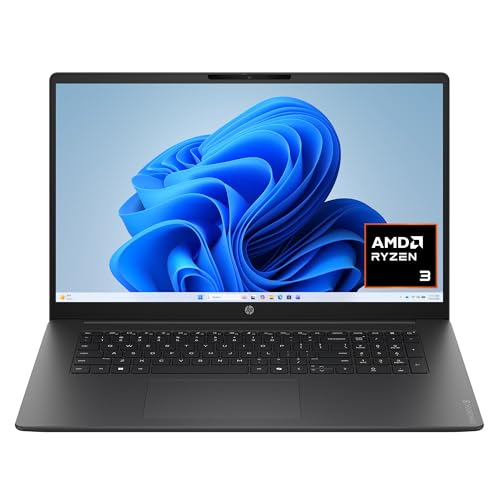
| 1 HP OmniBook 3 17.3-Inch Laptop | HP | 15.65 × 10.09 × 0.65 in | 4.4 lb | Large FHD IPS display | Check price |
| 2 Acer Aspire Go 15, 15.6-inch FHD | Acer | 14.29 × 0.78 × 9.35 in | 3.8 lb | Full HD IPS display | Check price |
| 3 Lenovo V-Series V15, Ryzen 7 | Lenovo | 14.13 × 9.29 × 0.78 in | 3.6 lb | 40GB of RAM | Check price |
| 4 1080 Graphics Cybersecurity Awareness Stickers | 1080 Graphics | Not listed | Not listed | 50 stickers across two sheets | Check price |
| 5 Tiny Detalles Cybersecurity Wooden Ornament | Tiny Detalles | 3.94 × 0.39 × 3.7 in | Not listed | Double-layer wooden construction | Check price |
| 6 BEETHIS Personalized Cybersecurity Ornament | BEETHIS | Not listed | Not listed | Customizable text | Check price |
| 7 BEETHIS Cybersecurity Ornament, 3.5-Inch | BEETHIS | Not listed | Not listed | Lightweight flat acrylic construction | Check price |
| 8 BLUEING Laptop, Pentium Gold 6500Y | BLUEING | 12.7 × 0.8 × 8.3 in | 2.9 lb | 14-inch Full HD IPS display | Check price |
| 9 Lenovo IdeaPad Slim 3i 15.6-inch Laptop | Lenovo | 14.14 × 9.31 × 0.78 in | 4.6 lb | Full HD anti-glare display | Check price |
Sizes and weights as listed by the manufacturer on Amazon. Check the retailer for current price and availability.
Best for a larger built-in display
Pros
- Large FHD IPS display
- Fast charging support
- FHD camera with HDR auto-switch
- Wi-Fi 6 and Bluetooth 5.4
Cons
- 8 GB of memory may constrain heavier multitasking
- Who should skip it: users needing more memory for demanding workloads
Best for a Full HD screen and Wi-Fi 6
Pros
- Full HD IPS display
- Wi-Fi 6 connectivity
- Two USB-C ports with DisplayPort
- HDMI 2.1 output
Cons
- 128GB onboard storage
- Who should skip it: users needing more storage or demanding workloads
Best for higher-memory multitasking
Pros
- 40GB of RAM
- 1TB PCIe NVMe SSD
- Windows 11 Pro
- Built-in numeric keypad and RJ45
Cons
- Display panel type and brightness are unspecified
- Who should skip it: buyers who need detailed display specifications

Pros
- 50 stickers across two sheets
- Compact 1-inch round format
- Stated waterproof vinyl material
Cons
- Small size may be hard to notice from a distance
- Who should skip it: anyone needing larger decals

Pros
- Double-layer wooden construction
- Gift-boxed and fully assembled
- Suitable for tree or desk display
Cons
- Who should skip it: shoppers seeking year-round decor

Pros
- Customizable text
- Lightweight, flat acrylic design
- Cybersecurity-themed artwork
Cons
- Who should skip it: shoppers seeking a dimensional ornament

Pros
- Lightweight flat acrylic construction
- Distinctive cybersecurity artwork
- Multiple display settings
Cons
- Flat design, not three-dimensional
- Who should skip it: shoppers seeking a 3D ornament
Best for a lower-cost entry point

Pros
- 14-inch Full HD IPS display
- 180-degree lay-flat hinge
- Manual webcam privacy cover
- Multiple USB ports and HDMI
Cons
- Who should skip it: users needing demanding workloads

Pros
- Full HD anti-glare display
- Numeric keypad
- USB-C, HDMI, and SD card reader
- Camera privacy shutter
Cons
- 128GB of UFS storage limits room for local files and applications
- Who should skip it: users needing more than 8GB of RAM
Best for Higher-Memory Multitasking: Lenovo V-Series V15, Ryzen 7
For higher-memory multitasking: Lenovo V-Series V15, Ryzen 7 combines 40GB RAM, a Ryzen 7 5825U with 8 cores and 16 threads, and a 1TB SSD. Those listed capacities suit buyers who need room for several applications, project files, or a lab setup, but the product page does not specify memory upgradeability or the exact display panel details beyond FHD resolution. Skip it if you need documented RAM upgrade options or a graphics processor intended for GPU-heavy work.
Best for Business Ports: Lenovo V15 G4 Laptop for Business
For business connectivity: Lenovo V15 G4 Laptop for Business lists Windows 11 Pro, 16GB RAM, a 1TB SSD, and an Ethernet RJ-45 port. Ethernet can be useful when a wired network connection is part of your workspace, though the listing describes a Ryzen 3 7320U, not a higher-tier Ryzen 7 as one feature heading suggests. Skip it if you need confirmed high-end CPU performance or detailed upgrade information before buying.
Related guides: Best Laptops for Designers, Best Laptops for DJing and Best Laptops for CAD.
Best for a Large Workspace Screen: HP OmniBook 3 17.3-Inch Laptop
For a larger built-in display: HP OmniBook 3 17.3-Inch Laptop pairs a 17.3-inch FHD IPS screen with a 512GB PCIe NVMe SSD. Its 8GB RAM is a notable constraint if your security coursework calls for multiple virtual machines or memory-intensive tools. Skip it if you prioritize higher listed RAM or a more compact display for frequent travel.
Best for Wi-Fi 6 and a Full HD Work Area: Acer Aspire Go 15, 15.6-inch FHD
For a Full HD screen and Wi-Fi 6: Acer Aspire Go 15, 15.6-inch FHD lists an 8-core Intel Core 3 N355 processor, a 15.6-inch 1920 × 1080 IPS display, and Wi-Fi 6. Its 8GB memory and 128GB UFS storage are modest for a machine expected to hold several lab environments. Skip it if your workflow needs more memory or local storage from the outset.
Best Budget Laptop Starting Point: BLUEING 2026 Laptop Computer with Gold 6500Y
For a lower-cost entry point: BLUEING 2026 Laptop Computer with Gold 6500Y lists 8GB RAM, a 256GB M.2 SATA SSD, and a 14-inch FHD IPS screen. The listing describes the Pentium Gold 6500Y as suited to lightweight office tasks, so treat it as a basic study or administration laptop rather than assuming it will comfortably handle virtualized labs. Skip it if your classes require several virtual machines or substantial local datasets.
Key Numbers at a Glance
- Listed memory ranges from 8GB on the HP OmniBook 3 17.3-Inch Laptop to 40GB on the Lenovo V-Series V15, Ryzen 7.
- Listed SSD capacity ranges from 128GB UFS on the Acer Aspire Go 15, 15.6-inch FHD to 1TB on the Lenovo V15 G4 Laptop for Business and Lenovo V-Series V15, Ryzen 7.
- Screen sizes among these laptop picks range from 14 inches on the BLUEING 2026 Laptop Computer with Gold 6500Y to 17.3 inches on the HP OmniBook 3 17.3-Inch Laptop.
- The Lenovo V15 G4 Laptop for Business and Lenovo V-Series V15, Ryzen 7 list Ethernet RJ-45; the Acer Aspire Go 15, 15.6-inch FHD lists Wi-Fi 6.
How to Choose a Laptop for Cybersecurity
Memory and virtual machines
Bottom line: Prioritize RAM if your work involves running virtual machines or several security tools at once. The Lenovo V-Series V15 lists 40GB, compared with 16GB in the Lenovo V15 G4 and 8GB in the HP, Acer, and BLUEING models. More memory can give you more room for concurrent workloads, but the listings do not establish how many virtual machines any laptop can run effectively; check your course or software requirements first.
Processor class and graphics
Bottom line: Match the processor to your tools, and do not assume a business label guarantees high performance. The Lenovo V-Series V15 lists a Ryzen 7 5825U with 8 cores and 16 threads, while the Lenovo V15 G4 lists a Ryzen 3 7320U with 4 cores and 8 threads. Most listings specify integrated graphics, so check whether any security software or specialized workload requires a dedicated GPU before choosing.
Storage capacity and type
Bottom line: Choose enough local storage for your operating system, tools, and lab files. The two Lenovo V15 configurations list 1TB SSDs, the HP lists a 512GB PCIe NVMe SSD, and the Acer lists 128GB UFS storage. Those differences affect how much you can keep locally, but the product pages do not establish free slots or upgrade paths; verify expandability if you expect your storage needs to grow.
If a smaller drive fits your budget better, compare other options in our laptops under $300 guide, then check storage type and capacity against your applications.
Ports, networking, and display connections
Bottom line: Check the exact ports you need instead of assuming every USB-C port supports every function. Both Lenovo business laptops list RJ-45 Ethernet, while the Acer includes Wi-Fi 6 and HDMI 2.1; the BLUEING laptop lists USB-C, USB-A, and HDMI. If you plan to attach an external monitor, confirm the laptop’s port capabilities and the monitor’s connection requirements, since USB-C features can differ by model.
Operating system and security workflow
Bottom line: Confirm that the operating system and account setup match your course or employer’s instructions. The Lenovo V15 G4 and Lenovo V-Series V15 list Windows 11 Pro; the Acer lists Windows 11 Home in S mode, and the HP lists Windows 11 Home. S mode and edition differences can affect your software choices, so check with your instructor or IT administrator before ordering.
A laptop’s listed features do not establish that it is secure by default or suitable for every security workflow. For general account and update practices, see CISA’s Secure Our World guidance.
How We Compared These Products
This guide is based on product research, comparing listed processors, memory, storage, displays, operating systems, ports, and wireless features. The product pages do not provide consistent details about memory upgradeability, sustained performance, or compatibility with specific cybersecurity applications, and no firsthand evaluation is documented here.
Which Option Fits Your Workload?
For heavier multitasking, start with the Lenovo V-Series V15, Ryzen 7, because its 40GB RAM and 1TB SSD lead the laptop listings in those capacities. For a wired office setup, the Lenovo V15 G4 Laptop for Business pairs 16GB RAM and a 1TB SSD with listed Ethernet; skip that configuration if your software requirements call for more memory or a specifically documented upgrade path.
For basic coursework and a larger screen, compare the HP OmniBook 3 17.3-Inch Laptop’s 17.3-inch display with the Acer Aspire Go 15, 15.6-inch FHD’s Wi-Fi 6 and 15.6-inch FHD IPS screen. Skip either if your lab requires more than the listed 8GB RAM or more local storage than its configuration offers.
Mistakes to Avoid When Choosing a Cybersecurity Laptop
- Buying by processor name alone. Compare core and thread counts, RAM, and your software’s requirements; a processor label does not describe the whole system.
- Assuming 8GB is enough for every lab. Virtual machines and concurrent applications can require more memory, so compare course requirements with the listed 8GB, 16GB, or 40GB configurations.
- Overlooking storage type and capacity. A 128GB UFS drive is not the same listed configuration as a 1TB SSD; account for applications and lab files before you choose.
- Assuming a port supports every feature. Verify the exact display, charging, and data functions you need with the manufacturer, especially for USB-C.
Frequently Asked Questions
How much RAM should a cybersecurity laptop have?
It depends on the applications and whether you will run virtual machines. These listings range from 8GB to 40GB, so use your class or employer’s requirements to decide rather than treating one configuration as universal.
Which listed laptop has the most memory?
The Lenovo V-Series V15, Ryzen 7 lists 40GB RAM. The product page does not state whether that memory is upgradeable, so verify the configuration and upgrade options before purchase.
Do these laptops have Ethernet?
The Lenovo V15 G4 Laptop for Business and Lenovo V-Series V15, Ryzen 7 list an RJ-45 Ethernet port. The other laptop descriptions do not list Ethernet, so check the exact model’s port specification if a wired connection is essential.
Is 128GB storage enough for cybersecurity coursework?
It can be limiting if you need to install several tools or keep lab files locally. The Acer Aspire Go 15 lists 128GB UFS storage, while the Lenovo V15 configurations list 1TB SSDs; compare your course software and data needs before deciding.
Can I use a laptop with Windows 11 Home for cybersecurity study?
The HP listing specifies Windows 11 Home, and the Acer specifies Windows 11 Home in S mode. Whether those editions suit your coursework depends on the required software and setup, so confirm with your instructor or IT team.






Write Your Review
No reviews yet. Be the first to share your experience!