

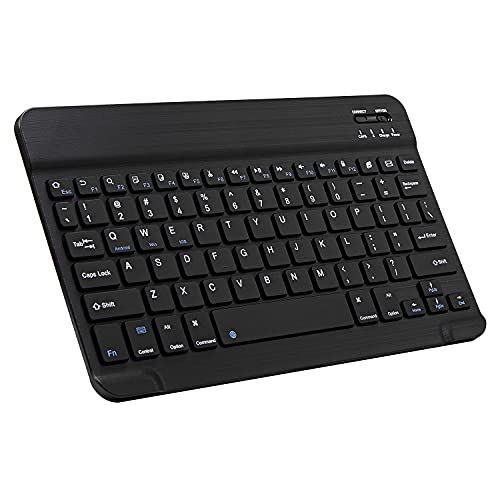


For Android users who need to type more than a short message, a compact Bluetooth keyboard can make a phone or tablet easier to use, but the right design depends on whether you need portability, a built-in stand, or a number pad. The picks here include foldable travel models, keyboards with touchpads, and options that pair with multiple devices, so check Android support and the way you plan to position your screen before choosing.
Compare at a glance
| Product | Brand | Size | Weight | Stands out for | Price |
|---|---|---|---|---|---|
| 1 Logitech Pebble Keys 2 K380s Keyboard | Logitech | 10.98 × 4.88 × 0.63 in | 0.9 lb | Switches between three paired devices | Check price |
| 2 Xukinroy 10-Inch Bluetooth Keyboard | Xukinroy | 9.85 × 5.9 × 0.24 in | 0 lb | Compact dimensions for portable use | Check price |
| 3 GOGARA Bluetooth Keyboard and Mouse Combo | GOGARA | Not listed | Not listed | Compact keyboard dimensions | Check price |
| 4 OMOTON Rechargeable Bluetooth Keyboard | OMOTON | 9.7 × 9.7 × 0.2 in | Not listed | Android, iOS, and Windows compatibility | Check price |
| 5 XCHYTECHER Universal Keyboard Case, 11-Inch | XCHYTECHER | Not listed | Not listed | Removable backlit keyboard | Check price |
| 6 Logitech K480 Multi-Device Keyboard | Logitech | 12.2 × 1.61 × 7.91 in | 1.8 lb | Switches among three connected devices | Check price |
Sizes and weights as listed by the manufacturer on Amazon. Check the retailer for current price and availability.
Pros
- Switches between three paired devices
- Slim, portable design
- Customizable Fn keys
- Batteries included
Cons
- Bluetooth connection only
- Who should skip it: users who need a wired keyboard
Pros
- Compact dimensions for portable use
- Rechargeable battery
- Compatible with iOS, iPadOS, and Android
Cons
- Who should skip it: users who prefer a full-size keyboard
Pros
- Compact keyboard dimensions
- Rechargeable keyboard battery
- Hot keys for media controls
Cons
- Mouse requires a separately purchased AAA battery
- Who should skip it: users who need a rechargeable mouse

Pros
- Android, iOS, and Windows compatibility
- Oversized keycaps
- Foldable, adjustable-angle stand
- Seven backlight color options
Cons
- Who should skip it: users needing extended backlit runtime

Pros
- Removable backlit keyboard
- Three adjustable viewing angles
- Mouse included
Cons
- Confirm tablet dimensions before ordering
- Who should skip it: tablet owners who need a model-specific fit

Pros
- Switches among three connected devices
- Integrated phone and tablet cradle
- Broad listed operating system compatibility
- Two AAA batteries included
Cons
- Limited to three connected devices
- Who should skip it: users who need a number pad
Best for Multiple Devices: Logitech Pebble Keys 2 K380s Keyboard
The Logitech Pebble Keys 2 K380s Keyboard can pair with up to three devices and switches between them using Easy-Switch buttons. Its compact design and laptop-like keys suit someone moving between a tablet, phone, and computer, although the product details list several operating systems without explicitly naming Android.
Skip it if Android compatibility is your main requirement and you want a product page that explicitly names Android support.
Best for Phone and Tablet Travel: ProtoArc XK04 Foldable Compact Keyboard for Phone
The ProtoArc XK04 Foldable Compact Keyboard for Phone folds to a pocket-sized form and connects to up to three devices over Bluetooth 5.1. Its unfolded size is 10.76 by 4.07 inches, and the PU leather cover protects it in a bag, but the compact layout is a trade-off if you prefer full-size keys.
Skip it if you need a number pad or a full-size desktop layout.
Best for a Built-In Phone Stand: Logitech K480 Wireless Multi-Device Keyboard
The Logitech K480 Wireless Multi-Device Keyboard explicitly supports Android and holds a phone or tablet in its integrated cradle. Its dial switches among three connected devices, but the cradle fits devices only up to 0.4 inches thick and 10 inches wide.
Skip it if your tablet is outside the cradle’s stated size limits or you want a foldable keyboard for a small bag.
Best for Android Typing with a Touchpad: Samsers Foldable Bluetooth Keyboard with Touchpad
The Samsers Foldable Bluetooth Keyboard with Touchpad combines a foldable keyboard, multi-touch touchpad, and phone holder, and its product details name Android compatibility. It weighs 5.53 ounces and connects over Bluetooth within a stated range of 10 meters; the listing excludes Android 3.0 and below for touchpad support.
Skip it if you need to connect multiple devices at once, since this model is specified for one device.
Key Numbers at a Glance
- The ProtoArc XK04 unfolds to 10.76 by 4.07 inches.
- The Samsers Foldable Bluetooth Keyboard with Touchpad weighs 5.53 ounces.
- The Logitech K480 cradle fits devices up to 0.4 inches thick and 10 inches wide.
- The Xukinroy Ultra-Slim Bluetooth Keyboard Portable Mini measures 9.84 by 5.9 by 0.24 inches.
How to Choose Among the Best Keyboards for Android
Confirm Android Support and Bluetooth Pairing
Bottom line: Choose a model that explicitly lists Android if dependable platform compatibility matters most. The Logitech K480, Arteck HB192, OMOTON Bluetooth Tablet Keyboard Rechargeable, and Samsers Foldable Bluetooth Keyboard with Touchpad name Android support. The Logitech Pebble Keys 2 K380s lists Windows, macOS, iPadOS, and ChromeOS, but does not name Android in its compatibility details, so verify support before buying it for an Android device.
Bluetooth keyboards connect without a physical USB receiver, but Android versions and keyboard shortcuts can vary by device. The Samsers listing specifically excludes Android 3.0 and below for touchpad support, a detail worth checking if you are using older hardware. For related comfort and layout considerations, see our guide to best keyboards for typing.
Pick a Layout That Matches Your Work
Bottom line: Compact layouts save bag space, while full-size keys and a number pad suit desk work. The Arteck HB192 has full-size keys, arrow keys, and a number pad, while the Xukinroy Ultra-Slim Bluetooth Keyboard Portable Mini measures 9.84 by 5.9 inches. A smaller keyboard is easier to carry, but a compact layout can feel cramped for long documents or spreadsheet entry.
If your priority is sustained writing, compare layout and key feel with our guides to best keyboards for writers and best keyboards for small hands. Check the product images and layout details to confirm the keys you use most are present.
Decide Whether You Need a Stand, Cradle, or Case
Bottom line: A keyboard that holds your screen can simplify a mobile setup, but fit depends on your device. The Logitech K480 has a built-in cradle for devices up to 10 inches wide and 0.4 inches thick. The OMOTON Bluetooth Tablet Keyboard Rechargeable includes a foldable stand with five adjustable angles, while the XCHYTECHER Universal Keyboard Case uses flexible corner straps and three viewing grooves.
Those designs are not interchangeable: a cradle or stand positions a device, while a case also holds it for transport. Check your tablet’s exact dimensions and case fit before ordering, especially with a universal case.
Consider Multi-Device Switching and Pointing Control
Bottom line: If you switch between devices or want cursor control, look for those features by name. The Logitech K480 and Arteck HB192 connect to three devices, as does the ProtoArc XK04; the Samsers foldable model is specified for one device and includes a multi-touch touchpad. The Logitech K400 Plus uses a USB Unifying receiver rather than Bluetooth, so confirm that your Android device has a compatible USB port and supports the receiver before choosing it.
For tablet use that needs a separate pointer, the XCHYTECHER case includes a mouse, while the GOGARA Bluetooth Keyboard and Mouse Combo pairs a keyboard and mouse. Check what connection each accessory requires and whether you want to carry or charge an additional device.
Balance Battery Life, Charging, and Backlighting
Bottom line: Compare the stated battery conditions and charging method, not just whether a keyboard is rechargeable. The OMOTON lists up to 200 hours with backlighting off and 3 to 5 hours with it on; the ProtoArc XK04 charges by USB-C and lists standby of up to 150 days. These manufacturer claims use different measures, so they are not direct comparisons of everyday runtime.
Backlighting can help when you type in dim surroundings, but it can sharply change the OMOTON’s stated usage time. The Xukinroy model lists more than 20 days when used continuously for two hours a day, while the Logitech K480 uses two AAA batteries. Check whether you prefer rechargeable power, replaceable batteries, or a backlight before settling on a design.
How We Compared These Products
This guide is based on product research, comparing listed dimensions, layouts, Bluetooth or receiver connections, Android compatibility, device switching, stands, and battery claims. Product pages do not provide the same details for every model, and manufacturer battery figures are not directly comparable. We did not independently evaluate these keyboards.
Which Option Fits Your Home and Devices?
If you want a phone held at the keyboard and a dial for switching among three devices, the Logitech K480’s built-in cradle and multi-device control are the clearest fit, provided your phone or tablet is within its size limits. If portability and Android support matter more, the Samsers Foldable Bluetooth Keyboard with Touchpad combines a 5.53-ounce foldable design with a phone holder and touchpad.
For longer desk sessions with number entry, the Arteck HB192’s full-size layout and number pad may suit you better than a pocket keyboard. If typing comfort is your main concern, our best keyboards for arthritis guide covers other layout and comfort considerations.
Mistakes to Avoid When Choosing an Android Keyboard
- Assuming every Bluetooth keyboard supports Android. Check the compatibility list for your operating system and device.
- Ignoring the screen holder’s fit limits. Compare your device’s width and thickness with the Logitech K480 cradle or the case dimensions before buying.
- Choosing portability without considering layout. Foldable and compact designs save space, while a full-size layout such as the Arteck HB192 includes a number pad.
- Overlooking connection details. Bluetooth models and the Logitech K400 Plus with its USB receiver have different connection requirements; verify the port and support available on your Android device.
Frequently Asked Questions
Will a Bluetooth keyboard work with an Android phone?
Android devices can support external Bluetooth keyboards, but compatibility depends on the device and its software. Check that the keyboard names Android support and confirm the pairing steps in its instructions.
Which is better for an Android phone, the Logitech K480 or the Samsers foldable keyboard?
The Logitech K480 suits a desk setup where its cradle and dial for three connected devices are useful. The Samsers model is the more portable design, with a foldable body, phone holder, and touchpad, and its product details name Android compatibility.
Can I connect one keyboard to multiple devices?
Several listed keyboards support switching among up to three connected devices, including the Logitech K480, Arteck HB192, and ProtoArc XK04. The Samsers model is specified for one device, so check the individual product details if multi-device switching is essential.
Do Android keyboards need a separate stand?
Not always. The Logitech K480 has an integrated cradle, the Samsers model includes a phone holder, and the OMOTON package includes a stand with five adjustable angles. A separate stand may be useful with a keyboard that does not hold your device.
Should I choose a foldable keyboard or a full-size one?
Choose a foldable design such as the ProtoArc XK04 or Samsers model if packing size matters. For a number pad and full-size keys, the Arteck HB192 is the clearer match, although it is less focused on pocketable travel.




Write Your Review
No reviews yet. Be the first to share your experience!