



If you type all day, the right keyboard depends on your desk space, preferred key feel, and whether you need a number pad or a wireless connection. This guide to the best keyboards for typing compares compact and full-size layouts, membrane and mechanical designs, and options for quiet offices or gaming setups.
Compare at a glance
| Product | Brand | Size | Weight | Stands out for | Price |
|---|---|---|---|---|---|
| 1 AULA S99 Wireless Membrane Keyboard | AULA | 17.4 × 7.28 × 2 in | Not listed | Three connection modes | Check price |
| 2 Logitech G413 SE Full-Size Mechanical Keyboard | Logitech G | 17.13 × 1.97 × 1.43 in | 1.7 lb | Full-size layout includes a number pad | Check price |
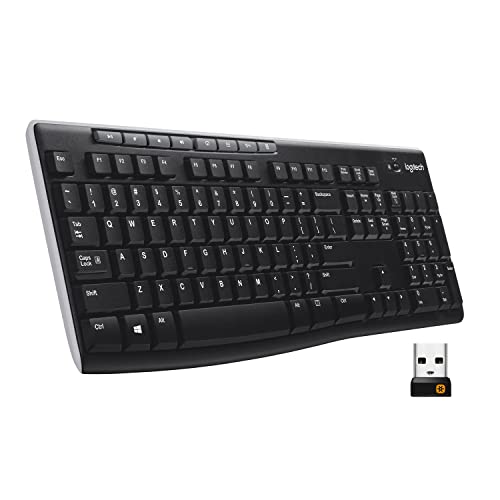
| 3 Logitech K270 Full-Size Wireless Keyboard | Logitech | 0.75 × 5.75 × 17.25 in | 1.1 lb | Familiar full-size layout with number pad | Check price |
| 4 RECCAZR Wireless Keyboard and Mouse Combo | RECCAZR | Not listed | 1.3 lb | Full-size keyboard with numeric keypad | Check price |
| 5 Amazon Basics Full-Sized Wired Keyboard | Amazon Basics | 17.39 × 5.01 × 1.06 in | 1 lb | Simple USB setup | Check price |
| 6 AULA F99 96% Wireless Mechanical Keyboard | AULA | 5.78 × 1.67 × 15.38 in | 3.3 lb | Three connection modes | Check price |
| 7 KNOWSQT Wireless Keyboard and Mouse Combo | KNOWSQT | Not listed | 1.6 lb | Full-size 104-key layout with number pad | Check price |
| 8 Redragon K668 108-Key Hot-Swap Keyboard | Redragon | 17.3 × 4.7 × 17.3 in | 1.9 lb | Hot-swappable 3-pin and 5-pin switch support | Check price |
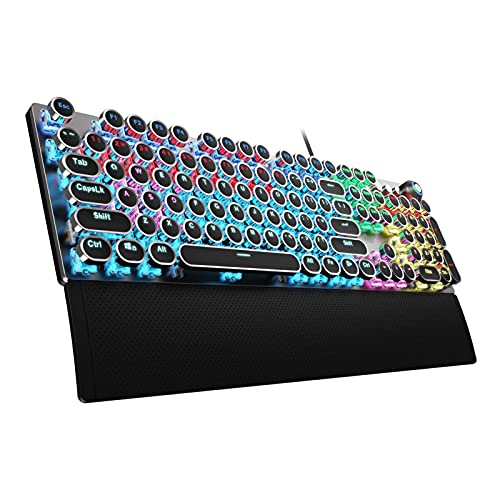
| 9 AULA F2088 Mechanical Keyboard with Blue Switches | AULA | 17.13 × 4.84 × 1.5 in | 2.2 lb | Dedicated media and lighting controls | Check price |
Sizes and weights as listed by the manufacturer on Amazon. Check the retailer for current price and availability.
Pros
- Three connection modes
- Integrated numeric keypad
- Full-key macro programming
- Three programmable shortcut keys
Cons
- Membrane design does not support hot-swapping
- Who should skip it: users seeking a compact layout
Pros
- Full-size layout includes a number pad
- PBT keycaps
- Dedicated FN media controls
- White LED backlighting
Cons
- Who should skip it: anyone needing a wireless keyboard
Best for a simple full-size wireless setup
Pros
- Familiar full-size layout with number pad
- Eight convenient multimedia hotkeys
- Long stated battery life
- Plug-and-play USB receiver setup
Cons
- Who should skip it: users without a free USB-A port
Best for a shared office

Pros
- Full-size keyboard with numeric keypad
- Quiet keyboard and mouse
- Three adjustable mouse DPI settings
- Shared receiver needs one USB port
Cons
- Who should skip it: users who need a free USB port

Pros
- Simple USB setup
- Full-sized QWERTY layout
- Convenient media and volume hot keys
Cons
- Wired connection
- Stated Windows compatibility stops at Windows 10
- Who should skip it: users who need a wireless keyboard

Pros
- Three connection modes
- Hot-swappable 3-pin and 5-pin switches
- Compact layout retains number area
- Double-shot PBT keycaps
Cons
- Who should skip it: buyers who need a stated battery runtime

Pros
- Full-size 104-key layout with number pad
- Keyboard and mouse share one receiver
- Detachable keycaps and included cleaning brush
Cons
- USB-C devices may require an adapter
- Who should skip it: users needing Bluetooth connectivity

Pros
- Hot-swappable 3-pin and 5-pin switch support
- Four dedicated, software-reassignable shortcut keys
- Full-size layout with anti-ghosting
- Adjustable feet and two keycap sets
Cons
- Full-size layout takes more desk space
- Who should skip it: users who need a compact keyboard
Pros
- Dedicated media and lighting controls
- Removable magnetic wrist rest
- Aluminum alloy panel
- Three customizable lighting settings
Cons
- Who should skip it: people who need a quiet keyboard
Best Overall Typing Keyboard: Logitech G413 SE Full-Size Mechanical Keyboard
Logitech G413 SE Full-Size Mechanical Keyboard pairs tactile mechanical switches with a full-size layout, PBT keycaps, and a brushed aluminum-magnesium top case. Its wired connection and white backlighting are straightforward, but the product page does not list Bluetooth or 2.4 GHz wireless support. Skip it if you need a wireless keyboard or prefer quiet membrane keys.
Best Budget Wired Typing Keyboard: Amazon Basics Full-Sized Wired Keyboard
Amazon Basics Full-Sized Wired Keyboard keeps setup simple with a USB connection, familiar QWERTY layout, and media hotkeys. Its listing describes Windows compatibility, so check your operating system before choosing it for a Mac or tablet. Skip it if you want wireless connectivity or mechanical switches.
Related guides: Best Keyboards for Gaming and Typing, Best Keyboards for Coding and Best Keyboards for Authors.
Best Quiet Wireless Typing Combo: RECCAZR Wireless Keyboard and Mouse Combo Silent
RECCAZR Wireless Keyboard and Mouse Combo Silent combines a full-size membrane keyboard, a number pad, and a quiet mouse using one shared USB receiver. It lists Windows, Mac OS, Chrome OS, and Linux support, plus adjustable keyboard tilt legs. Skip it if you need Bluetooth, a wired keyboard, or mechanical switches.
Best Compact Wireless Mechanical Keyboard: AULA F75 Pro 75% Wireless Keyboard
AULA F75 Pro 75% Wireless Keyboard saves desk space with an 81-key layout while retaining arrow keys, and it offers Bluetooth 5.0, 2.4GHz wireless, and USB wired connections. Its hot-swap support accepts 3-pin or 5-pin switches, but the compact layout omits a dedicated number pad. Skip it if frequent number entry makes a full-size layout more practical.
Key Numbers at a Glance
- The AULA S99 Wireless Membrane Keyboard has 99 keys, while the Amazon Basics Full-Sized Wired Keyboard has a standard full-size layout.
- The AULA F75 Pro 75% Wireless Keyboard has 81 keys; the AULA F99 96% Wireless Mechanical Keyboard has 99 keys and a number area.
- The Logitech K270 Full-Size Wireless Keyboard lists a 24-month battery life.
- The AULA F99 96% Wireless Mechanical Keyboard lists an 8000mAh battery, compared with 4000mAh for the AULA F75 Pro 75% Wireless Keyboard.
- The Redragon K668 108-Key Hot-Swap Wired RGB has 108 keys, including four extra shortcut keys.
How to Choose the Best Keyboards for Typing
Choose a layout that fits your work
Bottom line: Keep a number pad if your work involves frequent numeric entry, and choose a compact layout when desk space matters more. The AULA F75 Pro 75% Wireless Keyboard has 81 keys and arrow keys, while the AULA S99 Wireless Membrane Keyboard has 99 keys and an integrated numeric keypad. The 96% AULA F99 also keeps a number area in a more compact layout than a conventional full-size board. Check which keys you rely on before choosing a smaller footprint.
Match the key feel and sound to your setting
Bottom line: Pick membrane keys for a softer, quieter office setup, or mechanical switches if you want a more defined key response. The RECCAZR Wireless Keyboard and Mouse Combo Silent uses soft membrane keys, while the Logitech G413 SE Full-Size Mechanical Keyboard has tactile mechanical switches. The AULA F2088 Typewriter Style Mechanical uses blue switches described as crisp and clicky, a sound profile that may be disruptive in a shared room. Switch type alone does not establish an exact sound level, so consider your surroundings and preference.
Check connection type and device support
Bottom line: Match the keyboard’s connection to the ports and devices you actually use. The Logitech K270 Full-Size Wireless Keyboard uses a USB receiver, and the RECCAZR combo uses one shared nano receiver for its keyboard and mouse. The AULA S99 Wireless Membrane Keyboard supports Bluetooth 5.0, 2.4GHz wireless, and USB-C wired connections; its listing names Windows, Mac, Android, and iOS. If your laptop has only USB-C ports, check whether an adapter is needed for a USB receiver.
Decide whether customization is worth the trade-off
Bottom line: Hot-swap switches are useful if you want to change a mechanical keyboard’s feel without soldering. The Redragon K668 108-Key Hot-Swap Wired RGB and AULA F75 Pro 75% Wireless Keyboard support 3-pin or 5-pin switch replacement. The AULA S99 Wireless Membrane Keyboard is a membrane model and does not support hot-swapping. Choose a fixed design if you do not plan to customize switches, and confirm replacement switch compatibility before buying a hot-swap model.
Consider wireless power and desk setup
Bottom line: A wireless keyboard frees the cable, but battery and receiver needs become part of your setup. The Logitech K270 lists up to 24 months of battery life, while the AULA F99 96% Wireless Mechanical Keyboard lists an 8000mAh rechargeable battery. The AULA F75 Pro lists a 4000mAh battery and supports wired use as well as two wireless modes. Battery life depends on use, and the product pages do not give a directly comparable runtime for the rechargeable models.
How We Compared These Products
This comparison uses listed keyboard layouts, switch types, connection methods, operating system compatibility, customization features, and battery information. Customer ratings appear in the product data, but review counts are listed as zero, so they do not establish a customer consensus. We based this guide on product research, not firsthand evaluation.
Which Option Fits Your Home and Devices?
For a shared office where quieter typing matters: RECCAZR Wireless Keyboard and Mouse Combo Silent has soft membrane keys and a quiet mouse, and its shared receiver connects both devices. Skip it if you need Bluetooth or a mechanical key feel.
For a compact desk and mechanical customization: AULA F75 Pro 75% Wireless Keyboard combines an 81-key layout with three connection modes and hot-swap support for 3-pin or 5-pin switches. Skip it if you need a dedicated number pad.
For a simple full-size wireless setup: Logitech K270 Full-Size Wireless Keyboard includes a number pad, eight multimedia keys, and a USB receiver, with a listed battery life of 24 months. Skip it if you need Bluetooth, Mac compatibility, or mechanical switches. For more peripheral options, browse the keyboards category.
Mistakes to Avoid When Choosing a Typing Keyboard
- Choosing by appearance alone. Retro round keycaps or RGB lighting do not tell you whether the layout and switch feel suit long typing sessions; check the key type and layout.
- Assuming compact means complete. The 81-key AULA F75 Pro 75% Wireless Keyboard does not have a dedicated number pad, so consider how often you enter numbers.
- Ignoring the receiver connection. Several wireless models use a USB receiver; check your computer’s available ports and whether you have a suitable adapter.
- Expecting every operating system to work the same way. Compatibility listings differ by product, so verify the exact keyboard’s stated support before buying.
Frequently Asked Questions
Are mechanical keyboards better for typing?
Not for everyone. Mechanical switches offer a different key feel, and the listed models include tactile Logitech switches, linear switches on the AULA F99, and clicky blue switches on the AULA F2088. Membrane models such as the Logitech K270 and RECCAZR combo may suit buyers who prefer a quieter, softer typing style.
Which keyboard is quieter for a shared office?
The RECCAZR Wireless Keyboard and Mouse Combo Silent is specifically described as using a silent structure and soft membrane keys. The AULA F2088 Typewriter Style Mechanical has blue switches described as clicky, so it is a less suitable choice if audible key clicks would bother nearby people. No sound measurements are listed.
Can I use these keyboards with a Mac?
Compatibility varies. The Logitech G413 SE lists Windows and macOS, and the AULA S99 lists Mac alongside Windows, Android, and iOS. The Amazon Basics wired model is described for Windows, so check its compatibility details before choosing it for a Mac.
Should I choose a full-size or compact keyboard?
A full-size keyboard is a practical choice if you use a number pad regularly. Compact models such as the 81-key AULA F75 Pro free up desk space but omit a dedicated number pad; the 99-key AULA F99 keeps a number area in a compact 96% layout.
What does hot-swappable mean on these keyboards?
Hot-swap support lets you replace compatible mechanical switches without soldering. The Redragon K668 and AULA F75 Pro list support for 3-pin or 5-pin switches, while the AULA S99 is a membrane keyboard and does not support hot-swapping.
Do wireless keyboards connect over Bluetooth?
Some do, but wireless does not always mean Bluetooth. The AULA S99, AULA F99, and AULA F75 Pro list Bluetooth, 2.4GHz wireless, and wired modes; the Logitech K270 uses a USB receiver. Check the connection methods for the exact model you are considering.


Write Your Review
No reviews yet. Be the first to share your experience!