

If you write at a shared desk, a loud clicky keyboard could distract someone nearby, while a wireless model can reduce cable clutter but still needs a receiver or Bluetooth pairing. This guide to the best keyboards for writers compares retro-style options by switch feel, layout, connectivity, and device support so you can match the keyboard to your workspace and writing habits.
Compare at a glance
| Product | Brand | Size | Stands out for | Price |
|---|---|---|---|---|
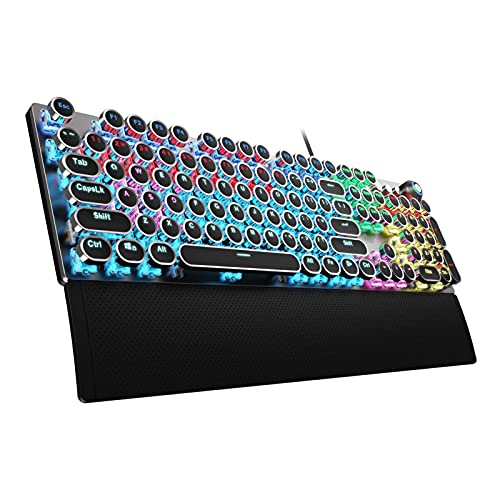
| 1 AULA F2088 Mechanical Keyboard with Blue Switches | AULA | 17.13 × 4.84 × 1.5 in | Dedicated media and lighting controls | Check price |
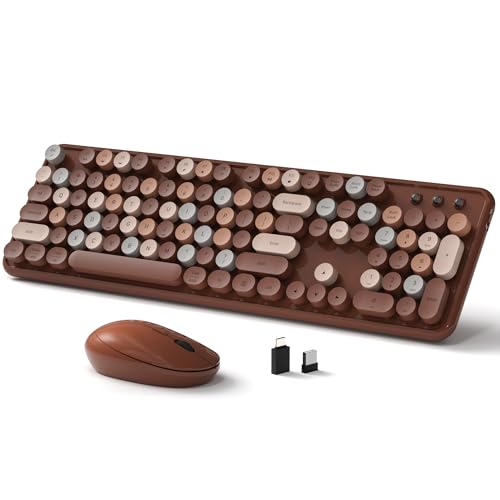
| 2 Links9+ Retro Wireless Keyboard and Mouse | Links9+ | Not listed | Full-size retro-style keyboard | Check price |
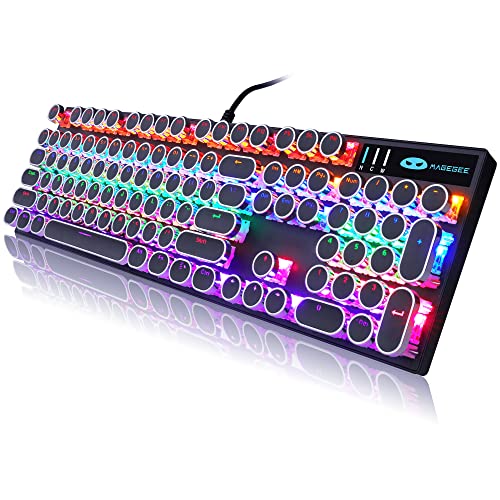
| 3 Camiysn 104-Key Mechanical Keyboard | Camiysn | 17.09 × 4.93 × 1.34 in | Full 104-key layout | Check price |
| 4 STIVIC Wireless Retro Keyboard and Mouse Combo | STIVIC | Not listed | Full-size 104-key layout | Check price |
| 5 YSCP Retro Mechanical Keyboard, Blue Switches | YSCP | 17.12 × 4.96 × 1.37 in | Full-size 104-key layout | Check price |
| 6 SABLUTE Backlit Wireless Keyboard and Mouse | SABLUTE | 17.1 × 6.3 × 1.4 in | Works with Mac, Windows, Linux, and Chrome OS | Check price |
| 7 RK Royal Kludge S108 Blue-Switch Keyboard | RK ROYAL KLUDGE | 17.4 × 7.2 × 1.6 in | Full-size layout with number pad | Check price |
| 8 SEUNKWANG Typewriter Keyboard, Blue Switches | SEUNKWANG | Not listed | Three connection modes | Check price |
| 9 Adventurers Retro 83-Key Bluetooth Keyboard | Adventurers | 12.6 × 6.6 × 1.6 in | Bluetooth support for up to three devices | Check price |
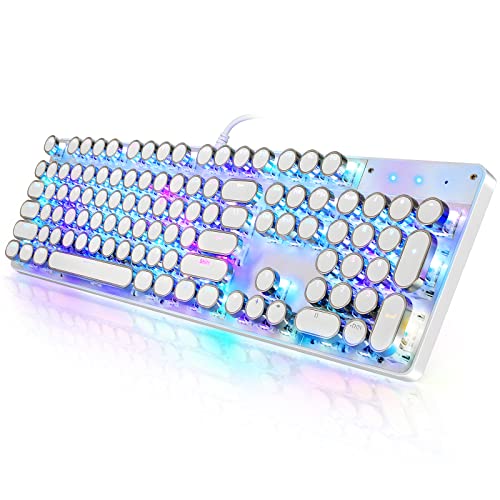
| 10 FINEDAY Keyboard 2.0 Plus, Blue Switch | FINEDAY | 18.91 × 7.37 × 3.41 in | Full-size 104-key layout | Check price |
Sizes and weights as listed by the manufacturer on Amazon. Check the retailer for current price and availability.
Best for a full-size wired setup
Pros
- Dedicated media and lighting controls
- Removable magnetic wrist rest
- Aluminum alloy panel
- Three customizable lighting settings
Cons
- Who should skip it: people who need a quiet keyboard
Pros
- Full-size retro-style keyboard
- Shared receiver for keyboard and mouse
- Three mouse DPI settings
- Twelve multimedia hotkeys
Cons
- Who should skip it: buyers who need included batteries
Pros
- Full 104-key layout
- Adjustable RGB lighting
- Round, double-injection keycaps
- 26 anti-ghosting keys
Cons
- Who should skip it: users who need quiet typing

Pros
- Full-size 104-key layout
- One receiver for both devices
- Three adjustable mouse DPI settings
- AA batteries included
Cons
- Who should skip it: users needing confirmed support beyond listed Windows versions
Pros
- Full-size 104-key layout
- Adjustable RGB backlighting and sidelights
- Interchangeable round and standard keycap styles
Cons
- Who should skip it: users seeking quiet typing
Best for a wireless set with desk extras

Pros
- Works with Mac, Windows, Linux, and Chrome OS
- One receiver connects the keyboard and mouse
- Detachable magnetic wrist rest
- Built-in phone holder
Cons
- Who should skip it: buyers who need stated battery runtime

Pros
- Full-size layout with number pad
- Customizable per-key RGB lighting
- Detachable wrist rest
- Compatible with Windows, Mac, and Linux
Cons
- Who should skip it: users who need quiet switches

Pros
- Three connection modes
- Pairs with up to five devices
- Rechargeable 5,000mAh battery
- Eighteen white backlight modes
Cons
- Clicky switches produce audible keystrokes
- Who should skip it: users needing a quiet keyboard

Pros
- Bluetooth support for up to three devices
- White LED backlighting
- Compact 83-key layout
Cons
- Who should skip it: users who need quiet typing
Best for switching among several devices

Pros
- Full-size 104-key layout
- Bluetooth, 2.4G, and USB connectivity
- Built-in 5000mAh battery
- Integrated device stand
Cons
- Who should skip it: users who need quiet typing
Key Numbers at a Glance
- Full-size layouts with number pads: AULA F2088 Typewriter Style Mechanical, Links9+ Colorful Wireless Keyboard and Mouse Combo, and STIVIC Wireless Keyboard and Mouse Combo each specify 104 keys.
- Compact layout: Adventurers Typewriter-Style Retro Mechanical specifies 83 keys, compared with 104 keys on AULA F2088 Typewriter Style Mechanical.
- Largest stated battery capacity: FINEDAY Keyboard 2.0 and SEUNKWANG Wireless Typewriter Style Mechanical each list a 5000mAh battery.
- Longest stated wireless range: SABLUTE Wireless Keyboard and Mouse lists up to 33 feet, compared with up to 28 feet for STIVIC Wireless Keyboard and Mouse Combo.
Best for Full-Size Retro Typing: AULA F2088 Typewriter Style Mechanical
For a full-size wired setup: AULA F2088 Typewriter Style Mechanical combines 104 keys with a media and lighting control knob. Its detachable magnetic wrist rest and 19 lighting effects add desk flexibility, while the blue switches are clicky. Skip it if you need wireless connectivity or a quieter typing sound.
Related guides: Best Keyboards for Arthritic Hands, Best Keyboards for Gaming and Typing and Best Keyboards for Arthritis.
Best for Wireless Multi-Device Use: FINEDAY Keyboard 2.0
For switching among several devices: FINEDAY Keyboard 2.0 supports Bluetooth connections to three devices, a 2.4GHz receiver connection, and USB, with the listing describing up to five devices across those connections. It also has a 5000mAh battery and an integrated device stand. Skip it if you prefer quiet switches, since its blue switches are tactile and clicky.
Best for a Wireless Writing Desk: SABLUTE Wireless Keyboard and Mouse
For a cordless keyboard-and-mouse setup: SABLUTE Wireless Keyboard and Mouse uses one 2.4GHz receiver for both devices and lists a wireless range of up to 33 feet. The set also includes a magnetic wrist rest and phone holder, and both devices charge via USB-C. Skip it if you want a wired connection or a plain keyboard without a bundled mouse.
How to Choose the Best Keyboards for Writers
Switch sound and feel
Bottom line: Pick clicky blue switches only if their sound suits your room. The AULA F2088, RK ROYAL KLUDGE S108, and FINEDAY Keyboard 2.0 all specify blue switches with audible clicks; the AULA listing also describes tactile feedback. That response can appeal if you enjoy a pronounced keystroke, but it is a poor fit for quiet shared spaces or calls where keyboard noise matters. The product data does not identify a quiet-switch model, so check the switch type and sound expectations before buying.
Layout and desk space
Bottom line: Choose a full-size keyboard if you regularly use a number pad, and a compact layout if desk space matters more. Several models, including the AULA F2088, specify 104 keys and a number pad, while the Adventurers keyboard has 83 keys. The compact model connects to up to three devices via Bluetooth, but the listing does not specify a number pad. Measure your available desk area and consider whether you use number-entry keys often before choosing.
Wired, receiver, or Bluetooth
Bottom line: Match the connection to your computer’s available ports and how often you switch devices. The wired AULA F2088 connects by USB, while STIVIC Wireless Keyboard and Mouse Combo uses one 2.4GHz USB receiver for both peripherals. FINEDAY Keyboard 2.0 offers Bluetooth, a 2.4GHz receiver, and USB; its listing describes connecting up to five devices across the available modes. Check whether your computer has a suitable USB port or Bluetooth support, and confirm which connection modes you actually plan to use.
Battery and charging needs
Bottom line: If you want rechargeable power, look for a stated battery and charging method. FINEDAY Keyboard 2.0 and SEUNKWANG Wireless Typewriter Style Mechanical each specify a 5000mAh battery; SEUNKWANG says it charges via USB-C. By contrast, STIVIC Wireless Keyboard and Mouse Combo uses one AA battery for each device, and Links9+ Colorful Wireless Keyboard and Mouse Combo also requires an AA battery for each, which is not included. Battery capacity alone does not establish how long a keyboard runs, so check for runtime information if charging frequency is a priority.
Comfort features and extras
Bottom line: Treat wrist rests and desk extras as fit details, not proof of ergonomic comfort. The AULA F2088 has a detachable magnetic wrist rest, while SABLUTE Wireless Keyboard and Mouse includes a soft magnetic wrist rest and a built-in phone holder. The RK ROYAL KLUDGE S108 lists a detachable wrist rest. These features may affect how the keyboard fits your routine, but the listings do not establish that every wrist position will feel comfortable. Check the keyboard’s angle and available desk depth, and consider whether a separate wrist rest works better for your setup.
How We Compared These Keyboards
This guide is based on product research, comparing listed switch types, layouts, connection methods, battery details, device support, and included features. Product descriptions do not establish typing comfort or noise levels in your specific room, and no firsthand evaluation is claimed here. Customer feedback is not used to make unsupported claims about long-term reliability.
Which Option Fits Your Home and Devices?
For full-size wired typing: AULA F2088 Typewriter Style Mechanical pairs a 104-key layout with a detachable wrist rest and media controls. Skip it if a cable or clicky blue switches do not suit your setup.
For switching between work devices: FINEDAY Keyboard 2.0 supports Bluetooth, 2.4GHz, and USB connections, and its listing describes up to five devices across those modes. Skip it if your priority is a quiet keyboard or a simpler single-device setup.
For a wireless set with desk extras: SABLUTE Wireless Keyboard and Mouse combines one receiver for both devices with a phone holder and USB-C charging. Skip it if you only need a keyboard or would rather avoid wireless peripherals.
Mistakes to Avoid When Choosing a Writer’s Keyboard
- Choosing by appearance alone. Retro round keycaps do not tell you whether a keyboard uses loud switches, includes a number pad, or fits your desk. Check the switch and layout details.
- Assuming wireless means Bluetooth. STIVIC Wireless Keyboard and Mouse Combo uses a 2.4GHz receiver, while Adventurers Typewriter-Style Retro Mechanical specifies Bluetooth. Confirm the connection your device supports.
- Overlooking the number pad. A 104-key layout and an 83-key layout serve different desk and data-entry needs. Check the key count and layout before ordering.
- Assuming all wireless models recharge the same way. Some use replaceable AA batteries, while FINEDAY Keyboard 2.0 and SEUNKWANG Wireless Typewriter Style Mechanical list rechargeable 5000mAh batteries. Verify the charging or battery arrangement for the exact model.
Frequently Asked Questions
Are blue-switch keyboards good for writing?
They can suit writers who like tactile feedback and an audible click. Models such as the AULA F2088 and RK ROYAL KLUDGE S108 specify blue switches, so consider room noise and nearby people before choosing one.
Which keyboard is better for a compact desk?
Adventurers Typewriter-Style Retro Mechanical specifies 83 keys, fewer than the 104-key AULA F2088. The product page gives the Adventurers model’s dimensions as 12.8 by 6.6 by 1.6 inches, which you can compare with your available desk space.
Can these keyboards connect to both Mac and Windows?
Several listings state support for both systems, including AULA F2088 Typewriter Style Mechanical and FINEDAY Keyboard 2.0. Support details vary by model, so check the product listing for your operating system and confirm that the key layout suits your preferred shortcuts.
Does a wireless keyboard need a USB receiver?
It depends on the connection. STIVIC Wireless Keyboard and Mouse Combo uses a shared 2.4GHz nano receiver, while Adventurers Typewriter-Style Retro Mechanical connects through Bluetooth. Check your computer’s ports and Bluetooth capability before deciding.
Which keyboard includes a wrist rest?
The AULA F2088 and RK ROYAL KLUDGE S108 list detachable wrist rests, and SABLUTE Wireless Keyboard and Mouse lists a magnetic wrist rest. The materials and design differ, so check each listing and consider whether the rest can be removed or positioned as you prefer.
Where can I compare more keyboard and peripheral guides?
Browse the keyboards category for related keyboard coverage, or explore the broader PC peripherals category for other desk devices.


Write Your Review
No reviews yet. Be the first to share your experience!