


If stiff or sore hands make long typing sessions uncomfortable, start with the keyboard shape and key layout you can use with the least strain. The Logitech Wave Keys Ergonomic Keyboard offers a wavy layout and cushioned palm rest, while the Logitech ERGO K860 Split Keyboard has a curved split design; compact one-handed models instead suit specific gaming tasks, not general typing.
This guide to the best keyboards for arthritic hands compares ergonomic features, connection choices, and work or gaming layouts. For a closer look at a related need, see our guide to best keyboards for arthritis.
Compare at a glance
| Product | Brand | Size | Weight | Stands out for | Price |
|---|---|---|---|---|---|
| 1 Logitech Wave Keys Ergonomic Keyboard | Logitech | 14.8 × 8.62 × 1.18 in | 2.2 lb | Cushioned memory foam palm rest | Check price |
| 2 Arteck Split Ergonomic Wireless Keyboard | Arteck | 16.5 × 9.6 × 1.02 in | Not listed | Split ergonomic design | Check price |
| 3 Logitech ERGO K860 Split Keyboard | Logitech | 9.17 × 17.95 × 1.89 in | 0 lb | Curved split ergonomic layout | Check price |
| 4 CHONCHOW 35-Key One-Handed Gaming Keyboard | CHONCHOW | 8.6 × 6.7 × 1.3 in | Not listed | Compact one-handed layout | Check price |
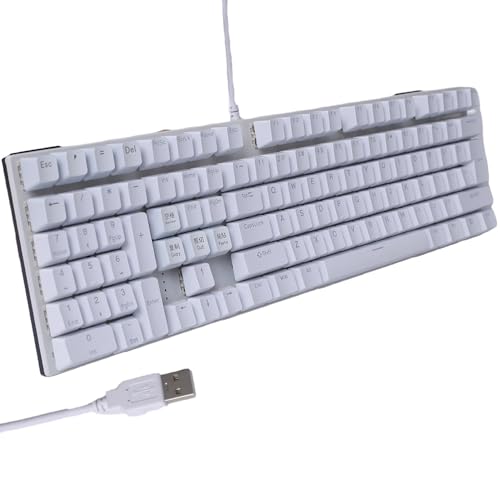
| 5 Urby King Mills Southpaw Left-Hand Keyboard | Urby | Not listed | Not listed | Left-side numeric keypad | Check price |
| 6 JUMPLAWN Half-Finger Gloves, XL | JUMPLAWN | 9.45 × 3.94 × 0.39 in | 0.1 lb | Half-finger design | Check price |
| 7 RECCAZR Wireless Keyboard and Mouse Combo | RECCAZR | Not listed | Not listed | Single receiver for keyboard and mouse | Check price |
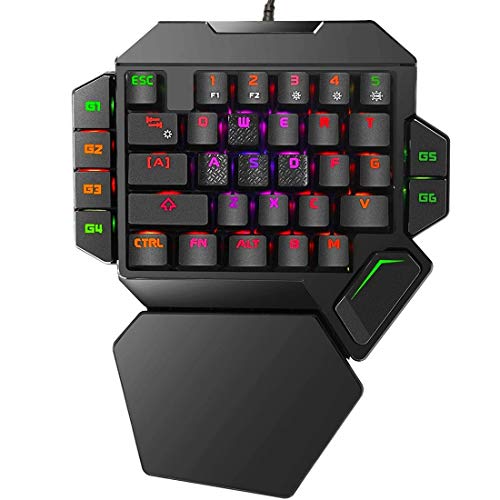
| 8 Cakce One-Handed Mechanical Gaming Keyboard | Cakce | 9.17 × 7.16 × 1.49 in | 0.9 lb | Compact one-hand layout | Check price |
Sizes and weights as listed by the manufacturer on Amazon. Check the retailer for current price and availability.
Pros
- Cushioned memory foam palm rest
- Switches among up to three devices
- Bluetooth and Logi Bolt connectivity
- Compatible with multiple operating systems
Cons
- Who should skip it: users who prefer a conventional straight keyboard layout
Pros
- Split ergonomic design
- Cushioned wrist and palm rest
- Rechargeable battery
- USB-C charging cable included
Cons
- Who should skip it: conventional-layout typists
Pros
- Curved split ergonomic layout
- Pillowed memory foam wrist rest
- Three adjustable palm-lift settings
- Bluetooth and USB receiver connectivity
Cons
- Nearly 18 inches wide
- Who should skip it: users needing a compact keyboard

Pros
- Compact one-handed layout
- Included wrist rest
- Adjustable backlight modes
- USB plug-and-play
Cons
- Who should skip it: users who need a full-size keyboard
Pros
- Left-side numeric keypad
- Wired USB connection
- Scissor key technology
- Compatibility with several operating systems
Cons
- Who should skip it: users who need a right-side keypad

Pros
- Half-finger design
- Non-slip design
Cons
- Who should skip it: shoppers needing a size other than XL

Pros
- Single receiver for keyboard and mouse
- Quiet keys and mouse
- Three mouse DPI settings
- Adjustable keyboard tilt
Cons
- Who should skip it: users needing Bluetooth connectivity
Pros
- Compact one-hand layout
- Six recordable macro keys
- Multiple RGB lighting modes
- Integrated palm rest
Cons
- Not a full keyboard for general typing
- Who should skip it: users who need a standard full-size layout
Best Ergonomic Keyboard for a Compact Desk: Logitech Wave Keys Ergonomic Keyboard
Logitech Wave Keys Ergonomic Keyboard pairs a wavy layout with a cushioned memory foam palm rest, and it can connect to as many as three devices through Bluetooth or a Logi Bolt receiver. Its compact design may suit a desk where a full-size split keyboard takes up too much room. Skip it if you specifically want a split keyframe or need a numeric keypad.
Best Split Ergonomic Keyboard for Wrist Position: Logitech ERGO K860 Split Keyboard
Logitech ERGO K860 Split Keyboard has a curved, split keyframe, scooped keys, and a pillowed wrist rest. Its palm lift adjusts to 0, -4, or -7 degrees, giving you more tilt choices than the fixed setup described for several other picks. Skip it if you need a compact keyboard or would rather avoid adapting to a split layout.
Best Gaming Layout for One-Handed Use: CHONCHOW 35-Key One-Handed Gaming Keyboard
CHONCHOW 35-Key One-Handed Gaming Keyboard uses a 35-key layout with a wrist rest, curved keycaps, and a stepped layout, keeping its focus on gaming controls rather than everyday full-keyboard work. Its listed compatibility includes PC, laptop, Mac, PS3, PS4, PS5, and Xbox. Skip it if you need a complete keyboard for writing, office tasks, or numeric data entry.
Key Numbers at a Glance
- The Logitech Wave Keys Ergonomic Keyboard connects to as many as 3 devices using Easy-Switch.
- The Logitech ERGO K860 Split Keyboard offers palm lift settings of 0, -4, and -7 degrees.
- The Arteck Split Ergonomic Wireless Keyboard lists 6 months of battery life based on 2 hours of continuous use per day.
- The Vaydeer Keyboard Wrist Rest measures 17.32 × 3.15 × 0.85 inches.
- The Cakce RGB One Handed Mechanical has 35 keys, while the Logitech Wave Keys Ergonomic Keyboard is a compact ergonomic keyboard with a full typing layout.
How to Choose a Keyboard for Arthritic Hands
Keyboard shape and hand position
Bottom line: Choose a shape that lets your hands reach the keys without forcing an unfamiliar wrist position. The Logitech Wave Keys Ergonomic Keyboard has a wavy layout, while the Logitech ERGO K860 Split Keyboard uses a curved split keyframe. The Arteck Split Ergonomic Wireless Keyboard also has a split design intended to position wrists and forearms in a more relaxed position. Shape is personal, so consider whether a gradual change or a distinct split layout better suits your typing habits.
If your fingers need less travel around the board, the compact CHONCHOW 35-Key One-Handed Gaming Keyboard is a specialized choice, but it is not a substitute for a standard work keyboard. See our guide to best keyboards for small hands for more on choosing a layout that fits your reach.
Palm and wrist support
Bottom line: Look for support that matches where you rest your hands, and check whether it is built in or separate. The Logitech Wave Keys Ergonomic Keyboard includes a cushioned memory foam palm rest, and the Logitech ERGO K860 Split Keyboard has a pillowed wrist rest with adjustable palm lift. The Vaydeer Keyboard Wrist Rest is a separate 17.32-inch pad, which lets you add support to a keyboard you already own but takes additional desk space.
Resting your palms while typing can change wrist position, so try to keep your hands comfortable rather than treating a cushion as a medical solution. If mouse use is also a concern, our guide to best mice for carpal tunnel covers a related workstation choice.
Key feel, layout, and task
Bottom line: Match the layout to the work you actually do, because gaming keypads and full typing keyboards solve different problems. The Logitech ERGO K860 Split Keyboard has a full-size layout and quiet keys; the CHONCHOW 35-Key One-Handed Gaming Keyboard is made for gaming controls. The Urby King Mills Southpaw Left-Hand Keyboard puts its numeric keypad on the left and uses scissor keys, a layout that may be useful if you prefer keeping your mouse on the right while entering numbers.
Key force and travel are not stated for most of these keyboards, so do not assume a particular model requires less force to press. For typing-focused comparisons, see best keyboards for typing.
Connection and operating system compatibility
Bottom line: Check your computer’s available ports and the connection method before choosing a wireless or wired layout. The Logitech Wave Keys Ergonomic Keyboard supports Bluetooth and a Logi Bolt receiver and lists Windows, macOS, iPadOS, and ChromeOS compatibility. The Arteck Split Ergonomic Wireless Keyboard uses a 2.4 GHz nano USB receiver, while the Urby King Mills Southpaw Left-Hand Keyboard uses wired USB.
If you use a tablet or switch between devices, confirm the keyboard’s operating system support and whether the required receiver fits your setup. The Logitech Wave Keys Ergonomic Keyboard supports switching among up to three devices, while the Arteck model’s listed setup uses a receiver plugged into the computer.
Desk space and adjustment
Bottom line: Account for the keyboard, wrist rest, and mouse area together, not just the board. The Vaydeer Keyboard Wrist Rest is 17.32 inches long, and the CHONCHOW 35-Key One-Handed Gaming Keyboard has a listed size of 8.3 × 6.3 × 1.2 inches. The Logitech ERGO K860 Split Keyboard offers three palm lift settings, whereas the RECCAZR Wireless Keyboard and Mouse Combo Silent Ergonomic has front and back adjustable tilt legs.
Measure the space where your hands and mouse need to move, and check that any separate wrist rest fits in front of your keyboard. For broader keyboard choices, browse the keyboards category.
How We Compared These Products
This guide is based on product research, not firsthand evaluation. We compared listed layouts, ergonomic features, connections, operating system compatibility, dimensions, and battery information where available. Product pages do not state key actuation force or travel for most models, and those details matter if pressing keys is difficult, so check for current manufacturer information before choosing.
Which Option Fits Your Home and Devices?
If you want a compact ergonomic typing layout with multi-device switching, consider the Logitech Wave Keys Ergonomic Keyboard: it supports up to three devices and includes a cushioned palm rest. Skip it if your priority is a split keyframe or a left-side numeric keypad.
If you prefer a split design with adjustable tilt, the Logitech ERGO K860 Split Keyboard combines a curved split keyframe with 0, -4, and -7 degree palm lift settings. Skip it if your desk is short on room or you do not want to adapt to a split layout.
If you need a gaming keypad rather than a full typing board, the CHONCHOW 35-Key One-Handed Gaming Keyboard has 35 keys and a wrist rest. Skip it if your daily work requires a standard letter layout or a numeric keypad.
Mistakes to Avoid When Choosing a Keyboard for Arthritic Hands
- Assuming every ergonomic shape feels alike. Wave, split, and compact layouts position the hands differently. Compare the shape with your usual typing posture.
- Choosing a wrist rest without measuring. The Vaydeer Keyboard Wrist Rest is 17.32 inches long. Check your desk and keyboard position before adding a separate pad.
- Buying a gaming keypad for general typing. The CHONCHOW 35-Key One-Handed Gaming Keyboard has a specialized 35-key layout. Choose a full typing layout for documents and routine computer work.
- Overlooking connection requirements. Bluetooth, 2.4 GHz receiver, and wired USB are not interchangeable for every setup. Confirm your computer has the connection you need.
Frequently Asked Questions
Which keyboard design should I compare first for arthritic hands?
Start with the layout and hand position you find comfortable. The Logitech Wave Keys Ergonomic Keyboard uses a wavy design, while the Logitech ERGO K860 Split Keyboard and Arteck Split Ergonomic Wireless Keyboard use split layouts. The product descriptions do not establish which design is right for every person.
Can I connect the Logitech Wave Keys to more than one device?
Yes. The Logitech Wave Keys Ergonomic Keyboard lists Easy-Switch for up to three devices and supports Bluetooth or a Logi Bolt receiver. Its stated operating system compatibility includes Windows, macOS, iPadOS, and ChromeOS.
Does the Arteck Split Ergonomic Wireless Keyboard use Bluetooth?
No Bluetooth connection is listed for this model. The Arteck Split Ergonomic Wireless Keyboard uses a 2.4 GHz nano USB receiver, so check that your computer has a suitable USB port.
Is a one-handed keyboard suitable for office typing?
The Cakce RGB One Handed Mechanical and CHONCHOW 35-Key One-Handed Gaming Keyboard are compact gaming keypads, not full-size typing keyboards. Their reduced layouts may suit a dedicated gaming task, but they do not provide the complete layout needed for ordinary document work.
Can I add a wrist rest to a keyboard I already own?
The Vaydeer Keyboard Wrist Rest is a separate pad designed for most standard keyboards and laptop setups, and it measures 17.32 × 3.15 × 0.85 inches. Check its dimensions against your desk and keyboard before buying.




Write Your Review
No reviews yet. Be the first to share your experience!