


If arthritis makes long typing sessions uncomfortable, the right keyboard depends on which layout feels natural to you and how much wrist support your desk setup allows. Split models such as the Logitech ERGO K860 emphasize a separated key layout and palm support, while the Logitech Wave Keys uses a compact, wavy shape; wired and wireless options also suit different desk and device needs.
Compare at a glance
| Product | Brand | Size | Stands out for | Price |
|---|---|---|---|---|
| 1 Perixx PERIBOARD-512B Split Keyboard | Perixx | 18.92 × 9.2 × 1.72 in | Split ergonomic layout | Check price |
| 2 Arteck Split Ergonomic Wireless Keyboard | Arteck | 16.5 × 9.6 × 1.02 in | Split ergonomic design | Check price |
| 3 Logitech ERGO K860 Split Keyboard | Logitech | 9.17 × 17.95 × 1.89 in | Curved split ergonomic layout | Check price |
| 4 TECKNET Ergonomic Wireless Keyboard | TECKNET | Not listed | Integrated memory-foam wrist rest | Check price |
| 5 Arteck Split Ergonomic Wired Keyboard | Arteck | Not listed | Cushioned wrist and palm rest | Check price |
| 6 Nulea Ergonomic Split Wireless Keyboard | Nulea | Not listed | Split ergonomic layout | Check price |
| 7 Nulea Split Wireless Ergonomic Keyboard | Nulea | Not listed | Split design and cushioned wrist rest | Check price |
| 8 Logitech Wave Keys Ergonomic Keyboard | Logitech | 14.8 × 8.62 × 1.18 in | Cushioned memory-foam palm rest | Check price |
Sizes and weights as listed by the manufacturer on Amazon. Check the retailer for current price and availability.
Pros
- Split ergonomic layout
- Integrated wrist rest
- Curved key rows and keycaps
- Wired USB connection
Cons
- Ergonomic layout may require an adjustment period
- Who should skip it: conventional-layout users
Pros
- Split ergonomic design
- Cushioned wrist and palm rest
- Rechargeable battery
- USB-C charging cable included
Cons
- Who should skip it: conventional-layout typists
Pros
- Curved split ergonomic layout
- Pillowed memory foam wrist rest
- Three adjustable palm-lift settings
- Bluetooth and USB receiver connectivity
Cons
- Nearly 18 inches wide
- Who should skip it: users needing a compact keyboard

Pros
- Integrated memory-foam wrist rest
- Bluetooth and 2.4GHz connectivity
- Four adjustable tilt settings
- USB-C charging while in use
Cons
- Who should skip it: users who need a wired data connection

Pros
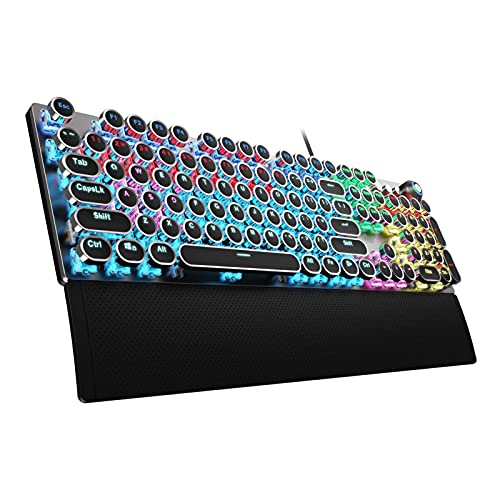
- Cushioned wrist and palm rest
- Seven backlight colors with adjustable brightness
- Simple USB wired setup
Cons
- Who should skip it: users who need a wireless keyboard
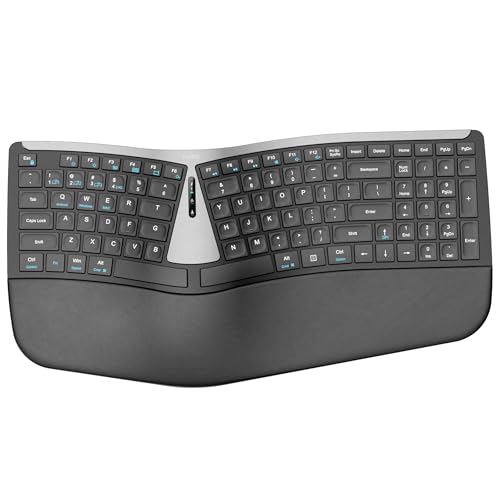
Pros
- Split ergonomic layout
- Cushioned palm rest
- Bluetooth and 2.4G connectivity
- Rechargeable with USB-C
Cons
- Who should skip it: users who need a wired keyboard

Pros
- Split design and cushioned wrist rest
- Bluetooth and 2.4 GHz connectivity
- Three-device switching
- Rechargeable battery with stated 200-hour life
Cons
- Who should skip it: users who prefer a conventional layout

Pros
- Cushioned memory-foam palm rest
- Switches among up to three devices
- Bluetooth and Logi Bolt connectivity
- Supports four operating systems
Cons
- Who should skip it: users who prefer a full-size keyboard
Best Split Keyboard for Multiple Devices: Nulea Ergonomic Keyboard
Nulea Ergonomic Keyboard combines a split design and oversized wrist rest with Bluetooth and 2.4G wireless connectivity. It supports switching between three devices and lists up to 200 hours of battery life, which can suit a desk shared by a computer and other devices. Skip it if you prefer a wired connection or need a layout that is not split.
Best Wired Split Keyboard for a Fixed Desk: Perixx PERIBOARD-512B Split Keyboard
Perixx PERIBOARD-512B Split Keyboard uses a wired USB connection, curved key rows, and a split-key layout, so you do not need to manage wireless pairing or charging. Its listed 4.2 mm key travel and membrane switches give buyers concrete details to compare against their typing preferences. Skip it if you need a wireless keyboard or want a flatter, more conventional layout.
Related guides: Best Keyboards for Arthritic Hands, Best Keyboards for Gaming and Typing and Best Keyboards for Coding.
Best Compact Wave-Shaped Keyboard: Logitech Wave Keys Ergonomic Wireless Keyboard
Logitech Wave Keys Ergonomic Wireless Keyboard has a compact wavy design and cushioned palm rest, and its smaller footprint can leave room to bring a mouse closer. It connects through Bluetooth or a Logi Bolt receiver and can switch among up to three devices. Skip it if you specifically want a split key layout or a full-size keyboard with a number pad.
Best Adjustable Split Keyboard for Multiple Angles: TECKNET Wireless Ergonomic Keyboard Rechargeable
TECKNET Wireless Ergonomic Keyboard Rechargeable pairs a split layout with a memory-foam wrist rest and four listed foot positions: 0°, 1.2°, 3°, and 6.2°. It offers Bluetooth and 2.4GHz connectivity, with support for up to four connected devices and up to 200 hours of continuous use according to the product page. Skip it if you prefer a wired keyboard or do not want a built-in wrist rest.
Key Numbers at a Glance
- The Nulea Ergonomic Keyboard lists support for switching among three devices, while TECKNET Wireless Ergonomic Keyboard Rechargeable lists support for up to four connected devices.
- TECKNET Wireless Ergonomic Keyboard Rechargeable lists four tilt positions: 0°, 1.2°, 3°, and 6.2°.
- Perixx PERIBOARD-512B Split Keyboard lists 4.2 mm key travel.
- Nulea Ergonomic Keyboard and TECKNET Wireless Ergonomic Keyboard Rechargeable both list up to 200 hours of battery life.
Buying Guide: Best Keyboards for Arthritis
Split, wave, or conventional layout
Bottom line: Choose a layout you can use without forcing your hands into an unfamiliar position. Split designs appear on models such as the Logitech ERGO K860, Arteck Split Ergonomic Wireless Keyboard, and Perixx PERIBOARD-512B Split Keyboard. The Logitech Wave Keys takes a different approach with a compact wave shape, while changing to a split layout can require an adjustment period. If you are comparing more models, browse the site’s keyboards category.
Wrist and palm support
Bottom line: Check whether the keyboard’s support is comfortable at your desk height and typing position. The product data describes cushioned or pillowed wrist rests on many of these models, including the Logitech ERGO K860 and TECKNET Wireless Ergonomic Keyboard Rechargeable. A built-in rest takes up more desk space and may not match every person’s preferred position, so check the shape and placement against your setup. The peripherals category includes other desk devices to consider when planning your workspace.
Wired or wireless connection
Bottom line: Pick wired for a direct USB connection, or wireless when you want fewer cables or device switching. The Perixx PERIBOARD-512B Split Keyboard connects by wired USB, while the Nulea Ergonomic Keyboard offers Bluetooth and 2.4G wireless modes. Wireless features differ: check whether the keyboard connects to the number of devices you use and whether its receiver or Bluetooth mode fits your computer.
Angle adjustment and charging
Bottom line: Compare the available tilt positions and charging details if you expect to change your desk posture or use the keyboard wirelessly. TECKNET Wireless Ergonomic Keyboard Rechargeable lists four foot positions, while the Logitech ERGO K860 lists 0°, -4°, and -7° palm-lift settings. Nulea Ergonomic Keyboard lists USB-C charging and up to 200 hours of battery life; these are manufacturer-listed details, not a guarantee of the same runtime in every setup.
Key feel and adjustment
Bottom line: Match key travel and layout to what feels easy to operate, rather than assuming an ergonomic shape will suit every typist. Perixx PERIBOARD-512B Split Keyboard specifies membrane switches and 4.2 mm key travel, while Nulea Ergonomic Split Wireless Keyboard specifies scissor-switch keys. New layouts can take time to learn, and the product page for the Perixx notes an adjustment period; consider how much retraining you are willing to do.
How We Compared These Products
This guide is based on product research, comparing listed layouts, wrist-support designs, connection types, adjustment features, compatibility notes, and battery claims. The product pages do not establish how comfortable a keyboard will feel for a particular person, and we did not evaluate the keyboards firsthand; use the specifications to narrow the field and confirm fit with your own preferences.
Which Option Fits Your Home and Devices?
For a wireless desk shared across devices: the Nulea Ergonomic Keyboard offers Bluetooth and 2.4G connectivity, a three-device switch feature, and a listed 200-hour battery life. Skip it if you want a direct wired connection or prefer a compact wave layout.
For a fixed workstation with no charging routine: the Perixx PERIBOARD-512B Split Keyboard uses wired USB and has curved rows with 4.2 mm key travel. Skip it if wireless device switching matters more than a cable-free desk.
For a compact wireless desk: the Logitech Wave Keys Ergonomic Wireless Keyboard has a compact shape, a cushioned palm rest, and switching for up to three devices. Skip it if you need a split layout or a full-size number pad.
Mistakes to Avoid When Choosing a Keyboard for Arthritis
- Choosing by ergonomic label alone. Compare the actual layout, support, and key features because split and wave-shaped designs are different.
- Overlooking desk space. Consider the keyboard’s footprint and wrist rest, especially if you want room to position a mouse close to the keyboard.
- Ignoring the connection method. Confirm whether your computer supports the listed Bluetooth or USB connection, and check whether a wireless receiver is part of the setup you plan to use.
- Assuming every wrist rest will feel right. Support shape and typing posture are personal; verify the product’s design and return terms before committing.
Frequently Asked Questions
Is a split keyboard a good choice for arthritis?
A split layout gives the hands separate key zones, a design featured on the Logitech ERGO K860 and Arteck Split Ergonomic Wireless Keyboard. Whether that arrangement feels comfortable is personal, so consider the learning curve and layout before choosing one.
Can these keyboards connect to a Mac?
Compatibility varies by model. The Logitech ERGO K860 and Logitech Wave Keys list Windows and Mac support, while the Nulea Ergonomic Keyboard lists Windows and MacBook compatibility; check the product page for the exact model and connection method before buying.
Which is better, a split keyboard or a wave-shaped keyboard?
A split keyboard such as the Logitech ERGO K860 suits shoppers who want separate key zones and a pillowed wrist rest. The Logitech Wave Keys suits those who prefer a compact wavy layout and want to connect to up to three devices.
Do wireless ergonomic keyboards need charging?
Rechargeable wireless models do need charging. The Nulea Ergonomic Keyboard and TECKNET Wireless Ergonomic Keyboard Rechargeable each list up to 200 hours of battery life, while wired models such as the Perixx PERIBOARD-512B connect by USB.
Should I choose a keyboard with a number pad?
A number pad can be useful for frequent spreadsheet or numeric entry, but it adds keys and can affect how much room remains on your desk. The Frixalox Split Ergonomic Keyboard with RGB is listed as full-size with a number pad; the Logitech Wave Keys is described as compact.




Write Your Review
No reviews yet. Be the first to share your experience!