


If you code at a compact desk, a 75% keyboard keeps arrow keys while giving up the number pad; if your workflow depends on frequent numeric entry, a full-size layout may be a better fit. This guide to the best keyboards for coding compares layout, switch type, connectivity, and customization so you can match a keyboard to your work habits and devices.
Compare at a glance
| Product | Brand | Size | Weight | Stands out for | Price |
|---|---|---|---|---|---|
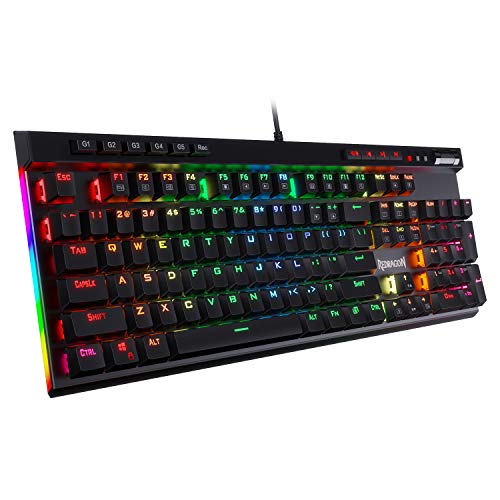
| 1 Redragon K668 108-Key Hot-Swap Keyboard | Redragon | 17.3 × 4.7 × 17.3 in | 1.9 lb | Hot-swappable 3-pin and 5-pin switch support | Check price |
| 2 Redragon K580 Full-Size Mechanical Keyboard | Redragon | 0.98 × 5.91 × 15.75 in | 2.6 lb | Onboard macro recording without software | Check price |
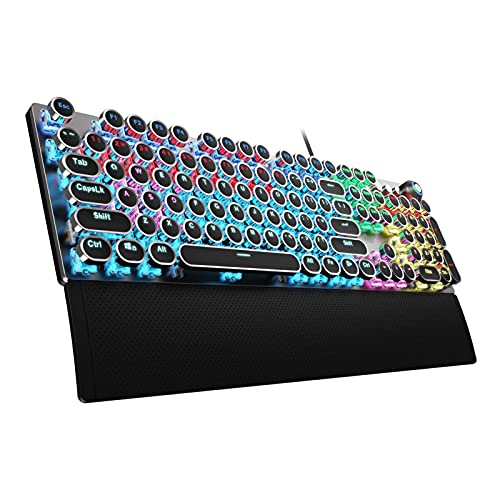
| 3 AULA F2088 Mechanical Keyboard with Blue Switches | AULA | 17.13 × 4.84 × 1.5 in | 2.2 lb | Dedicated media and lighting controls | Check price |
| 4 AULA F99 96% Wireless Mechanical Keyboard | AULA | 5.78 × 1.67 × 15.38 in | 3.3 lb | Three connection modes | Check price |
| 5 Kisnt KN85 75% Wireless Mechanical Keyboard | Kisnt | 13.88 × 5.51 × 1.77 in | 2 lb | Compact layout retains function and arrow keys | Check price |
| 6 Keychron K10 HE Full-Size Keyboard | Keychron | 15.75 × 7.87 × 2.68 in | 2.2 lb | Full-size layout with dedicated media keys | Check price |
Sizes and weights as listed by the manufacturer on Amazon. Check the retailer for current price and availability.
Pros
- Hot-swappable 3-pin and 5-pin switch support
- Four dedicated, software-reassignable shortcut keys
- Full-size layout with anti-ghosting
- Adjustable feet and two keycap sets
Cons
- Full-size layout takes more desk space
- Who should skip it: users who need a compact keyboard
Pros
- Onboard macro recording without software
- Dedicated media controls
- Hot-swappable switches
- Full anti-ghosting
Cons
- Clicky switches produce audible keystrokes
- Who should skip it: users who prefer quiet typing
Pros
- Dedicated media and lighting controls
- Removable magnetic wrist rest
- Aluminum alloy panel
- Three customizable lighting settings
Cons
- Who should skip it: people who need a quiet keyboard

Pros
- Three connection modes
- Hot-swappable 3-pin and 5-pin switches
- Compact layout retains number area
- Double-shot PBT keycaps
Cons
- Who should skip it: buyers who need a stated battery runtime

Pros
- Compact layout retains function and arrow keys
- Tri-mode connectivity with three Bluetooth channels
- Hot-swappable 3-pin and 5-pin switch support
- Rechargeable battery and wired use while charging
Cons
- No dedicated number pad
- Driver features are Windows-only
- Who should skip it: frequent number-pad users

Pros
- Full-size layout with dedicated media keys
- Adjustable Hall Effect actuation
- Three connection modes
- Hot-swappable magnetic switches
Cons
- Who should skip it: users who need a compact keyboard
- Launcher setup requires clearing browser cookies and cache
Key Numbers at a Glance
- The Kisnt KN85 Wireless Mechanical Keyboard has an 85-key, 75% layout and measures 13.68 × 5.51 × 1.77 inches.
- The AULA F75 Pro 75% Wireless Keyboard has 81 keys and retains arrow keys.
- The AULA F99 96% Wireless Mechanical Keyboard has 99 keys and retains a number area.
- The Keychron K10 HE Full-Size Hall Effect Keyboard offers adjustable actuation from 0.2 mm to 3.8 mm.
- The Logitech MX Mechanical Full-Size Keyboard supports pairing with up to three devices.
Best Compact Coding Keyboard: Kisnt KN85 Wireless Mechanical Keyboard
For a compact desk, Kisnt KN85 Wireless Mechanical Keyboard pairs an 85-key 75% layout with a stated footprint of 13.68 × 5.51 inches. It includes arrows and F1–F12 keys, tri-mode connection, and hot-swappable linear switches. The trade-off is no number pad, and its remapping software is listed for Windows in wired or 2.4 GHz mode. Skip it if numeric keypad entry is central to your coding workflow.
Related guides: Best Keyboards for Typing, Best Keyboards for Authors and Best Keyboards for Arthritic Hands.
Best for a Number Pad in Less Space: AULA F99 96% Wireless Mechanical Keyboard
The AULA F99 96% Wireless Mechanical Keyboard has 99 keys in a 96% layout, keeping a number area while using a more compact layout than a conventional full-size board. It supports Bluetooth, 2.4 GHz, and USB-C, with switching between up to five connected devices. Its denser layout may not suit someone who wants wide spacing between key groups. Skip it if you prefer a standard full-size layout or need a smaller 75% board.
Best Full-Size Coding Keyboard for Multiple Devices: Logitech MX Mechanical Full-Size Keyboard
The Logitech MX Mechanical Full-Size Keyboard combines a full-size layout with low-profile tactile quiet switches and pairing for up to three devices. Smart backlighting and USB-C charging are also listed, and the product page states up to 15 days of battery life. It costs more than the other layouts in this roundup and does not list hot-swappable switches. Skip it if you want to experiment with replacement switches or prioritize a smaller footprint.
Best Adjustable-Actuation Coding Keyboard: Keychron K10 HE Full-Size Hall Effect Keyboard
The Keychron K10 HE Full-Size Hall Effect Keyboard stands out for adjustable magnetic-switch actuation from 0.2 mm to 3.8 mm, with QMK and a web configurator listed for remapping and macros. Its full-size layout includes familiar number-pad access, and it supports Bluetooth, 2.4 GHz, and USB-C. Its specialized actuation controls can be unnecessary if you want a straightforward typing board. Skip it if you do not need adjustable actuation or prefer low-profile keys.
How to Choose a Keyboard for Coding
Choose the layout around your daily key use
Bottom line: Pick the smallest layout that still includes the keys your workflow uses. A 75% board such as the Kisnt KN85 retains arrows and F1–F12 but leaves out the number pad; the 99-key AULA F99 keeps a number area, while the Keychron K10 HE is full-size. If you frequently enter numeric values, use spreadsheet-like tools, or rely on a dedicated number pad, favor the larger layout. Browse the keyboards category for other layout options.
Match switch feel and sound to your workspace
Bottom line: Choose tactile feedback, quieter operation, or adjustable actuation based on where and how you type. The Logitech MX Mechanical lists tactile quiet switches, while the Kisnt KN85 and AULA F99 list pre-lubed linear switches. The Keychron K10 HE adds adjustable Hall Effect actuation, but a feature-rich switch system is not necessary for everyone. Clicky blue switches, such as those listed for the Redragon K580 and AULA F2088, produce audible clicks, so consider nearby coworkers or household members before choosing them.
Check wired and wireless connections against your devices
Bottom line: Choose connection modes that match your computer and whether you want to switch devices. The Keychron K10 HE, AULA F99, and Kisnt KN85 list Bluetooth, 2.4 GHz wireless, and USB-C wired modes; the Logitech MX Mechanical pairs with up to three devices. A wired connection avoids depending on a wireless pairing, while multi-device pairing can suit a laptop-and-desktop setup. Confirm the specific operating system and connection method you plan to use; a USB-C port alone does not establish support for every USB feature.
Decide whether hot-swap and remapping matter
Bottom line: Pay for customization only if you expect to change switches or key behavior. Hot-swap models in this group include the Kisnt KN85, AULA F99, and Redragon K668, which lists sockets for 3-pin or 5-pin switches. The Keychron K10 HE lists key remapping, macros, and adjustable actuation through its Launcher configurator. Software support varies, so check whether the stated configuration method works with your operating system and preferred connection mode.
Consider ergonomics and desk space for long sessions
Bottom line: Leave room for your mouse and choose a shape you can use comfortably for long coding sessions. The Kisnt KN85 has stated dimensions of 13.68 × 5.51 × 1.77 inches; the AULA F75 Pro has an 81-key 75% layout. Larger full-size boards preserve the number pad but take more desk area. Some models list a palm rest, such as the Logitech G213 and AULA F2088, but a palm rest does not guarantee a comfortable fit for every desk or typing position.
How We Compared These Products
This guide is based on product research, comparing listed layouts, switch types, connection modes, customization features, dimensions, and compatibility details. Product descriptions provide the basis for the model-specific claims; no firsthand evaluation is documented here, so subjective feel and noise should be treated as individual preferences.
Which Option Fits Your Devices?
For a compact desk, consider the Kisnt KN85; for coding across several devices, compare the Logitech MX Mechanical and AULA F99, which list pairing for up to three and five devices respectively. If you need a number pad, the 96% AULA F99 or a full-size board is a more suitable starting point than a 75% layout.
Mistakes to Avoid When Choosing a Coding Keyboard
- Choosing by layout label alone. Check whether the board retains the number pad, arrows, and function row you use.
- Assuming every mechanical switch feels alike. Compare listed linear, tactile, and clicky switch types, and consider whether audible clicks fit your workspace.
- Assuming USB-C means every connection feature. Confirm whether the keyboard supports wired data, Bluetooth, or a 2.4 GHz receiver as needed.
- Buying customization you will not use. Hot-swap sockets and remapping software are useful for specific preferences, but add little if you want a fixed, simple setup.
Frequently Asked Questions
Is a 75% keyboard suitable for coding?
It can be if you want a smaller footprint and can work without a number pad. The Kisnt KN85 retains arrows and F1–F12, while the AULA F75 Pro lists an 81-key 75% layout. Choose a 96% or full-size model if you regularly enter numbers on a dedicated pad.
Are linear or tactile switches better for programming?
Neither type is universally better. The Kisnt KN85 and AULA F99 list linear switches, while the Logitech MX Mechanical lists tactile quiet switches. Choose by the feedback and sound you prefer, and check the exact switch description before buying.
Can these keyboards connect to more than one device?
Several models list multi-device connections, but their limits differ. The Logitech MX Mechanical supports up to three paired devices, while the AULA F99 and AULA F75 Pro list connection to up to five. Check the model’s switching method and supported connection modes for your computers.
Does a hot-swappable keyboard make changing switches easier?
Hot-swap sockets let you replace compatible switches without soldering, according to the product descriptions. Compatibility is not universal: the Redragon K668 lists support for 3-pin and 5-pin switches, so verify socket compatibility before purchasing replacements.
Which keyboard is a good fit if I need a number pad?
The AULA F99 is a 99-key 96% board described as retaining a number area, and the Keychron K10 HE and Logitech MX Mechanical are full-size layouts. The Kisnt KN85 is an 85-key 75% model without a dedicated number pad.


Write Your Review
No reviews yet. Be the first to share your experience!