


If you game and type on the same desk, the wrong keyboard can leave you short on desk space, without a number pad you need, or with a switch feel that does not suit long writing sessions. For a compact setup, consider a 65% or 75% layout; for everyday number entry, look at full-size models, and choose wired or wireless based on your devices and preference.
Compare at a glance
| Product | Brand | Size | Weight | Stands out for | Price |
|---|---|---|---|---|---|
| 1 Logitech G413 SE Full-Size Mechanical Keyboard | Logitech G | 17.13 × 1.97 × 1.43 in | 1.7 lb | Full-size layout includes a number pad | Check price |
| 2 Redragon K521 104-Key Gaming Keyboard | Redragon | Not listed | Not listed | Full 104-key layout | Check price |
| 3 Redragon S101M-KS Tri-Mode Keyboard and Mouse | Redragon | Not listed | 2.3 lb | Three connection modes | Check price |
| 4 GEODMAER 65% Gaming Keyboard | GEODMAER | 1.18 × 0.59 × 1.57 in | Not listed | Compact layout with separate arrow keys | Check price |
| 5 Redragon K671 Wired Mechanical Keyboard | Redragon | 17.13 × 4.88 × 1.42 in | Not listed | Hot-swappable Red switches | Check price |
| 6 Kisnt KN85 75% Wireless Mechanical Keyboard | Kisnt | 13.88 × 5.51 × 1.77 in | 2 lb | Compact layout retains function and arrow keys | Check price |
| 7 Redragon K556 104-Key Brown Switch Keyboard | Redragon | 17.13 × 4.88 × 1.59 in | 2.2 lb | Full-size 104-key layout | Check price |
Sizes and weights as listed by the manufacturer on Amazon. Check the retailer for current price and availability.
Pros
- Full-size layout includes a number pad
- PBT keycaps
- Dedicated FN media controls
- White LED backlighting
Cons
- Who should skip it: anyone needing a wireless keyboard
Pros
- Full 104-key layout
- Adjustable rainbow backlighting
- 19-key anti-ghosting
- Plug-and-play setup
Cons
- Keys are described as mechanical-feeling, not specified as mechanical switches
- Who should skip it: buyers seeking specified mechanical switches
Pros
- Three connection modes
- Shared receiver for both devices
- Five selectable DPI levels
- Rechargeable keyboard with battery indicator
Cons
- Software required for customization
- Who should skip it: buyers seeking a standalone keyboard

Pros
- Compact layout with separate arrow keys
- Detachable Type-C cable
- Adjustable backlight modes and brightness
Cons
- Who should skip it: users who need a dedicated number pad

Pros
- Hot-swappable Red switches
- Full-key anti-ghosting
- Macro editing support
- Eleven backlight modes
Cons
- Backlight color cannot be changed
- Who should skip it: wireless keyboard seekers

Pros
- Compact layout retains function and arrow keys
- Tri-mode connectivity with three Bluetooth channels
- Hot-swappable 3-pin and 5-pin switch support
- Rechargeable battery and wired use while charging
Cons
- No dedicated number pad
- Driver features are Windows-only
- Who should skip it: frequent number-pad users
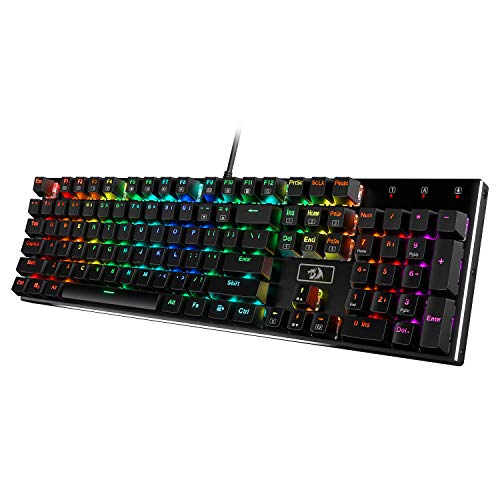
Pros
- Full-size 104-key layout
- Hot-swap switch sockets
- Aluminum frame
- Onboard RGB lighting presets
Cons
- Who should skip it: users who need a wireless keyboard
Best for Quiet Linear Gaming: Razer BlackWidow V4 X Yellow Switches
Razer BlackWidow V4 X Yellow Switches stands out for its linear Yellow switches, which specify 1.2 mm actuation and 45 g force, plus six dedicated macro keys. The listing also describes built-in switch sound dampeners and foam under the circuit board, but it has a full-size layout rather than a compact footprint.
Skip it if you need wireless connection or want a compact keyboard without a number pad.
Best for Customizable Wireless Typing: AULA F75 Pro 75% Wireless Keyboard
AULA F75 Pro 75% Wireless Keyboard combines Bluetooth, 2.4 GHz wireless, and USB wired modes with an 81-key layout that retains arrow keys. Its hot-swap support, multi-function knob, and 4,000 mAh battery add flexibility, while the compact layout omits a number pad.
Skip it if you regularly enter numbers on a dedicated keypad or prefer a full-size layout.
Related guides: Best Keyboards for Typing, Best Keyboards for Arthritic Hands and Best Keyboards for Arthritis.
Best for a Low-Cost Full-Size Mechanical Setup: Redragon K556 Wired RGB Mechanical
Redragon K556 Wired RGB Mechanical offers a 104-key layout, tactile Brown switches, an aluminum board, and hot-swap support for 3-pin or 5-pin switches. Its wired connection and full-size footprint are practical for a fixed desk, but less convenient if you want a wireless or compact board.
Skip it if wireless use or a smaller keyboard is important to your setup.
Best for Small Desks: Kisnt KN85 Wireless Mechanical Keyboard
Kisnt KN85 Wireless Mechanical Keyboard measures 13.68 by 5.51 by 1.77 inches and keeps function keys and arrows in its 85-key layout. Bluetooth, 2.4 GHz, and USB-C modes support different devices, but the 75% layout does not include a number pad.
Skip it if your work depends on frequent number-pad entry or you need a full-size keyboard.
Key Numbers at a Glance
- The Kisnt KN85 Wireless Mechanical Keyboard measures 13.68 × 5.51 × 1.77 inches.
- The AULA F75 Pro 75% Wireless Keyboard has 81 keys; the Kisnt KN85 Wireless Mechanical Keyboard has 85 keys.
- The Logitech G413 SE Full-Size Mechanical Keyboard specifies 6-key rollover anti-ghosting, while the Redragon K556 Wired RGB Mechanical lists full anti-ghosting.
- The Redragon S101M-KS Tri-Mode Keyboard and Mouse lists a keyboard battery life of up to 300 hours with RGB off.
How to Choose the Best Keyboards for Gaming and Typing
Layout and desk space
Bottom line: Match the keyboard layout to your daily typing, not just your gaming setup. Full-size models such as the Logitech G413 SE Full-Size Mechanical Keyboard and Redragon K556 Wired RGB Mechanical retain a number pad. The Kisnt KN85 Wireless Mechanical Keyboard has 85 keys and measures 13.68 inches wide, while the GEODMAER 65% Gaming Keyboard has separate arrow keys but no number pad. Measure the desk area available for the keyboard and mouse, and consider how often you enter numbers.
Switch feel for games and long typing sessions
Bottom line: Choose tactile feedback for a noticeable bump or linear switches for a smoother keypress. The Redragon K556 Wired RGB Mechanical lists tactile Brown switches, while the Redragon K671 Wired Mechanical Keyboard uses linear Red switches. The Razer BlackWidow V4 X Yellow Switches specifies 45 g force and 1.2 mm actuation. Switch preference is personal, so check the listed switch type and actuation details before choosing.
Connection type and device switching
Bottom line: Wired models suit a stationary desk, while wireless modes can simplify multi-device use. The AULA F75 Pro 75% Wireless Keyboard supports Bluetooth, 2.4 GHz, and USB; the Kisnt KN85 Wireless Mechanical Keyboard offers the same connection categories and Bluetooth support for three channels. The Redragon S101M-KS Tri-Mode Keyboard and Mouse supports wired, Bluetooth, and 2.4 GHz connections. Check that your computer or console supports the connection you plan to use, and confirm platform compatibility on the product page.
Key rollover, macros, and controls
Bottom line: Prioritize rollover for simultaneous inputs and dedicated controls only if you will use them. The Redragon K556 Wired RGB Mechanical lists full anti-ghosting, the Redragon K671 Wired Mechanical Keyboard lists anti-ghosting on all keys, and the Logitech G413 SE Full-Size Mechanical Keyboard specifies 6-key rollover. The Razer BlackWidow V4 X Yellow Switches adds six dedicated macro keys. Compare these features with the key combinations and shortcuts you use in games or work.
Build, customization, and maintenance
Bottom line: Hot-swap support is useful if you may want to change switches without soldering. The Redragon K556 Wired RGB Mechanical supports 3-pin and 5-pin switches, while the AULA F75 Pro 75% Wireless Keyboard and Kisnt KN85 Wireless Mechanical Keyboard also specify hot-swap support. The Logitech G413 SE Full-Size Mechanical Keyboard lists PBT keycaps and an aluminum-magnesium alloy top case, while the AULA and Kisnt models specify PBT keycaps. Check which keycap and switch features matter to you rather than treating RGB as a substitute for fit.
How We Compared These Keyboards
This guide compares listed layout, switch type, connection modes, rollover, keycap and case details, software features, compatibility statements, and available warranty information. It is based on product research, not firsthand evaluation; product pages do not give identical levels of detail for every model.
Which Option Fits Your Setup?
If you want a compact board with wireless choices, start with the Kisnt KN85 Wireless Mechanical Keyboard or AULA F75 Pro 75% Wireless Keyboard, then compare their dimensions, key count, and feature priorities. For full-size typing with a number pad, compare the Logitech G413 SE Full-Size Mechanical Keyboard and Redragon K556 Wired RGB Mechanical. Browse more options in our keyboards category or the broader PC peripherals category.
Mistakes to Avoid When Choosing a Gaming and Typing Keyboard
- Choosing by appearance alone. Check layout and switch type first, since RGB lighting does not tell you whether the board has a number pad or the feel you prefer.
- Assuming compact means functionless. Compare the key count and layout: the GEODMAER 65% Gaming Keyboard retains separate arrow keys but omits the number pad.
- Overlooking connection requirements. Confirm whether your device supports the keyboard’s wired, Bluetooth, or 2.4 GHz mode before buying.
- Expecting every keyboard to work the same across platforms. Check the specific compatibility listing; the Frixalox Split Ergonomic Keyboard with RGB, for example, states that it is not compatible with PS5 or Xbox.
Frequently Asked Questions
Is a 75% keyboard suitable for both gaming and typing?
It can suit users who want a smaller footprint while keeping function and arrow keys. The Kisnt KN85 Wireless Mechanical Keyboard has 85 keys, and the AULA F75 Pro 75% Wireless Keyboard has 81 keys; neither includes a number pad.
Should I choose linear or tactile switches?
Linear switches move without the tactile bump associated with tactile switches, while tactile switches provide a distinct bump. These picks include linear Red switches in the Redragon K671 Wired Mechanical Keyboard and tactile Brown switches in the Redragon K556 Wired RGB Mechanical. Choose according to your preferred feel and the product’s listed switch details.
Do wireless gaming keyboards also work with a cable?
Some models list both wireless and wired modes. The Kisnt KN85 Wireless Mechanical Keyboard and AULA F75 Pro 75% Wireless Keyboard both specify USB-C wired, Bluetooth, and 2.4 GHz connections; verify the mode and device compatibility you need before purchase.
Does a gaming keyboard need full-key anti-ghosting?
Not every player needs every key to register simultaneously, but rollover details can matter if you press several keys at once. The Logitech G413 SE Full-Size Mechanical Keyboard specifies 6-key rollover, while the Redragon K556 Wired RGB Mechanical lists full anti-ghosting. Match the feature to the combinations you use.
Which listed keyboards have a number pad?
The Logitech G413 SE Full-Size Mechanical Keyboard and Redragon K556 Wired RGB Mechanical list full-size 104-key layouts. The Frixalox Split Ergonomic Keyboard with RGB is also described as full-size with a numpad. Check the specific listing if a dedicated keypad is essential.




Write Your Review
No reviews yet. Be the first to share your experience!