


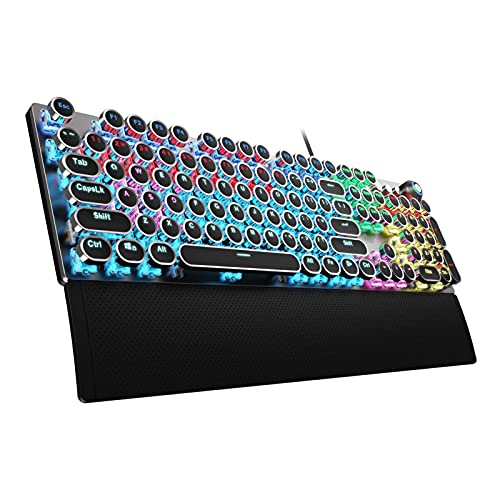

If you write for hours at a desk, the wrong keyboard can make keys harder to see or typing noise distracting. For authors who want a familiar full-size layout, wired membrane models offer a straightforward choice; writers who need larger legends can compare large-print designs, while the AULA’s clicky blue switches suit people who prefer audible, tactile feedback.
This guide to the best keyboards for authors compares visibility, layout, connection, and typing feel so you can narrow the choices to your workspace and writing routine. If a different typing priority matters more, see our guides to best keyboards for writers and best keyboards for typing.
Compare at a glance
| Product | Brand | Size | Weight | Stands out for | Price |
|---|---|---|---|---|---|
| 1 Amazon Basics Full-Sized Wired Keyboard | Amazon Basics | 17.39 × 5.01 × 1.06 in | 1 lb | Simple USB setup | Check price |
| 2 Logitech K120 Full-Size Wired Keyboard | Logitech | 0.92 × 17.7 × 6.1 in | 1 lb | No software installation required | Check price |
| 3 AULA F2088 Mechanical Keyboard with Blue Switches | AULA | 17.13 × 4.84 × 1.5 in | 2.2 lb | Dedicated media and lighting controls | Check price |
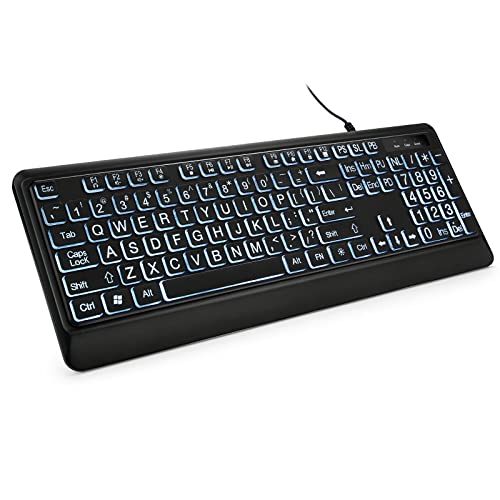
| 4 KOPJIPPOM Large-Print Backlit Keyboard | KOPJIPPOM | 17.56 × 6.3 × 0.98 in | 1.5 lb | Enlarged key lettering | Check price |
| 5 Hamile Large Print Backlit Keyboard | Hamile | 16.34 × 5.08 × 0.98 in | Not listed | Oversized, easy-to-identify key labels | Check price |
| 6 MIKUSO Large Print Backlit Keyboard | MIKUSO | 17.67 × 7.48 × 1 in | 1.3 lb | 4X larger lettering than standard keyboard fonts | Check price |
| 7 KOPJIPPOM Large Print Keyboard, 7-Color Backlight | KOPJIPPOM | 17.7 × 6.3 × 1.16 in | Not listed | Large-print key labels | Check price |
Sizes and weights as listed by the manufacturer on Amazon. Check the retailer for current price and availability.
Pros
- Simple USB setup
- Full-sized QWERTY layout
- Convenient media and volume hot keys
Cons
- Wired connection
- Stated Windows compatibility stops at Windows 10
- Who should skip it: users who need a wireless keyboard
Pros
- No software installation required
- Full-size layout with number pad
- Spill-resistant design
- Adjustable tilt legs
Cons
- Who should skip it: users who need a wireless keyboard
Pros
- Dedicated media and lighting controls
- Removable magnetic wrist rest
- Aluminum alloy panel
- Three customizable lighting settings
Cons
- Who should skip it: people who need a quiet keyboard
Pros
- Enlarged key lettering
- Adjustable white backlight
- Full-size layout with numeric keypad
- USB plug-and-play connection
Cons
- Mac multimedia keys may not fully work
- Who should skip it: users seeking a wireless keyboard

Pros
- Oversized, easy-to-identify key labels
- Seven backlight colors with three brightness levels
- Full-size layout with numeric keypad
- Quiet membrane key design
Cons
- Who should skip it: users who need wireless connectivity

Pros
- 4X larger lettering than standard keyboard fonts
- Adjustable white LED backlighting
- Full-size layout with numeric keypad
- Included wrist rest and dust cover
Cons
- Multimedia keys may not fully work with Mac OS
- Backlight stays on while the computer is in standby
- Who should skip it: Mac users relying on multimedia keys

Pros
- Large-print key labels
- Seven backlight colors
- Full-size layout with numeric keypad
- No batteries or charging required
Cons
- Multimedia keys may not fully work with Mac OS
- Who should skip it: Mac users needing fully compatible multimedia keys
Best Large-Print Keyboard for Low Light: KOPJIPPOM Large Print Keyboard
KOPJIPPOM Large Print Keyboard pairs letters described as four times larger than standard with seven backlight colors and three brightness levels, giving writers more ways to adjust key visibility. It has a full-size 104-key layout with a number pad and a spill-resistant design. The trade-off is that it uses a wired USB connection, and the listing notes that multimedia keys might not fully work with Mac OS.
Skip it if you want a wireless keyboard or require fully compatible multimedia shortcuts on a Mac.
Best for Adjustable Lighting: X9 Performance X9 Large Print Backlit Keyboard
X9 Performance X9 Large Print Backlit Keyboard combines large, bold print with seven backlight colors and four brightness levels. Its full-size 107-key layout includes a number pad and 12 shortcut keys, and the product page lists plug-and-play USB compatibility with PC, Chromebook, and laptop use. It is wired, so it is less suited to a desk where cable-free placement is a priority.
Skip it if you need a wireless connection or a compact layout without a number pad.
Best for a Supported Wrist Rest: MIKUSO Large Print Backlit Keyboard
MIKUSO Large Print Backlit Keyboard has large-print keys, a white LED backlight, and a listed 17.67-by-7.48-by-1-inch footprint. It also includes a wrist rest and a dust cover, plus 12 Fn key combinations for shortcuts such as volume and media control. Its backlight behavior has a caveat: the product page says it cannot be turned off while the computer is in standby and locked.
Skip it if you need to switch off the backlight while a computer remains locked in standby.
Key Numbers at a Glance
- Large-print fonts are described as four times standard size on the KOPJIPPOM Large Print Keyboard, Hamile Large Print Light Up Keyboard, TECURS Large Print Backlit Keyboard, MIKUSO Large Print Backlit Keyboard, X9 Performance X9 Large Print Backlit Keyboard, and KOPJIPPOM Large-Print Backlit Keyboard.
- The X9 Performance X9 Large Print Backlit Keyboard lists seven backlight colors and four brightness levels; the KOPJIPPOM Large Print Keyboard lists seven colors and three brightness levels.
- The TECURS Large Print Backlit Keyboard has a listed 117-key layout, compared with 104 keys on the Amazon Basics Full-Sized Wired Keyboard.
- The MIKUSO Large Print Backlit Keyboard measures 17.67 by 7.48 by 1 inch, according to its product details.
How to Choose Among the Best Keyboards for Authors
Key visibility and backlighting
Bottom line: If standard legends are difficult to see, prioritize large print; if you also write in dim light, check the backlight controls. Several models describe their legends as four times larger than standard, but their lighting differs: the KOPJIPPOM Large Print Keyboard offers seven colors and three brightness levels, while the X9 Performance X9 Large Print Backlit Keyboard lists seven colors and four levels. The TECURS Large Print Backlit Keyboard instead specifies white illumination with seven brightness levels.
A backlight can improve key visibility in a darker room, but it is not a substitute for checking whether the letter color and background contrast work for you. Look closely at the product images and verify the available lighting controls before choosing; for a closer look at accessibility-focused layouts, see best keyboards for arthritis.
Layout, number pad, and desk space
Bottom line: Choose a full-size layout if you use a number pad, and measure your desk before committing to one. Most models here specify a full-size layout with a number pad; the TECURS Large Print Backlit Keyboard lists 117 keys, while the Amazon Basics Full-Sized Wired Keyboard lists a standard full-size QWERTY layout. Full-size boards can be useful if your work includes frequent numerical entry, but they occupy more desk space than a compact keyboard.
The product details give an exact footprint for the MIKUSO Large Print Backlit Keyboard, but not for every keyboard in this comparison. Measure the space between your monitor, mouse, and desk edge, and check a product’s dimensions before ordering if space is tight. Writers with smaller hands may also want to compare the layout considerations in our best keyboards for small hands guide.
Typing feel and noise
Bottom line: Choose the switch style that suits your writing environment, not just the look of the keyboard. The AULA F2088 Mechanical Keyboard with Blue Switches specifies clicky blue switches with tactile feedback, while the Hamile Large Print Light Up Keyboard and TECURS Large Print Backlit Keyboard describe their membrane keys as quiet or silent. These descriptions indicate different design intentions, not measured noise levels.
Clicky switches may suit a private writing space if you enjoy audible keystrokes, but can be distracting in a shared room. If you write near others or take calls at your desk, a membrane design described as quiet is the more cautious direction; see best keyboards for coding for another comparison focused on typing feel.
Connection and operating system
Bottom line: Confirm that your computer has a compatible USB port and that the features you want work with your operating system. The listed models use wired USB connections, and many describe plug-and-play setup. The TECURS Large Print Backlit Keyboard specifies a USB and Type-C connector arrangement, while the KOPJIPPOM Large Print Keyboard notes that multimedia keys may not fully work with Mac OS.
Do not assume that every shortcut works identically across Windows and Mac just because basic typing is compatible. Check your computer’s available port and the model’s operating-system notes, especially if media keys are part of your workflow.
Spill resistance, covers, and upkeep
Bottom line: Treat spill resistance as a backup feature, not permission to clean or use a keyboard while it is wet. Spill-resistant designs are listed for the Logitech K120 Full-Size Wired Keyboard, BOOGIIO Large Print Computer Keyboard, and several large-print options; the MIKUSO Large Print Backlit Keyboard also includes a dust cover. The BOOGIIO product details say to let the keyboard air-dry completely after a spill before using it again.
Keyboard layouts and care details vary, so follow the model’s own instructions rather than assuming a cover or spill-resistant description makes a keyboard waterproof. If writing comfort is your main concern, compare shape and posture considerations in our best keyboards for writers guide.
How We Compared These Products
This guide is based on product research, not firsthand evaluation. We compared the listed layouts, connection details, operating-system notes, lighting, switch descriptions, and included features; product claims such as spill resistance and large-print sizing are attributed to the product pages, not treated as independently verified results.
Which Option Fits Your Home and Devices?
If you need large legends with several lighting choices, start with the labeled KOPJIPPOM Large Print Keyboard or X9 Performance X9 Large Print Backlit Keyboard picks, then choose based on their brightness controls and shortcut needs. For a wrist rest and included dust cover, the MIKUSO Large Print Backlit Keyboard is the more feature-specific match; skip it if its standby backlight behavior does not suit your setup.
For a straightforward familiar layout without backlighting, compare the Amazon Basics Full-Sized Wired Keyboard and Logitech K120 Full-Size Wired Keyboard. Skip either if you need wireless use, a compact footprint, or large-print legends.
Mistakes to Avoid When Choosing a Keyboard for Authors
- Choosing lighting without checking the legends. Compare key contrast and font size as well as the backlight, since lighting features differ across models.
- Assuming every full-size board fits. Measure your desk and check the keyboard’s listed dimensions where available, especially if your mouse space is limited.
- Buying a switch style by appearance alone. The AULA F2088 Mechanical Keyboard with Blue Switches is described as clicky, while several membrane models are described as quiet; consider who shares your workspace.
- Assuming every shortcut works on every computer. Check the operating-system notes, especially if you use Mac multimedia keys or depend on dedicated shortcuts.
Frequently Asked Questions
Are wired keyboards suitable for writing on a laptop?
Yes, if your laptop has a compatible USB connection. These listed keyboards are wired, and several specify plug-and-play setup; check the exact connector and operating-system notes for your computer.
Which keyboard is easier to see in a dim room?
The KOPJIPPOM Large Print Keyboard and X9 Performance X9 Large Print Backlit Keyboard both list seven backlight colors. The X9 specifies four brightness levels, while the KOPJIPPOM lists three, so choose according to the amount of adjustment you want.
Are these keyboards compatible with Mac?
Compatibility varies by model. The KOPJIPPOM Large Print Keyboard lists Mac OS support but cautions that multimedia keys may not fully work; check the individual product details for your chosen keyboard and operating system.
Are mechanical blue switches quiet enough for a shared office?
The AULA F2088 Mechanical Keyboard with Blue Switches is described as clicky, so it is not the cautious choice if you want quiet typing. The Hamile Large Print Light Up Keyboard and TECURS Large Print Backlit Keyboard describe their membrane designs as quiet or silent, though no measured sound levels are listed.
Does spill-resistant mean a keyboard is waterproof?
No. Several product pages describe spill-resistant designs, but that does not establish waterproofing; follow the model’s care instructions. The BOOGIIO Large Print Computer Keyboard listing specifically says to let it air-dry completely after a spill before using it.


Write Your Review
No reviews yet. Be the first to share your experience!