




If you need more mouse room, a tenkeyless keyboard can free up desk space, while a full-size layout keeps a number pad within reach. The best SteelSeries keyboards in this comparison range from quiet membrane models to mechanical and magnetic-switch designs, so match switch feel, layout, and controls to your games and daily work.
Compare at a glance
| Product | Brand | Size | Weight | Stands out for | Price |
|---|---|---|---|---|---|
| 1 Redragon K671 Wired Mechanical Keyboard | Redragon | 17.13 × 4.88 × 1.42 in | Not listed | Hot-swappable Red switches | Check price |
| 2 Redragon S101-3 Wired Keyboard and Mouse | Redragon | 17.91 × 7.2 × 0.91 in | 2.2 lb | Keyboard and mouse included | Check price |
| 3 SteelSeries Apex 3 Gaming Keyboard | SteelSeries | 5.94 × 17.52 × 1.57 in | 2.8 lb | Whisper-quiet gaming switches | Check price |
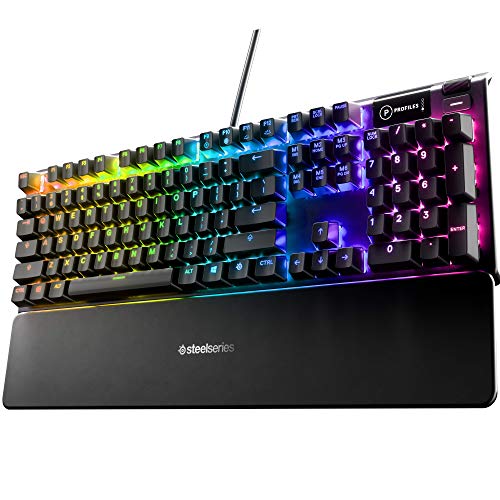
| 4 SteelSeries Apex 5 Hybrid Gaming Keyboard | SteelSeries | 5.51 × 17.52 × 1.59 in | 2 lb | Tactile, clicky hybrid switches | Check price |
| 5 SteelSeries Apex 3 TKL Keyboard | SteelSeries | 5.9 × 14.3 × 1.57 in | 1.4 lb | Compact tenkeyless form factor | Check price |
| 6 SteelSeries Apex 3 TKL Keyboard, White | SteelSeries | Not listed | 1.4 lb | Compact tenkeyless layout | Check price |
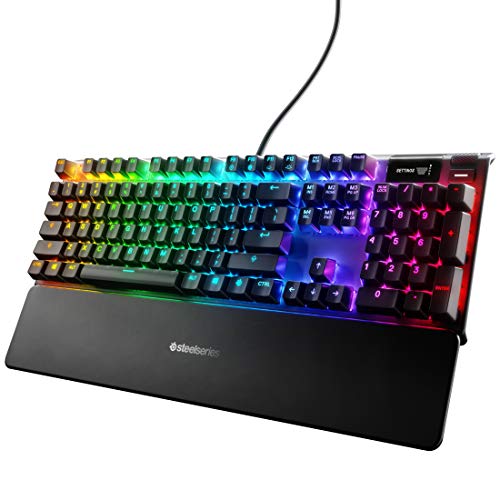
| 7 SteelSeries Apex 7 Keyboard, Red Switch | SteelSeries | 5.5 × 17.2 × 1.6 in | 2.1 lb | Linear, quiet mechanical switches | Check price |
Sizes and weights as listed by the manufacturer on Amazon. Check the retailer for current price and availability.
Pros
- Hot-swappable Red switches
- Full-key anti-ghosting
- Macro editing support
- Eleven backlight modes
Cons
- Backlight color cannot be changed
- Who should skip it: wireless keyboard seekers
Pros
- Keyboard and mouse included
- Five dedicated macro keys
- Wrist rest included
- Adjustable mouse sensitivity
Cons
- Who should skip it: wireless-only buyers
Pros
- Whisper-quiet gaming switches
- Magnetic wrist rest
- Dedicated multimedia controls
- Broad listed platform compatibility
Cons
- Who should skip it: buyers who require per-key RGB control
Pros
- Tactile, clicky hybrid switches
- Customizable per-key RGB lighting
- OLED smart display
- Magnetic wrist rest included
Cons
- Who should skip it: users seeking fully mechanical switches

Pros
- Compact tenkeyless form factor
- Quiet switches with anti-ghosting
- Dedicated multimedia controls
- IP32 water and dust resistance
Cons
- Who should skip it: users who need a dedicated number pad

Pros
- Compact tenkeyless layout
- Anti-ghosting keys
- Whisper-quiet switches
- Eight-zone RGB lighting
Cons
- Who should skip it: users who need a dedicated number pad
Pros
- Linear, quiet mechanical switches
- OLED display and media controls
- Per-key RGB customization
- Aircraft-grade aluminum alloy construction
Cons
- Who should skip it: users seeking a compact keyboard
Best Quiet Compact Keyboard: SteelSeries Apex 3 TKL Gaming Keyboard – White
SteelSeries Apex 3 TKL Gaming Keyboard – White suits a compact gaming setup, with a tenkeyless layout, eight-zone RGB, and whisper-quiet switches rated for 20 million keypresses. Its water- and dust-resistant design is a useful listed feature, but it does not provide the per-key RGB or mechanical switches found on the Apex 7. Skip it if you need a number pad or specifically want mechanical key switches.
Best Hybrid Switches: SteelSeries Apex 5 Hybrid Gaming Keyboard
SteelSeries Apex 5 Hybrid Gaming Keyboard combines tactile, clicky hybrid blue switches with per-key RGB and an OLED display. The listed 900 x 300 x 4 millimeter dimensions and magnetic wrist rest make desk space worth checking; its clicky character may also be distracting in a quiet shared room. Skip it if you prefer nearly silent typing or want adjustable magnetic actuation.
Related guides: Best Keyboards for Small Hands, Best Keyboards for Authors and Best Keyboards for Arthritic Hands.
Best Adjustable Magnetic Switches: SteelSeries Apex Pro TKL Gen 3 Keyboard
SteelSeries Apex Pro TKL Gen 3 Keyboard stands out for OmniPoint 3.0 magnetic switches with 40 actuation levels from 0.1 mm to 4.0 mm, plus Rapid Trigger and Rapid Tap features. It also has an OLED display, PBT keycaps, and USB-C, but its specialized controls may be unnecessary for general typing. Skip it if you want a straightforward, quiet membrane keyboard instead.
Key Numbers at a Glance
- SteelSeries Apex 3 TKL Gaming Keyboard – White lists whisper-quiet switches rated for 20 million keypresses.
- SteelSeries Apex 5 Hybrid Gaming Keyboard measures 900 x 300 x 4 millimeters, according to its product data.
- SteelSeries Apex Pro TKL Gen 3 Keyboard offers 40 actuation levels across a stated range of 0.1 mm to 4.0 mm.
- SteelSeries Apex 7 Mechanical Gaming Keyboard lists an 84-key n-key rollover feature.
How to Choose Among the Best SteelSeries Keyboards
Layout and available desk space
Bottom line: Choose tenkeyless for a smaller footprint, and full-size when you rely on a number pad. The Apex 3 TKL variants and Apex Pro TKL Gen 3 use a tenkeyless design, while the Apex 3 Gaming Keyboard and Apex 7 are full-size models. A TKL board leaves more room to position a mouse, but omits the dedicated number pad. Measure your usable desk area and consider whether frequent number entry makes that trade-off inconvenient. Browse the keyboards category for more layout comparisons.
Switch feel and typing noise
Bottom line: Pick the switch style you can live with during both gaming and everyday typing. Apex 3 models use whisper-quiet gaming switches, while the Apex 5 has hybrid blue switches described as tactile and clicky. The Apex 7 listing specifies linear, quiet red switches, and the Apex Pro TKL Gen 3 uses adjustable magnetic switches. Quiet membrane models fit shared rooms better as a feature choice, while the clicky Apex 5 prioritizes tactile feedback. Switch descriptions do not establish measured noise levels, so look for a return policy if feel is a deciding factor.
Gaming controls and actuation features
Bottom line: Pay for specialized input features only if your games or setup can use them. The Apex Pro TKL Gen 3 specifies Rapid Trigger, Rapid Tap, and 40 actuation levels; those features give players more adjustment than the Apex 3 TKL’s listed anti-ghosting. The Apex 7 and Apex 5 add OLED displays for settings or information, according to their product listings. If you mainly type, a display or adjustable actuation may add complexity without addressing your priorities. Check the product page for the specific model’s controls before ordering.
Lighting, media controls, and wrist support
Bottom line: Compare the exact model’s lighting zones and physical controls, not just its RGB label. The Apex 3 TKL models list eight-zone RGB, while the full-size Apex 3 lists ten-zone illumination and dedicated multimedia controls. The Apex 7 and Apex 5 specify per-key RGB, OLED displays, and magnetic wrist rests; features vary across the range. Extra controls can make volume changes convenient, but take desk space and may not matter if you use separate media controls. For broader peripheral choices, see our PC peripherals category.
Platform support and connection details
Bottom line: Confirm the exact keyboard’s connection and platform support before relying on console or Mac compatibility. The Apex 3 RGB TKL listing names Windows, Mac OS X, Xbox Series S and X, PS4, and PS5 compatibility. The Apex Pro TKL Gen 3 title specifies USB-C, while the other listings do not consistently describe connection details in the available product data. Do not assume every model supports the same platforms or connector. If you use a laptop, check its ports and the keyboard’s complete product page; our MacBook Air accessories guide covers ways to plan a laptop setup.
How We Compared These Products
This guide is based on product research, comparing listed layouts, switch descriptions, lighting, controls, platform compatibility, and other stated features. Customer feedback and firsthand evaluation are not available as evidence here, so recommendations are limited to the published product details and fit for specific needs.
Which Option Fits Your Setup?
For a compact, quieter gaming desk: SteelSeries Apex 3 TKL Gaming Keyboard – White pairs a tenkeyless layout with whisper-quiet switches rated for 20 million keypresses and eight-zone RGB. Skip it if you need a number pad or mechanical switches.
For adjustable actuation and competitive input features: SteelSeries Apex Pro TKL Gen 3 Keyboard combines 40 magnetic-switch actuation levels with Rapid Trigger and Rapid Tap. Skip it if you do not need those adjustments and would rather choose a simpler keyboard.
For tactile, clicky feedback with an OLED display: SteelSeries Apex 5 Hybrid Gaming Keyboard lists hybrid blue switches, per-key RGB, and a magnetic wrist rest. Skip it if clicky switches are unsuitable for your room or you want quiet typing.
Mistakes to Avoid When Choosing a SteelSeries Keyboard
- Choosing layout by appearance alone. Check whether a tenkeyless board’s missing number pad conflicts with work tasks, and measure the space available for a full-size model.
- Assuming all switches feel alike. Compare the listed quiet, linear, hybrid clicky, and magnetic switch designs against your typing preference and shared-room needs.
- Expecting every model to share the same features. Verify the exact keyboard’s RGB zones, media controls, OLED display, wrist rest, and platform compatibility.
- Buying advanced features without a use case. Decide whether adjustable actuation, Rapid Trigger, or an OLED display solves a real need before prioritizing those features.
Frequently Asked Questions
Are the Apex 3 TKL keyboards mechanical?
No. The Apex 3 TKL listings describe whisper-quiet gaming switches, whereas the Apex 7 is listed as mechanical and the Apex 5 as hybrid mechanical. Choose by the switch type and feel you want, not by the Apex name alone.
What is the difference between the Apex 3 TKL and full-size Apex 3?
The Apex 3 TKL has a tenkeyless compact layout and eight-zone RGB in its listing. The full-size Apex 3 lists ten-zone RGB, dedicated multimedia controls, and a magnetic wrist rest. Choose TKL to save space, or full-size if you prefer a number pad.
Can I use these keyboards with a console?
The Apex 3 RGB Gaming Keyboard and Apex 3 TKL RGB Gaming Keyboard listings name Xbox Series S and X, PS4, and PS5 compatibility. Compatibility details are not equally stated for every model, so check the specific product page and the console’s support requirements before buying.
Is the Apex 5 suitable for a quiet shared room?
The Apex 5 uses hybrid blue switches described as tactile and clicky, so it is not the quiet-switch choice in this comparison. The Apex 3 models are described as whisper-quiet, making them a more fitting starting point if minimizing keyboard noise is important.
Does the Apex Pro TKL Gen 3 use USB-C?
USB-C appears in the Apex Pro TKL Gen 3 product title. The available data does not specify connector details for every other keyboard, so confirm the exact model’s connection before purchase.




Write Your Review
No reviews yet. Be the first to share your experience!